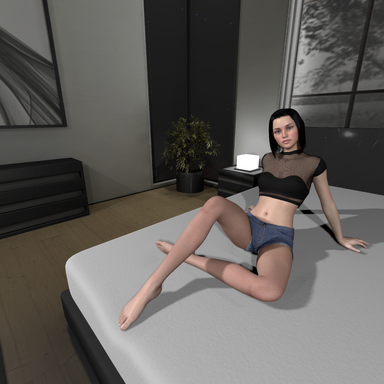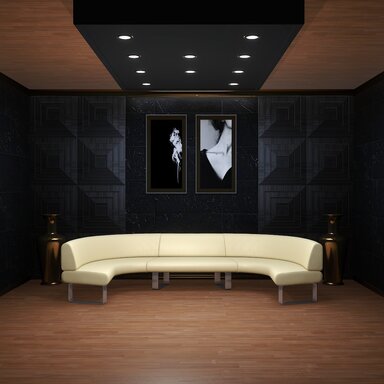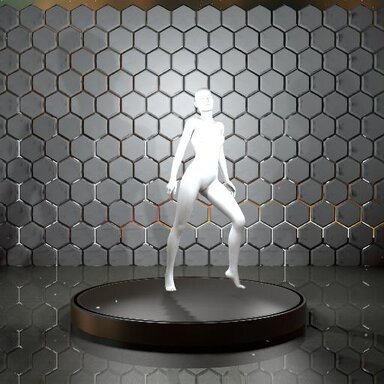



MODEL NOT INCLUDED. This scene is for you to load your own models.
(Song and dance by PrimeMocap, from Christmas 2025 Dance)
This is essentially a handbuilt model testing scene using VamStory and Logic Bricks, with timeline animations repacked and stripped down from VertigoEighty's TryOnMaster. Zero lagtime between scene switches and animation switches. Built entirely for my own use and convenience, but uploading due to requestsfrom two people. The scene is built with consistency in mind (with the two locked views and FOV) when switching between models or taking full body shots / portraits.
I did not include zCameraman and there are some plugins loaded on the Person atom that are not activated by default (eg. BetterBends, Cheesy ShakeIt) and are not on the UI. Remove them or leave them deactivated if you don't want them active. The VamStory atoms all have the word "MENU" in their name, and all the LogicBricks plugins are in "STATE_CORE". Feel free to study them and change them for your own use.
Most important button: F2 hides all menus.
If viewing angles for the menu get janky, use F5 to reset the view and switch to FOV 40 to see everything neatly.

Buttons are self explanatory. When in doubt, F4 to reset the model.
The slider is for rotation speed, not rotation angle.

Known issue: Pause F3 does not pause the song for PrimeMocap's Christmas 2024 dance. Just use the F4 reset.
(Fixed in V2)
Might Be Useful Tips For The Showroom:
Feel free to make edits to the scene or remix it for distribution etc, as long as credit is given to all the contributors.
Version 2:
If I've forgotten anyone in the credits, or you'd like something removed as the original creator, do let me know, thanks!
Credits:
This is essentially a handbuilt model testing scene using VamStory and Logic Bricks, with timeline animations repacked and stripped down from VertigoEighty's TryOnMaster. Zero lagtime between scene switches and animation switches. Built entirely for my own use and convenience, but uploading due to requests
I did not include zCameraman and there are some plugins loaded on the Person atom that are not activated by default (eg. BetterBends, Cheesy ShakeIt) and are not on the UI. Remove them or leave them deactivated if you don't want them active. The VamStory atoms all have the word "MENU" in their name, and all the LogicBricks plugins are in "STATE_CORE". Feel free to study them and change them for your own use.
Most important button: F2 hides all menus.
If viewing angles for the menu get janky, use F5 to reset the view and switch to FOV 40 to see everything neatly.
Buttons are self explanatory. When in doubt, F4 to reset the model.
The slider is for rotation speed, not rotation angle.
(Fixed in V2)
Might Be Useful Tips For The Showroom:
- "NL" stands for "No Light". The NL options disable the inbuilt lights in the rooms.
- Use the inbuilt "Harli Heels" for the animations tagged with "(HEELS)", they fit perfectly. Remove the heels for the other animations as they will glitch into the ground.
- Use Z and X to move your camera straight up and down. W and S to move it back and forth. Handy with the F5 button since it centers your view.
- Hit TAB to move your camera freely with the mouse, and TAB again to lock it.
- Hitting F5 while the Person menu is open will still re-center the camera.
- If you're taking a screenshot with Supershot, close the menu with F1, tap F5 to center the camera, then F1 again to click supershot, and the preview will be dead center.
- Face VIew + FOV 25 is useful for taking facial screenshots (Use FOV 18~) and you can consistently get the same shot with the same pose but different models.
- Moving the Person atom around works for all animations because the Control Node is not locked in timeline.
- DO NOT USE THE RED RESET POSE button in Control:
- Use the Load Defaults button under the Pose tab instead of the red RESET POSE button in Control, because:
- Rotation works when the Person Atom's parent is "Rotation_Core"; hitting Reset Pose removes this link.
- If you lose rotation, just set the Person's parent as "Rotation_Core" again under the Control tab.
Feel free to make edits to the scene or remix it for distribution etc, as long as credit is given to all the contributors.
Version 2:
If I've forgotten anyone in the credits, or you'd like something removed as the original creator, do let me know, thanks!
Credits:
Copied from VertigoEight's list:
AcidBubbles, JayJayWon, SPQR, Hazmhox and Macgruber for essential plugins.
AshAuryn, Everlaster, Ascorad and Kemenate for expression morphs.
Jackaroo for lighting, environment textures, and water rigs
Clockwisesilver for the SilverKiss plugin
Maru for the Rope and Chain clothing
Everlaster for the Naturalis plugin
Spacedog for the skyboxes
VamTimbo, xxxa, ReignMocap, NL, KittyMocap, XRWizard, AnythingFashionVR and others for their pose animations
Additional:
CaptainVargoss for the Rotator plugin
PrimeMocap for the Christmas 2025 Dance and music
SCAMP for the Girl Watching Porn animations
CuddleMocap for the Cute Sitting Idle animations
Farger for the particles
oooo for the sofa room
TacoCaf for the Rocky Cabin
iCannotDie for the huge LUT Pack
Hazmhox for the Wall Tile asset + plugin and Vamstory
Skynet for Better Bends
NorthernShikima for Skin Micro Detail
CheesyFX for the ShakeIt plugin
Epi for the two EpiLight rigs
VamXFan for the cube environment
BlazeDust for the plugin to color the Cube / Wall
Shadow Venom for the idea of the 2 light setup from Produce 69 II
AcidBubbles, JayJayWon, SPQR, Hazmhox and Macgruber for essential plugins.
AshAuryn, Everlaster, Ascorad and Kemenate for expression morphs.
Jackaroo for lighting, environment textures, and water rigs
Clockwisesilver for the SilverKiss plugin
Maru for the Rope and Chain clothing
Everlaster for the Naturalis plugin
Spacedog for the skyboxes
VamTimbo, xxxa, ReignMocap, NL, KittyMocap, XRWizard, AnythingFashionVR and others for their pose animations
Additional:
CaptainVargoss for the Rotator plugin
PrimeMocap for the Christmas 2025 Dance and music
SCAMP for the Girl Watching Porn animations
CuddleMocap for the Cute Sitting Idle animations
Farger for the particles
oooo for the sofa room
TacoCaf for the Rocky Cabin
iCannotDie for the huge LUT Pack
Hazmhox for the Wall Tile asset + plugin and Vamstory
Skynet for Better Bends
NorthernShikima for Skin Micro Detail
CheesyFX for the ShakeIt plugin
Epi for the two EpiLight rigs
VamXFan for the cube environment
BlazeDust for the plugin to color the Cube / Wall
Shadow Venom for the idea of the 2 light setup from Produce 69 II




![Rocky Cabin [Free Stuff] [Scene+Asset]](https://1424104733.rsc.cdn77.org/data/resource_icons/4/4355.jpg?1611866530)