
Click here to view the Disclaimer / 点击查看免责声明
![[No.5]behindthecouch_post.jpg](https://hub.virtamate.com/attachments/no-5-behindthecouch_post-jpg.550430/ "[No.5]behindthecouch_post.jpg")
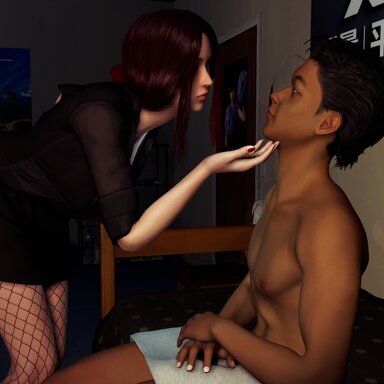
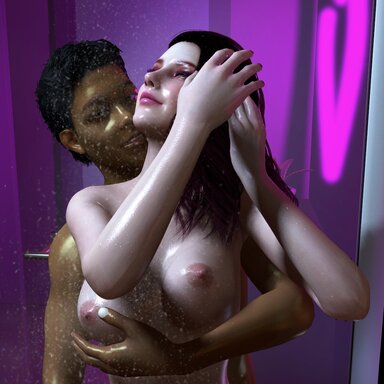
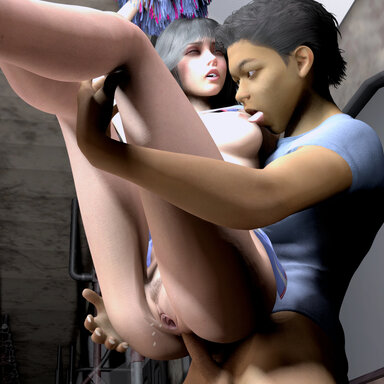
Serena, a beautiful psychological counselor, who is also possesses an untamed heart. I hope I can help Mr. Liao complete his wish of having sex with 100 famele here. 5% finished now.
沈芮安,漂亮的心理咨询师,跟阿嘹一样拥有一颗不羁的心。希望我可以在这里帮阿嘹完成百人斩的心愿。目前达成5%。
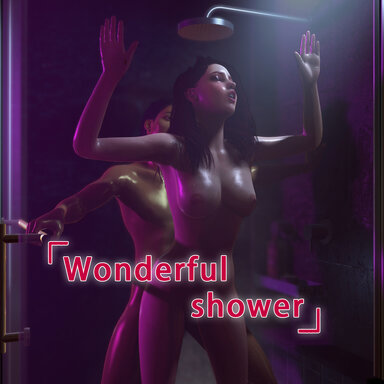
The filename for this scene is "Nobius.[No5]BehindTheCouch.1.var", the screen-recording and screenshot are as follows:
本场景文件名“Nobius.[No5]BehindTheCouch.1.var”,动画录屏及截图如下:


If you are missing hundreds or thousands of dependencies and can not use the “Scan hub for missing packages" feature, please try this little tool I made:
如果你缺失成百上千个依赖,无法使用自动补全依赖功能,请试试我做的这个小工具:
https://www.patreon.com/posts/145559666
Instructions:
1. It is recommended to play on a monitor.
2. VR users, please click the blue-purple button to start the game.
3. This scene consists of random animations, so theoretically it will be different every time you watch.
4. Keyboard Hotkeys:
Numbers 1 to 9 can jump to the corresponding action.
BackSpace for toggle between free/flying view
Press the "I" key If you encounter a black screen, which should never happens. Just in case.
5. Menu Explanation:
Hide Glass can result in a higher frame rate, but will sacrifice the beautiful glass reflection effect.
To loop a single action, please uncheck "Auto Play".
Pressing the BackSpace button will not change whether "Flying View" is checked in the menu.
When resetting the scene, all content will be based on the latest selection in the menu.
操作说明:
1.建议用显示器游玩。
2.VR用户请点击蓝紫色按钮开始游戏。
3.本场景由随机动画组成,理论上每次观看都不一样。
4.键盘热键:
数字键1-9可跳转至相应动作。
回退键用于在自由/飞行视角间切换。
“i”键用于黑屏自救。只是多加一道保险,实际测试从没遇到过。
5.菜单说明:
隐藏玻璃可以带来更高的帧数,但会损失漂亮的玻璃反射效果。
如需单组动作循环,请取消勾选“自动跳转”。
按回退键不会影响菜单上“飞行视角”是否勾选。
重置场景时,所有内容均以菜单上做出的选择为准。

Thank you for your suport!
感谢您的支持!
Nöbius
Serena, a beautiful psychological counselor, who is also possesses an untamed heart. I hope I can help Mr. Liao complete his wish of having sex with 100 famele here. 5% finished now.
沈芮安,漂亮的心理咨询师,跟阿嘹一样拥有一颗不羁的心。希望我可以在这里帮阿嘹完成百人斩的心愿。目前达成5%。
The filename for this scene is "Nobius.[No5]BehindTheCouch.1.var", the screen-recording and screenshot are as follows:
本场景文件名“Nobius.[No5]BehindTheCouch.1.var”,动画录屏及截图如下:
If you are missing hundreds or thousands of dependencies and can not use the “Scan hub for missing packages" feature, please try this little tool I made:
如果你缺失成百上千个依赖,无法使用自动补全依赖功能,请试试我做的这个小工具:
https://www.patreon.com/posts/145559666
Instructions:
1. It is recommended to play on a monitor.
2. VR users, please click the blue-purple button to start the game.
3. This scene consists of random animations, so theoretically it will be different every time you watch.
4. Keyboard Hotkeys:
Numbers 1 to 9 can jump to the corresponding action.
BackSpace for toggle between free/flying view
Press the "I" key If you encounter a black screen, which should never happens. Just in case.
5. Menu Explanation:
Hide Glass can result in a higher frame rate, but will sacrifice the beautiful glass reflection effect.
To loop a single action, please uncheck "Auto Play".
Pressing the BackSpace button will not change whether "Flying View" is checked in the menu.
When resetting the scene, all content will be based on the latest selection in the menu.
操作说明:
1.建议用显示器游玩。
2.VR用户请点击蓝紫色按钮开始游戏。
3.本场景由随机动画组成,理论上每次观看都不一样。
4.键盘热键:
数字键1-9可跳转至相应动作。
回退键用于在自由/飞行视角间切换。
“i”键用于黑屏自救。只是多加一道保险,实际测试从没遇到过。
5.菜单说明:
隐藏玻璃可以带来更高的帧数,但会损失漂亮的玻璃反射效果。
如需单组动作循环,请取消勾选“自动跳转”。
按回退键不会影响菜单上“飞行视角”是否勾选。
重置场景时,所有内容均以菜单上做出的选择为准。
Thank you for your suport!
感谢您的支持!
Nöbius














![[Unisex] Morphs](https://1424104733.rsc.cdn77.org/data/resource_icons/0/213.jpg?1590806147)