This guide applies to the NEXT template and any scene/quickintro made from it:

NEXT - Toolkits + Templates -
A template to make a scene in 60 seconds ‼️but before you hit the download button‼️ This is a template scene. The persons are loaded with built-in skins, no clothes (besides cum clothing), no environment, no music. But all these you can add...
 hub.virtamate.com
This is the first thing I do in any scene, to change the person's appearance.
The NEXT template's persons are built-in skins with no hair. They do come with fluid clothing hidden at start. Both persons use a scale of 1, the default value.
After you load a appearance preset I suggest you press the button "calibrate" (Body in main UI) for Naturalis to adjust the breasts and glutes of the female person atom(s).
Do not use look presets (in legacy presets) as these change the atom's name and have the potential to break triggers in the scene.
Loading from the scene UI:
You can load an appearance preset from the Body UI for any of the persons.
When loading that way, Naturalis will calibrate to the loaded preset and fluid clothing will be merged to automatically.
The starting persons come nude in terms of real clothing.
You can add clothing in any way you want, but do press the button "add/clean fluids" to merge-load the fluids clothing back to the person. This can be done before or during a sex animation, as long as it happens before the orgasm moment.
Using quickdress presets:
quickdress are VARs containing empty atom presets combined with clothing presets and a plugin (VAMStory Actions) that creates an UI to control the loading of presets and the state of individual clothes, eg: open/close a blouse.
Each quickdress VAR includes multiple clothing options, some can have more than 10 clothing options. If you do not want to use a quickdress preset you can still use the clothing presets inside these VARs.
NEXT already includes an empty atom (left of the male person) called quickdress to load these VARs.
I have a ton of quickdress VARs if you're interested:

If using quickdress. please read the instructions first. Some may include non-hub hosted clothes dependencies in the presets, getting those is your responsibility.
quickplace subscenes load prepared environments that self-reposition to suitable animations in the NEXT template.
The idea behind is simple:
With this method, you can load and change to different environments without needing to reload or save copies of the scene, and the quickplace subscenes work on any NEXT template-based scene.
How to use a quickplace subscene environment:
At the origin (0, 0, 0) is a subscene atom named quickplace. Load a subscene from one of the quickplace VARs you downloaded.
Loading a quickplace subscene is best done when on a "stand reset pose" or just click "reset to pose" or an animation to resync.
If you want to use another quickplace subscene, just repeat the above process of loading the subscene.
6 quickplace subscene VARs available in this guide and more in:
 NEW: quickintro presets
My scenes that were based on the NEXT template are now quickintro presets.
These presets are loaded from the NEXT template scene and bring in a them with intro animations,an environment, clothes, voices, and other content realting to the theme. You can think of it like a subscene loaded on NEXT, all this on demand, able to change to another, all without having to leave the NEXT scene.
How to load a quickintro preset in NEXT:
Follow as the picture and read the instructions on the Intros panel when opened
See my Hub resources for quickintro "scenes" or on my website:
Regardless of what is loaded with a quickintro, like a quickplace environment, you can load a different one and make other changes. The results may work well or not so much, but it's fun to explore and diversify.
quickintro and quicktheme guide - Guides -
It's like a subscene but not a subscene, because I don't care and make shit up. What is this? This is a combination of empty atom presets and other files that, when loaded on the NEXT template scene, bring in animations, clothes, an...
hub.virtamate.com
made from Modern Apartment V4 by VamTastic | made from No Tell Motel Room by Chase81 |
made from Industrial apartment by Nial | made from Apartment by DarkFantasy |
made from vsl_Classroom by Vam_SlesaR | made from Locker Room by abubu_nownanka |
More modular things you can load on the template
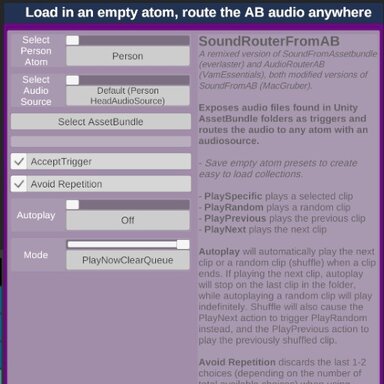
| Load music There's a quickmusic atom with a plugin from MacGruber to load and play a assetbundle with music. Once you load a music assetbundle in there, you can use the Audio UI to play, skip tracks and adjust the volume. If you don't have any music assetbundles around, no problem, VamEssentials uploaded a bunch of them to the Hub, try them out: 
VamEssentials
hub.virtamate.com
If you want to make your own music assetbundles (also commonly named audiobundles), the process of using Unity is very simple and worthwhile giving it a try. If you never used Unity, might as well start now as VaM 2 will use this tool extensively. For more information see my quickspeech guide in the section "Audio assetbundles": 
quickspeech: quickly load and switch random audio speech - Guides -Have you been playing around with Text to Speech systems like ElevenLabs or Tortoise, and want a person to say smutty things to you? A modular randomized looping system for sexy time speech The quickspeech setup is a combination of plugins...
hub.virtamate.com
| Load audio speech (female atom) Do you want the girl to say things to you? Not a problem, just load a compatible audiobundle with speech on the quickspeech atom. I have many american voices audiobundles you can use: 
quickspeech: american english preset pack - Audio -Enjoy this pack of two american english voices speaking to you while you're having sex. Doesn't include moaning, use VAMMoan or similar for that. Here's a taste: Valley girl (american young) Gabriella (american deep) This VAR...
hub.virtamate.com
|
About many more things
There are tons of features in the template, explore them and let me know if there's anything I should add to this guide.
If you want more content like quickdress presets, quickplace subscenes, and a bunch of other stuff, feel free to pop by my website:
Now go play and enjoy