
Do you want to auto start something on scene load but don't know how?
It's easy. You just have to know 20 more other things, put them all in the right way, and then it works*
*maybe
This is VAM after all...
Many ways to do it
VAM may be a complicated bitch of a tool sometimes, but at least you can often reach your goal in different ways.
But first, if you don't know what triggers are or how to make them, you need to learn that first, or else you're just a gooner and not a VAM obsessed creator gooner

Join us by reading this:
Wiki Article - 10. Triggers
VAM triggers: Triggers are commands that perform an action on an atom's property. that translates into: something that does something on something Triggers in VAM follow this basic structure: Receiver Atom > Receiver > Receiver Target a.k.a. this atom > this thing in the atom > to do...
 hub.virtamate.com
Welcome to the VAM creator club! we don't have cookies
You know how to make triggers and know how to make a UI button trigger a music to play.
You are ready to learn how to skip that button and have the music play automatically after the scene loads. Or whatever else you want to auto start on scene load, you do you.
Be aware that the following list does not show the only ways to have triggers auto start on scene load, just options that I know about. Pick and adapt to your scene needs.
VAM built-in options
Scene Animation tab
A very common way to auto start triggers on scene load until some years ago. You add an animation time, timed triggers, set to auto start and there they go when the scene finished loading and is on Play mode.
Still works of course, but plugins became a more common use of this need, either because they were already used in the scene (Timeline for example) or provided new options like a distinction between desktop and VR use.
Wiki Article - 08. Scene Animation
Scene Animation Scene Animation refers specifically to animations on Person Atom Controls or Atom Controls captured within your scene or driven by the scene animation timeline. This is separate from the Built-In animations available on the Person Atom, any script driven animations like...
hub.virtamate.com
Animation patterns
This animation method can be set to auto play and is time based like Scene Animation. Is more complicated to set up though, so it's rare to be seen in use for this purpose.
VAM plugins
Timeline
If you're animating a scene you are likely using this animation plugin from AcidBubbles. If you didn't notice yet, there's a checkbox somewhere to autostart the first animation in the list. As such, if you are auto starting that animation, triggers on the Trigger track of that animation will be also auto triggered on scene load.
EventSceneLoad logicbrick
This is one of the many bricks in MacGruber's collection of logicbricks. The name is a little cryptic at first, a very programmer like name, but see it as TriggersSceneLoad, ok? Simpler to understand now, right? When the scene finishes* loading, the triggers you set on the plugin are triggered, and you can also make a distinction of triggers when playing the scene in desktop or VR mode. Neat, isn't it?
*by finished it doesn't necessarily means everything has finished loading, for example textures on an appearance, but the core of the scene is.
VAMStory Director plugin
This plugin from hazmhox in the VAMStory plugin is made for organizing triggers in a scene and provide extended options for trigger control. An action gives you a place to set triggers to trigger when the action is called at all times, or when in desktop mode, or when in VR mode, and other extended options. You can define one action to trigger on scene load.
No shortage of options
With all these options you are spoiled for choice and I bet other plugins can do this too. So now you know how to auto start something on scene load.
Mimicking scene loading using presets/subscenes
Did you know you can also auto start triggers from atom presets or subscenes? True story.
Why would you want this at all?
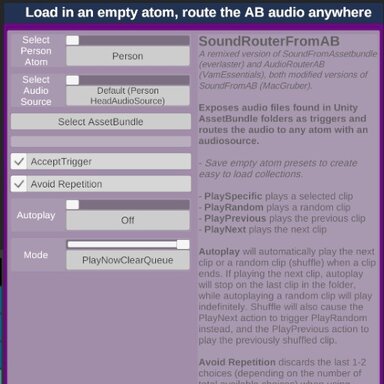
I use it change music on a scene. I make audiosource atom presets that includes a similar logicbrick to eventsceneload called audioqueueevent. The atom preset has a brick for random audio and the audioqueueevent; when the preset is loaded the audioqueue brick triggers the music of the other brick, and music auto plays. With many presets to pick, I can play all kinds of playlists just by loading the preset.

quickmusic: modular loading of music audiobundles - Guides -
Quickly load and play randomised music playlists in audiobundle form You might be interested in reading this guide if you: want to play your own music on any scene like to change and load different music collections have it or plan to have your...
hub.virtamate.com
Another use I make is loading CUA environments as a subscene. With eventsceneload in the subscene, it triggers a plugin that removes parts of the CUA I don't want, or plays an ambience sound, etc.
Explore and find ways to make these methods lead you to good ideas and experiences.
That is the VAM way!