

You are using an out of date browser. It may not display this or other websites correctly.
You should upgrade or use an alternative browser.
You should upgrade or use an alternative browser.

Plugins + Scripts ToySerialController+VAMLaunch
- Thread starter Blazedust
- Start date
I had similar input issues. I noticed that after loading a few scenes vamlaunch would suddenly appear to be frozen. However, after rebooting VAM everything goes back to normal until I load a few more scenes. In my case more than likely the issues is with my PC. Thanks for the information.View attachment 548047View attachment 548048After months of trying, vamlaunch plugin was not showing any inputs. Then it started working. Happy days! Then today it seems to have failed and i went in circles checking addins and forums again. The mysterious fix happened to be lowering my physics Rate to 90Hz, it was set at 120 (maybe i was tinkering?) Then the inputs immediately worked. i hope this helps someone else !!
Thank you very much, I've been looking for a long time to find out why it wasn't working. I changed the frequency to 90Hz, and it started working.View attachment 548047View attachment 548048After months of trying, vamlaunch plugin was not showing any inputs. Then it started working. Happy days! Then today it seems to have failed and i went in circles checking addins and forums again. The mysterious fix happened to be lowering my physics Rate to 90Hz, it was set at 120 (maybe i was tinkering?) Then the inputs immediately worked. i hope this helps someone else !!
anyone else notice the L1 is not supposed to be left right its supposed to be forward back. i altered the tcodedevices.cs trying to get the tcodedevices ui to match now

anyone else notice the L1 is not supposed to be left right its supposed to be forward back. i altered the tcodedevices.cs trying to get the tcodedevices ui to match now
And did that work?
I only have the one-axis handy. I've noticed that one of the others works too, I think R1? V1? It's got data in there. Depending on the scene that works well.
This whole system is so imperfect. So far the best experience is when you use a pre-programmed animation pattern that is synced to movements someone.
I've come up with a system to convert funscripts to APs, and then attach the hip/pelvis to that. Works great.
KM and CMC both figured out ways to convert as well.
Otherwise, it's all an imperfect attempt that works "well enough", but god damn the amount of time wasted tinkering and troubleshooting makes me hate myself sometimes.
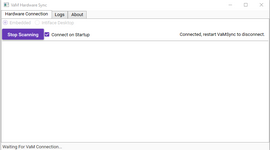
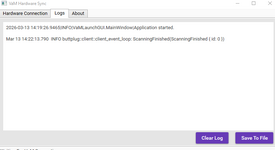
HELP! I can't even get the session plugin to load without an error.
I DO see my Handy show up in the Vamsync app and it does connect, then I'm stuck on the "Waiting for VAM connection" part.
I assumed my issue was I needed to load the "Session Plugin" right? Well, I get this ERROR in VAM whenever I try to load it:
I DO see my Handy show up in the Vamsync app and it does connect, then I'm stuck on the "Waiting for VAM connection" part.
I assumed my issue was I needed to load the "Session Plugin" right? Well, I get this ERROR in VAM whenever I try to load it:
Blazedust.ToySerialController+VAMLaunch.12:/Custom/Scripts/Blazedust/ToySerialController+VAMLaunch/ADD_ME.cslist failed. Errors:
!> [CS16]: Could not write to file `MVRPlugin_Blazedust_ToySerialController+VAMLaunch_12__Custom_Scripts_Blazedust_ToySerialController+VAMLaunch_ADD_ME_cslist_fb53ffcddca71fe16e9f132872f5c353_1', cause: Could not find a part of the path "C:\Users\x\x\VaM-1.20-Downloader-VRPorn-Premium\VaM-1.20-Downloader-VRPorn-Premium\MVRPlugin_Blazedust_ToySerialController+VAMLaunch_12__Custom_Scripts_Blazedust_ToySerialController+VAMLaunch_ADD_ME_cslist_fb53ffcddca71fe16e9f132872f5c353_1.dll
The plugin woks fine for me but I do not use it as a Session plugin. Are you using Intiface? My issues is connecting Vamsync to Intiface. It rarely connects on the first attempt. However, once connected I have no issues.HELP! I can't even get the session plugin to load without an error.
I DO see my Handy show up in the Vamsync app and it does connect, then I'm stuck on the "Waiting for VAM connection" part.
I assumed my issue was I needed to load the "Session Plugin" right? Well, I get this ERROR in VAM whenever I try to load it:
Are you using Intiface?For some reason, vamsync can't find my handy. Bluetooth mode is enabled, the latest update but noting
yes it fixed everything i need to find where i put the file againAnd did that work?
I only have the one-axis handy. I've noticed that one of the others works too, I think R1? V1? It's got data in there. Depending on the scene that works well.
This whole system is so imperfect. So far the best experience is when you use a pre-programmed animation pattern that is synced to movements someone.
I've come up with a system to convert funscripts to APs, and then attach the hip/pelvis to that. Works great.
KM and CMC both figured out ways to convert as well.
Otherwise, it's all an imperfect attempt that works "well enough", but god damn the amount of time wasted tinkering and troubleshooting makes me hate myself sometimes.
heres my tweak that fixed the L1 issue and names if i recall.
i was lazy rename to a rar instead of txt
you can repackage into a var if you zip it and then var it
i was lazy rename to a rar instead of txt
you can repackage into a var if you zip it and then var it
Last edited:
It seems many connection issues happen with Vamsyns. Can this plugin be set up to work without Vamsync? LinusMinus' plugin StrokerSync only uses Intiface to communicate with VAM. It is a great plugin but a few features are missing (add feet and breast to targeted orifice list and saving presets). Is there another solution I could be missing?
Hello, i already search here to find some info about Kiiroo Keon 2 i guest no one ask about it. If any one can confirm please, that works with VAMLaunch?
I know the Keon 1 works but i want to be sure the new KEON2 works too, verifying if any one already have works with VAM. thanks
I know the Keon 1 works but i want to be sure the new KEON2 works too, verifying if any one already have works with VAM. thanks
Similar threads


- Replies
- 1
- Views
- 635