• Hi Guest!

    We are extremely excited to announce the release of our first Beta1.1 and the first release of our Public AddonKit!
    To participate in the Beta, a subscription to the Entertainer or Creator Tier is required. For access to the Public AddonKit you must be a Creator tier member. Once subscribed, download instructions can be found here.

    Click here for information and guides regarding the VaM2 beta. Join our Discord server for more announcements and community discussion about VaM2.
  • Hi Guest!

    VaM2 Resource Categories have now been added to the Hub! For information on posting VaM2 resources and details about VaM2 related changes to our Community Forums, please see our official announcement here.
IdlePoser Mini Tutorial

Guides IdlePoser Mini Tutorial

MacGruber

Invaluable member
Developer
Wiki Contributor
Featured Contributor
Joined
May 11, 2020
Messages
1,745
Solutions
93
Reactions
3,390
Could your idle poser and particularly Anchoring, help with the problem of different body sizes? I have an animtion where a girl is leaning on a guy for support. But if the guy is smaller, she is hovering instead of leaning on his chest. Is that something which could be solvable by using an anchor?
 
Could your idle poser and particularly Anchoring, help with the problem of different body sizes? I have an animtion where a girl is leaning on a guy for support. But if the guy is smaller, she is hovering instead of leaning on his chest. Is that something which could be solvable by using an anchor?
Within reason, yes, it can help somewhat. However, note that you may still need to adjust animation / control node positions for the guy.

If character height changes or some morphs change the character too much in a way that would require angle or finger morph changes for the touching hand for example, there is simply nothing that can be done. Anchors simply mean "place this control in this distance with this relative rotation to that other control". While very powerful for animated characters, it isn't magic ?‍♂️
 
Within reason, yes, it can help somewhat. However, note that you may still need to adjust animation / control node positions for the guy.

If character height changes or some morphs change the character too much in a way that would require angle or finger morph changes for the touching hand for example, there is simply nothing that can be done. Anchors simply mean "place this control in this distance with this relative rotation to that other control". While very powerful for animated characters, it isn't magic ?‍♂️
Thank you for your explanation!
 
MacGruber submitted a new resource:

IdlePoser Mini Tutorial - Explaining the bare basics of the powerful IdlePoser plugin.


Read more about this resource...
I want to know if this is a bug or if its supposed to function like this. Im trying to capture two different "States" of a girl riding a guy with her hands on his chest on the first pose and the next pose her hands on the ground beside the guy. Her hands are linked to his chest with "Linked to physics" at the first state and then I change the control to "On" and place her hands on the ground and capture that next state. So far it seems to work to change between the two states, but! the "Link to physics" state is not saved on the first state so when I switch between the states the hands keep the "On" control from the second state not going back to the "Linked to physics" state.. So if this is how its supposed to be I dont really understand the use of this plugin. I always have some kind of linking points between characters in the scenes and those linking points must be saved and kept.. If I dont change from "Link to physics" to something else the hands wont move when switching between the states.. so please how is this supposed to work?

Edit: I found out that I can do a trigger where I change the positionState and rotationState at the same time that I switch state and this works!
 
Last edited:
I want to know if this is a bug or if its supposed to function like this. Im trying to capture two different "States" of a girl riding a guy with her hands on his chest on the first pose and the next pose her hands on the ground beside the guy. Her hands are linked to his chest with "Linked to physics" at the first state and then I change the control to "On" and place her hands on the ground and capture that next state. So far it seems to work to change between the two states, but! the "Link to physics" state is not saved on the first state so when I switch between the states the hands keep the "On" control from the second state not going back to the "Linked to physics" state.. So if this is how its supposed to be I dont really understand the use of this plugin. I always have some kind of linking points between characters in the scenes and those linking points must be saved and kept.. If I dont change from "Link to physics" to something else the hands wont move when switching between the states.. so please how is this supposed to work?

Edit: I found out that I can do a trigger where I change the positionState and rotationState at the same time that I switch state and this works!
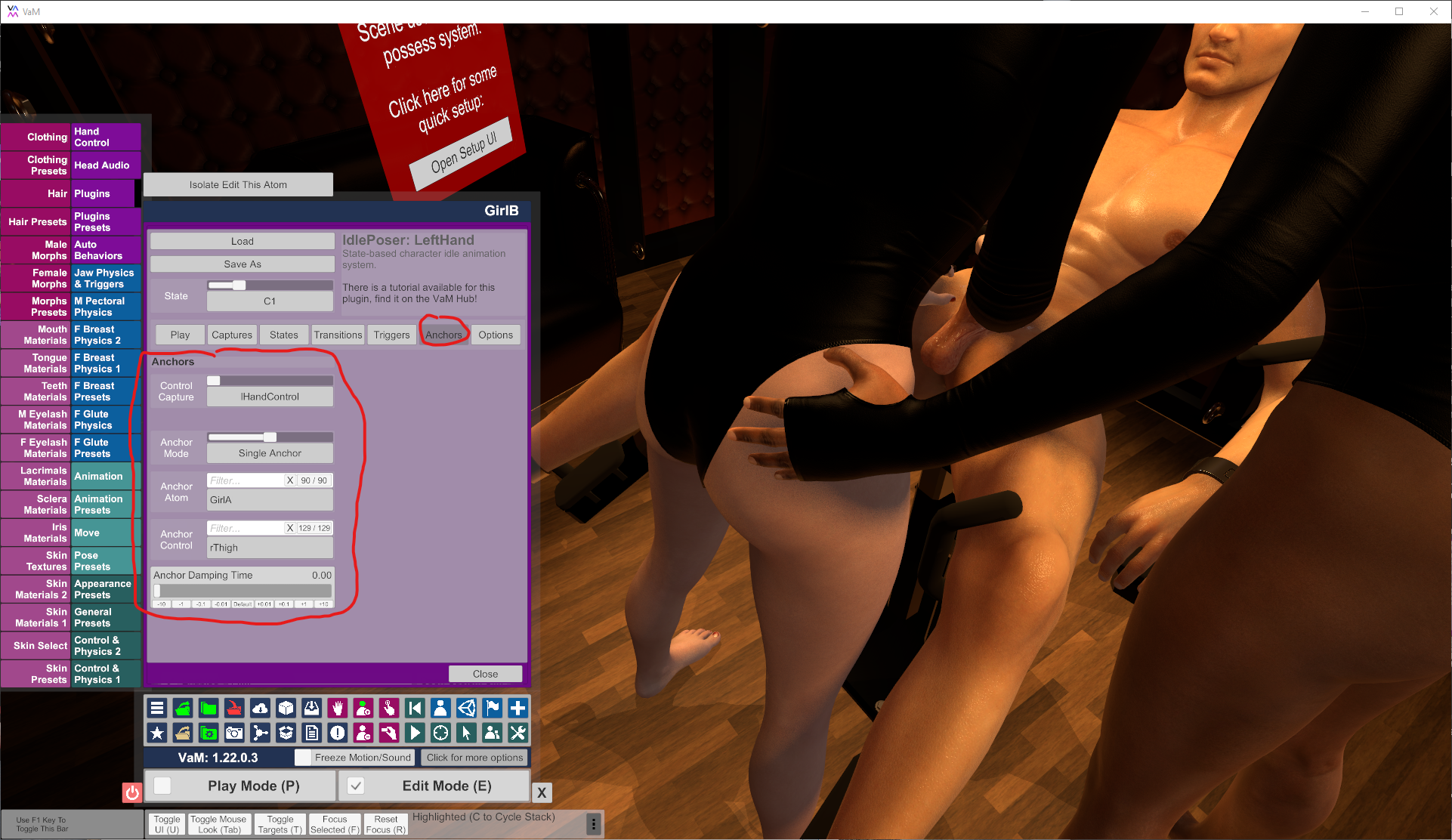
The intended way for IdlePoser to be used in this case would be using Anchors inside IdlePoser instead of "Linked to Physics". Its mentioned in the tutorial.
312015-aa6f83397f3196e9c2b6771b21defd91.data


In your situation, for the first state you would anchor the girls hand control to the guys chest or one of the nipples. Or whatever node is closest. Always link to the actual node, not the "control". So, "chest" instead of "chestControl", etc. You can also anchor to some average between two nodes, the middle between both nipples. For the second state you can anchor to something else, say the girls thigh or nothing at all.

Don't forget that you can also anchor the control points of your transition. E.g. if you got a control point close to the guy, you may want to anchor that to the guys chest (or some other nearby body part) as well. Probably with an increased damping value, though.

The benefit of using Anchors over VaM Physics is that that there is more control and its all blended smoothly. A physics link can just be on or off...so you would always have that little animation jerk there.
 
Back
Top Bottom