• Hi Guest!

    We are extremely excited to announce the release of our first Beta1.1 and the first release of our Public AddonKit!
    To participate in the Beta, a subscription to the Entertainer or Creator Tier is required. For access to the Public AddonKit you must be a Creator tier member. Once subscribed, download instructions can be found here.

    Click here for information and guides regarding the VaM2 beta. Join our Discord server for more announcements and community discussion about VaM2.
  • Hi Guest!

    VaM2 Resource Categories have now been added to the Hub! For information on posting VaM2 resources and details about VaM2 related changes to our Community Forums, please see our official announcement here.
IdlePoser Mini Tutorial

Guides IdlePoser Mini Tutorial

MacGruber

Invaluable member
Developer
Wiki Contributor
Featured Contributor
Joined
May 11, 2020
Messages
1,748
Solutions
93
Reactions
3,390
Could your idle poser and particularly Anchoring, help with the problem of different body sizes? I have an animtion where a girl is leaning on a guy for support. But if the guy is smaller, she is hovering instead of leaning on his chest. Is that something which could be solvable by using an anchor?
 
Could your idle poser and particularly Anchoring, help with the problem of different body sizes? I have an animtion where a girl is leaning on a guy for support. But if the guy is smaller, she is hovering instead of leaning on his chest. Is that something which could be solvable by using an anchor?
Within reason, yes, it can help somewhat. However, note that you may still need to adjust animation / control node positions for the guy.

If character height changes or some morphs change the character too much in a way that would require angle or finger morph changes for the touching hand for example, there is simply nothing that can be done. Anchors simply mean "place this control in this distance with this relative rotation to that other control". While very powerful for animated characters, it isn't magic ?‍♂️
 
Within reason, yes, it can help somewhat. However, note that you may still need to adjust animation / control node positions for the guy.

If character height changes or some morphs change the character too much in a way that would require angle or finger morph changes for the touching hand for example, there is simply nothing that can be done. Anchors simply mean "place this control in this distance with this relative rotation to that other control". While very powerful for animated characters, it isn't magic ?‍♂️
Thank you for your explanation!
 
MacGruber submitted a new resource:

IdlePoser Mini Tutorial - Explaining the bare basics of the powerful IdlePoser plugin.


Read more about this resource...
I want to know if this is a bug or if its supposed to function like this. Im trying to capture two different "States" of a girl riding a guy with her hands on his chest on the first pose and the next pose her hands on the ground beside the guy. Her hands are linked to his chest with "Linked to physics" at the first state and then I change the control to "On" and place her hands on the ground and capture that next state. So far it seems to work to change between the two states, but! the "Link to physics" state is not saved on the first state so when I switch between the states the hands keep the "On" control from the second state not going back to the "Linked to physics" state.. So if this is how its supposed to be I dont really understand the use of this plugin. I always have some kind of linking points between characters in the scenes and those linking points must be saved and kept.. If I dont change from "Link to physics" to something else the hands wont move when switching between the states.. so please how is this supposed to work?

Edit: I found out that I can do a trigger where I change the positionState and rotationState at the same time that I switch state and this works!
 
Last edited:
I want to know if this is a bug or if its supposed to function like this. Im trying to capture two different "States" of a girl riding a guy with her hands on his chest on the first pose and the next pose her hands on the ground beside the guy. Her hands are linked to his chest with "Linked to physics" at the first state and then I change the control to "On" and place her hands on the ground and capture that next state. So far it seems to work to change between the two states, but! the "Link to physics" state is not saved on the first state so when I switch between the states the hands keep the "On" control from the second state not going back to the "Linked to physics" state.. So if this is how its supposed to be I dont really understand the use of this plugin. I always have some kind of linking points between characters in the scenes and those linking points must be saved and kept.. If I dont change from "Link to physics" to something else the hands wont move when switching between the states.. so please how is this supposed to work?

Edit: I found out that I can do a trigger where I change the positionState and rotationState at the same time that I switch state and this works!
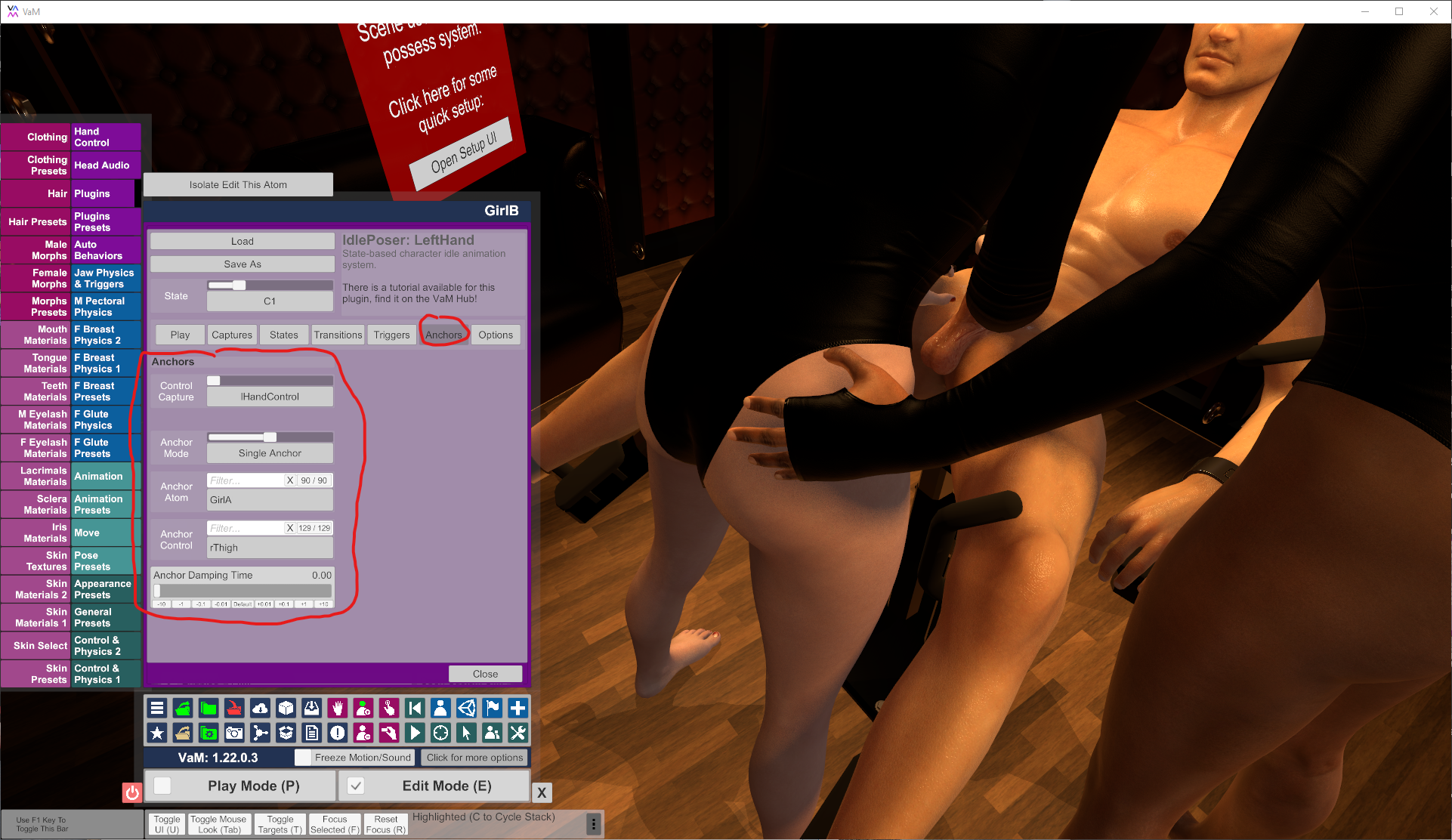
The intended way for IdlePoser to be used in this case would be using Anchors inside IdlePoser instead of "Linked to Physics". Its mentioned in the tutorial.
312015-aa6f83397f3196e9c2b6771b21defd91.data


In your situation, for the first state you would anchor the girls hand control to the guys chest or one of the nipples. Or whatever node is closest. Always link to the actual node, not the "control". So, "chest" instead of "chestControl", etc. You can also anchor to some average between two nodes, the middle between both nipples. For the second state you can anchor to something else, say the girls thigh or nothing at all.

Don't forget that you can also anchor the control points of your transition. E.g. if you got a control point close to the guy, you may want to anchor that to the guys chest (or some other nearby body part) as well. Probably with an increased damping value, though.

The benefit of using Anchors over VaM Physics is that that there is more control and its all blended smoothly. A physics link can just be on or off...so you would always have that little animation jerk there.
 
Hello, I have been playing around with Idle Poser on and off for a while now. I think this really has some potential to be very useful for making simple animations that add a lot of immersiveness to my scenes. The problem that I have not been able to figure out is how to properly use transitions. I have a scene where the guy is sitting on a sofa and a girl is facing him in his lap and riding him. She has her hands on his shoulders, for one of the poses I want her to lean back and place her hands on his knees. I made a transition pose to get her hands around her body. I added this as a transition for the Lean Back pose. I assumed that since the ON and OFF buttons were both checked on the Transitions tab that this would cause the transition to be implemented anytime the Lean Back pose is used, but it doesn't. I got it to work by also adding the transition pose the Ride position and that works great, but I have a few other poses in this part of the scene. In total there is Ride, Close, Kiss, Ride High, and Lean Back. If I add the transition to all of the poses so that the transition will be used to go from any pose to the Lean Back pose, then it goes out of sync on all of the other transitions as it is going to the transition when it is not necessary. I could set up the scene so that she could only go from the Ride pose to the Lean Back pose, but it would be cool to be able to transition from any pose to any other pose. What do I need to do to, to get this to use the transition just when it is going to and from the Lean Back pose?

I apologize for this being so long, but I really want to get this to work and then perhaps add more transitions and with your logic make a really nice scene.

Thank you for this and all the many plugins you have created that make Vam so fun!
 
I think this really has some potential to be very useful for making simple animations that add a lot of immersiveness to my scenes.
Thx! :cool:

She has her hands on his shoulders, for one of the poses I want her to lean back and place her hands on his knees. I made a transition pose to get her hands around her body.
I think you got it already, but just to be sure:
From your description you should most likely use a setup like this. (Quick and dirty posing, obviously)

State "State#LeanBack"
  • "State Type" set to "Regular State"
    1771354852201.png
State "State#Close"
  • "State Type" set to "Regular State"
    1771354893736.png

State "T#Close-LeanBack"
  • "State Type" set to "Control Point"
    1771355100300.png
  • Transitions setup from the control point to both regular states, each in both directions.
  • So we go from "State#LeanBack" via the control point "T#Close-LeanBack" to "State#Close". And we can also go back from there.
    1771355137582.png
Additional Poses
  • Add more Regular States and potentially ControlPoints for each of the poses you want: Ride, Kiss, Ride High, etc.
  • Add transitions between the RegularStates as you want them. From your description is sounds like you want to use the "LeanBack" pose as kind of a central states. That's fine.
  • While you can go directly from RegularState to RegularState, usually you would go via one or two ControlPoints. That way the animation will be curved (like in the images above), which just looks way more natural.
  • By default IdlePoser will wait (random between WaitDurationMin/Max) at each RegularState and then randomly pick a transition to another RegularState.
but it would be cool to be able to transition from any pose to any other pose.
As I tried to explain, that should be possible. I presume you just got some quirk in your transition setup. I recommend to turn on the debug drawing, so you see better what you are doing for transitions. In above images you see the transitions as grey lines, and the blue curved lines are the actual animation (bézier curve following the points)
1771355288309.png


then it goes out of sync on all of the other transitions as it is going to the transition when it is not necessary.
I'm not quite sure what you mean with "goes out of sync". Do you have multiple IdlePoser or some other animation maybe?
If you want a more complex setup, for example left and right hand each having their own IdlePoser, plus another IdlePoser for the body, you can coordinate the different IdlePoser using a LogicBricks StateMachine. Its a great way to achieve more variations, as the different poses multiply. But certainly advanced stuff.
 
Thx! :cool:


I think you got it already, but just to be sure:
From your description you should most likely use a setup like this. (Quick and dirty posing, obviously)

State "State#LeanBack"
State "State#Close"

State "T#Close-LeanBack"
  • "State Type" set to "Control Point"
    View attachment 567184
  • Transitions setup from the control point to both regular states, each in both directions.
  • So we go from "State#LeanBack" via the control point "T#Close-LeanBack" to "State#Close". And we can also go back from there.
    View attachment 567188
Additional Poses
  • Add more Regular States and potentially ControlPoints for each of the poses you want: Ride, Kiss, Ride High, etc.
  • Add transitions between the RegularStates as you want them. From your description is sounds like you want to use the "LeanBack" pose as kind of a central states. That's fine.
  • While you can go directly from RegularState to RegularState, usually you would go via one or two ControlPoints. That way the animation will be curved (like in the images above), which just looks way more natural.
  • By default IdlePoser will wait (random between WaitDurationMin/Max) at each RegularState and then randomly pick a transition to another RegularState.

As I tried to explain, that should be possible. I presume you just got some quirk in your transition setup. I recommend to turn on the debug drawing, so you see better what you are doing for transitions. In above images you see the transitions as grey lines, and the blue curved lines are the actual animation (bézier curve following the points)
View attachment 567192


I'm not quite sure what you mean with "goes out of sync". Do you have multiple IdlePoser or some other animation maybe?
If you want a more complex setup, for example left and right hand each having their own IdlePoser, plus another IdlePoser for the body, you can coordinate the different IdlePoser using a LogicBricks StateMachine. Its a great way to achieve more variations, as the different poses multiply. But certainly advanced stuff.
Wow! That is the most detailed, thought out, and comprehensive response I have ever gotten! I really appreciate the effort and thought that you put into it. I think I am getting pretty good grasp of this plugin. I also found the "original" tutorial that you made for this, which previously I had only found this one. This scene is really making very simple use of the plugin, in that it is only handling the transitions between various positions and is all triggered manually now and will probably be controlled by your timer and Sequence Select later. What I had wanted to do and have not been able to find a way to, and I think it may not be possible using the plugin alone, is to be able to move from any position to any other position. The problem is that there are several poses that require no transition and one (Lean back) that does to move to/from it to and any other position. Her hands stay in the same position in all of the poses other than the Lean Back pose. I have the transition from the Ride pose (which is the base pose) to the Lean Back pose and that works great. I can add the transition to the other poses and go from any of those poses to/from the Lean Back pose just fine as well. The problem that causes though is that then the transition is activated between say the Ride and the Close pose, which is not realistic. I am thinking that the best plan is just to set this up in Sequence Select and the poses will be setup to only make transitions that work well. She can get everywhere needed, just not anywhere necessarily from where she is. Which is similar to what the Grouping facilitates. Maybe I could Use Sequence Select and add some logic to get what I want also, I just haven't thought it that far yet. I am just trying to learn how to set things up in this plugin for now. I am interested now in figuring out to do some more complex transitions, like moving her feet from a kneeling position to a squatting one. This could be really cool!

By the way, I now typically set up a scene to let Sequence choice handle all the pose changes and trigger them by saying "Next" which makes easier than trying to remember all the proper command names for the many positions I typically build into my scenes.

Again, THANK YOU for the detailed response!!

MH
 
What I had wanted to do and have not been able to find a way to, and I think it may not be possible using the plugin alone, is to be able to move from any position to any other position. The problem is that there are several poses that require no transition and one (Lean back) that does to move to/from it to and any other position. Her hands stay in the same position in all of the poses other than the Lean Back pose. I have the transition from the Ride pose (which is the base pose) to the Lean Back pose and that works great. I can add the transition to the other poses and go from any of those poses to/from the Lean Back pose just fine as well. The problem that causes though is that then the transition is activated between say the Ride and the Close pose, which is not realistic.
I still not quite sure I understood the problem. You can add as many transitions as you like. From anywhere to anywhere. For a transition you can reuse existing ControlPoint, or add new ones. All IdlePoser does is try to find a path on the graph of transitions from one RegularState to the next, optionally passing up to 2 ControlPoint. If you don't want to go from state A to B, well then don't add a transition between them, make sure there is no path on the graph.
I am interested now in figuring out to do some more complex transitions, like moving her feet from a kneeling position to a squatting one. This could be really cool!
You may want to look at my DoubleTrouble scene. There is a central LogicBricks StateMachine which basically sets the group mask on all the IdlePosers to control which state groups are allowed or not at any time. If IdlePoser finds itself in a not allowed group, it transitions to an allowed one.
There is a bit of explanation how the scene works in the StateMachine - Basics tutorial here:
 
I still not quite sure I understood the problem. You can add as many transitions as you like. From anywhere to anywhere. For a transition you can reuse existing ControlPoint, or add new ones. All IdlePoser does is try to find a path on the graph of transitions from one RegularState to the next, optionally passing up to 2 ControlPoint. If you don't want to go from state A to B, well then don't add a transition between them, make sure there is no path on the graph.

You may want to look at my DoubleTrouble scene. There is a central LogicBricks StateMachine which basically sets the group mask on all the IdlePosers to control which state groups are allowed or not at any time. If IdlePoser finds itself in a not allowed group, it transitions to an allowed one.
There is a bit of explanation how the scene works in the StateMachine - Basics tutorial here:
Oh my gosh, I am stupid!!! I made a video demonstrating what the problem I am having was. As I was reviewing it, what you are saying finally sank into my brain. I added the same transition pose to all of the other poses but with different names and then added all of those to the Lean Back pose as well and now it does exactly what I want it to do! I can go from any pose to any other pose, at any time. Thank you! Thank you! Thank you, for sticking with me on this!!

I did run across your Double Trouble scene and was thinking the same thing, that I should watch it and dissect it to understand what all you did there. I plan to do that to learn what other tricks there to this plugin. This is a lot of fun, I love making these things work as much as I love playing in Vam. I am fascinated by using logic to make things work, even though sometimes the simplest logic seems to go over my head.

I really do appreciate all the time spent on this! Thank you again!

MH
 
Back
Top Bottom