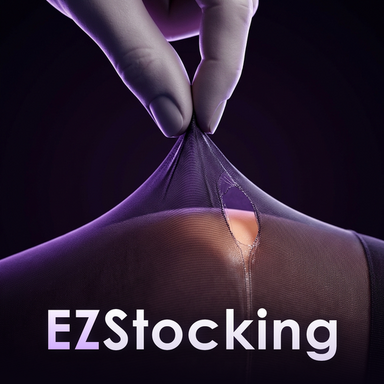


Stop settling for static, painted-on stockings and clothing. EZStocking lets you pinch, tug, snag, and rip stockings—or any VAM clothing (jeans, skirts, tops, leggings, cloth-sim garments)—live in Desktop or VR, with real-time 3D wrinkles, SSS/DeepSkin-safe 3D skin bulge around torn rims, nylon audio, scrubbable 32-step tear replay with Timeline & VAM Triggers, and cross-garment presets—all while keeping your original look intact.
Highlights
- Stockings + Any VAM Clothing (Multi-Garment Ready) - Auto-detects Stocking Shader vs. VAM Native Clothing shading mode. Tick multiple worn garments at once on a Person atom (e.g. skirt/jeans + stockings) with independent tearing, and click straight through outer holes to grab inner layers.
- Grab, pull & rip live (Desktop + VR) - Drag with left-click in Smart Mode or grab natively with VR Grip; release early to snag, hold to rip, and tear up to 32 holes & 32 runs per garment.
- 3D skin bulge around tears (SSS / DeepSkin safe) - Natural flesh bulge and pinched rims with anti-pokethrough skin-hug; works with Native Skin, Skynet.SkinSSS, and Mxx.DeepSkin without replacing your skin shader.
- 32-Step Tear Replay + Timeline & VAM Triggers - Dedicated Replay tab records every rip/snag for smooth forward/reverse scrubbing, AcidBubbles Timeline keyframing (
TearReplayProgress), and 4 outbound VAM Triggers (OnTear,OnSnag,OnLimit,OnPull). - Preset Manager (Cross-Garment Tears) - Save, load, browse (
.var-aware), and delete presets directly from the left Edit column. Optional tear recordings are stored in 3D rest space (not locked to a specific clothing ID), so the same rip pattern transfers cleanly across garments. - Natural rolled rims, live wrinkles & nylon audio - Smooth 3D rolled rims, bent-joint silk folds (including Cloth Sim garments), built-in tear/snag/walking leg-rub & UI haptic audio, EN / ZH UI with hover tips, hotkey
Y, and zero-ReadPixelsfallback compatibility for encrypted clients.
What's New in v3 (lulu.EZStocking.3.var)
- VAM Native Clothing Shading Mode - Auto-detects and switches between Stocking Shader and VAM Native Clothing (Marmoset Subsurface/Specular lighting), bringing live pulling, tearing, dynamic 3D wrinkles, and 3D skin bulge to jeans, skirts, tops, and cloth-simulated outfits without altering their original material look.
- Multi-Garment Simultaneous Support - New Active Garments checklist in Person mode lets you take over and tear multiple garments at once, each with independent shading mode, holes, and replay, plus click-through across torn layers.
- 32-Step Recording, Smooth Replay, Timeline & VAM Triggers - New Replay tab with smooth rip interpolation, step-by-step / auto playback, Rewind (Keep),
TearReplayProgressfor AcidBubbles Timeline, trigger actions (TriggerNextTear,TriggerPrevTear,TriggerRandomTear,PlayTearReplay), and 4 native outbound VAM Trigger panels (OnTear,OnSnag,OnLimit,OnPull). - Preset Save & Load Manager - Added directly to the left Edit column for one-click preset saving, loading, browsing, and deleting, with optional 3D tear-recording snapshots that work across different garments.
- Cloth Sim, Encrypted Client Compatibility & UI Polish - Fixed cloth-simulated garment rest baselines and seam pulling; added automatic zero-
ReadPixelslive vertex ray-triangle picking (full compatibility with encrypted/anti-rip clients) and a Diagnostic Log switch; fixed UI text clipping, wrapped long tooltips, viewport-pinned toasts, upward-flipping dropdowns, and async scene restore stability.
- 3D Tear Skin Bulge & Skin-Hug - Added 3D skin bulge, rim pinch shading, and anti-pokethrough skin-hug around holes (compatible with Native Skin, Skynet.SkinSSS, and Mxx.DeepSkin, plus a Debug Bulge Map toggle).
- VR Grip, Smart Mode & HUD Alerts - Added native VR Grip tearing, customizable hotkey (
Y), TogglePullTear / RepairAllTears trigger actions, HUD toast bubbles (including 32/32 Tear Limit), and fixed accidental controller dragging after tearing. - Tear, Leg-Rub & UI Audio - Added stocking tear/snag/walking friction foley and subtle toggleable UI feedback sounds.
- Smoother Rolled Rims & Edge Controls - Reworked 3D Rim Bump for cleaner, natural rolled edges and improved Rim Darkness / Tear Edge Soften on both dark and light stockings.
- Picking & Stability Fixes - Fixed overlapping-leg raycast picking (front leg wins, and clicking through a tear grabs intact stocking behind it), improved point/spot light blending, and fixed cleanup on clothing toggle/removal.
Tension wrinkles & weave close-up | 3D tear skin bulge, rolled rims & runs close-up | Live elastic fabric pull |
VAM Native Clothing mode + simultaneous multi-garment tearing
Quick start
- Load
EZStocking.cslistin one of two ways:- On a Person atom (recommended for multi-garment): Add it to the Person's Plugins tab, open Custom UI, tick one or more items under Active Garments, switch focus in Editing, and tick the slots you want under Active Materials.
- On a single Clothing item: Attach it directly via EZClothPlugin or InjectorPluginManager - it auto-locks to the host item so you only need to tick Active Materials.
- Keep Pull & Tear (Mouse / VR) on (toggle anytime with
Y):- Desktop: Left-click and drag directly on the garment - tug gently for elastic pull, hold past max pull distance to snag or rip, or click Random Tear to test instantly.
- VR: Reach close to the garment and hold native Grip to pinch and rip.
- Next-level workflow:
- Presets: Save or load presets (with optional 3D tear recordings) right from PRESET MANAGER in the left column.
- Replay & Triggers: Open the Replay tab to scrub/play back recorded tears, keyframe
TearReplayProgressin Timeline, or wire VAM Triggers. - Reset & Calibrate: Hit Repair All Tears for a fresh garment (or Rewind (Keep) to keep your recording), and Calibrate Rest in the Wrinkle tab after changing body morphs or cloth simulation settings.
Timeline & VAM Triggers Integration
EZStocking exposes full bidirectional AcidBubbles Timeline and native VAM Trigger support—drive tears from animations, UIButtons, or collisions, and fire character expressions, audio, or Timeline segments directly from live pulling and ripping.
1. AcidBubbles Timeline Setup (Keyframe-Driven Tearing)
- Record by hand: Rip and snag the garment normally in-scene—EZStocking automatically records every step in order (up to 32 holes + 32 runs).
- Rewind without erasing: Open the Replay tab and click Rewind (Keep) so the garment returns to 0% intact while keeping your full recording.
- Add Target in Timeline: Click Add Targets → Float Params, select
plugin#X_lulu.EZStockingon the Person atom:TearReplayProgress(0.0..1.0, primary target):0= intact,1= fully torn. With Smooth Rip Interpolation enabled, scrubbing or playing shows a pre-tear split preview before smoothly opening each hole, and crossing steps forward automatically fires rip/snag SFX and outbound triggers.TearReplayStep(0..32): Step-indexed scrubbing for exact per-hole cue timing.- You can also invoke inbound actions (such as
TriggerNextTearorTriggerRandomTear) directly from Timeline's Triggers track.
2. Inbound Trigger Actions (UIButton / CollisionTrigger / Timeline)
TriggerNextTear/TriggerPrevTear— Smoothly steps forward / backward by one recorded tear or snag (speed set by Step Dur.)TriggerRandomTear— Spawns a tear at a random intact position immediately (no prior recording required)PlayTearReplay/PauseTearReplay/TogglePlayTearReplay— Starts, pauses, or toggles automatic playback of the recorded sequenceResetTearReplay— Rewinds to 0% intact while keeping the recorded tear sequenceRepairAllTears— Clears all holes, runs, and recorded history back to brand-new conditionTogglePullTear— Toggles Pull & Tear mode on/off (ideal for VR quick menus or keybinding plugins)
3. Outbound Native VAM Triggers (Configured in the Replay Tab)
OnTear(Instant Pulse,Start Actions) — Fires on every new hole, upgrade, or merge (including forward replay & multi-garments) — drive expressions, gasps, or Timeline clipsOnSnag(Instant Pulse,Start Actions) — Fires on partial snag runs or run elongationsOnLimit(Latched State,Start/End) — Activates (Start) when active holes hit 32; deactivates (End) when repaired or rewound below 32OnPull(Continuous0..1,Start/Transition/End) — Activates on grab (Start), streams live0..1tension to Transition Actions while pulling (morphs/expressions/breathing), ends on release or tear (End)
Support: If you enjoy my work, please consider supporting me on Patreon or Afdian (爱发电).
中文说明 · EZStocking 丝袜与通用服装实时手撕拉扯与张力褶皱插件
别再让丝袜和衣服像贴图一样死扒在身上了。装上 EZStocking,不管是丝袜、紧身裤、牛仔裤、上衣还是布料模拟裙,在桌面和 VR 里都能直接上手捏、拉、勾丝、手撕;弯腿自带实时 3D 褶皱与拉伸透肉,破洞处皮肤自然 3D 鼓肉勒痕并配齐拟真音效,还能无损录制回放破洞过程、一键接入 Timeline 与 VAM 触发器,原材质质感一点不丢。
亮点
- 丝袜 + 任意服装通用(多服装同时生效) —— 自动识别 丝袜着色器 与 VAM 原生服装 模式,支持在 Person 上同时勾选多件衣物各自独立手撕(如外裙/牛仔裤 + 丝袜),点击外层破洞可直接穿透捏拉内层衣物。
- 桌面 + VR 原生手撕捏拉 —— 桌面左键智能模式拖拽,VR 按原生 Grip 直接抓撕;轻拽弹性拉扯、松早勾丝、按久撕洞(单件上限 32 洞 / 32 抽丝)。
- 破洞 3D 勒肉(兼容 SSS / DeepSkin) —— 破洞自然 3D 鼓肉、勒痕与贴肤防穿模,不替换皮肤着色器,兼容原生、Skynet.SkinSSS 与 Mxx.DeepSkin。
- 32 步无损回放 + Timeline & 触发器联动 —— 独立 回放触发 页,自动记录每次手撕/抽丝步骤并支持平滑过渡回放,原生支持 AcidBubbles Timeline K 帧驱动与 4 组外发 VAM Triggers(破洞/抽丝/上限/拉扯进度)。
- 预设保存与加载(跨服装通用) —— 左侧常用区一键保存/加载/浏览/删除预设;破洞按 3D 静止空间坐标保存,不绑定特定服装 ID,换穿其他衣物照样还原一致的破洞效果。
- 自然立体卷边、3D 褶皱与拟真音效 —— 平滑 3D 卷边、屈膝实时褶皱(支持 Cloth Sim 布料模拟)、内置撕裂/勾丝/双腿摩擦及 UI 微动音效;中英界面、快捷键
Y、全悬停提示,并兼容屏蔽ReadPixels的加密客户端。
v3 更新内容(lulu.EZStocking.3.var)
- VAM 原生服装模式(任意服装可手撕):新增「着色器外观模式」自动识别与切换(丝袜着色器 / VAM 原生服装),普通衣物(牛仔裤、短裙、上衣、布料模拟服装等)完整保留原生 Marmoset 光照质感,同时享受手撕破洞、弹性拉扯、3D 褶皱与破洞勒肉。
- 多服装同时生效:Person 模式新增 生效服装 多选列表,可同时接管并独立手撕多件衣物,并支持透过外层破洞穿透拉扯内层衣物。
- 32 步破洞录制回放 + Timeline & VAM 触发器:新增 回放触发 标签页,支持平滑撕裂过渡动画、逐步前进/回退/自动播放、
TearReplayProgressTimeline K 帧驱动,以及OnTear/OnSnag/OnLimit/OnPull四组原生 VAM Triggers。 - 预设管理器(左侧栏快捷入口):新增预设保存、加载、原生文件浏览(支持
.var包内预设)与删除,可选附带跨服装复用的 3D 破洞录制序列。 - 布料模拟、加密客户端兼容与全面 UI 优化:修复布料模拟服装基线与接缝拉扯;新增自动检测
ReadPixels拦截的零ReadPixels实时顶点射线拾取(兼容加密客户端)与左侧 诊断日志 调试开关;全面修复文字溢出、长 Tooltip 换行、Toast 视口居中、下拉框贴底自动向上展开与场景异步加载稳定性。
- 破洞 3D 勒肉与贴肤防穿模:新增破洞 3D 皮肤鼓肉、勒痕法线与贴肤紧身,兼容原生 / Skynet.SkinSSS / Mxx.DeepSkin,并新增左侧勒肉调试视图开关。
- VR 抓取、智能模式与 HUD 提示:新增 VR 原生 Grip 手撕、自定义快捷键(默认
Y)、快捷触发动作、桌面/VR HUD 气泡提示(含 32/32 破洞上限),并修复撕破后误拖控制器问题。 - 拟真音效系统:新增撕裂/勾丝/双腿摩擦音效,以及可关闭的 UI 微动交互音。
- 卷边与破边优化:重构立体卷边法线消除硬轮廓线,优化黑白丝的卷边压暗与破边柔化效果。
- 拾取与稳定性修复:修复侧面/重叠视角穿透抓后腿(并支持透过破洞抓后层丝袜),优化点/聚光灯光照混合与服装卸载自动清理。
三步开玩
- 加载
EZStocking.cslist(二选一):- 挂到人物(Person,支持多服装同时生效):添加到 Person 的 Plugins,打开 Custom UI 后在 生效服装 勾选一件或多件衣物,用 当前编辑 切换要调参的衣物,再展开 生效材质 勾选主体材质槽。
- 挂到服装(单件独立绑定):配合 EZClothPlugin 或 InjectorPluginManager 挂到目标衣物上,自动锁定宿主服装,只需勾选 生效材质。
- 确认 开启手撕/拉扯 (鼠标/VR) 打开(随时可按
Y开关):- 桌面端:直接左键拽衣物——轻拽弹性拉扯,拉满按住就能勾丝或撕洞;也可点 测试撕洞 (随机) 快速试效果。
- VR 端:手靠近衣物按住原生 Grip 抓取键即可直接捏拉撕破。
- 进阶玩法:
- 保存/加载预设:左侧 预设保存与加载 (Presets) 直接存为 JSON 预设(可选包含破洞录制序列),换服装也能一键套用。
- 回放与联动:切到右侧 回放触发 页拖动进度条、自动播放、绑定 Timeline(
TearReplayProgress)或配置 VAM Triggers。 - 复原与校准:点 修复全部破洞 一键复原(或用 归零 (保留录制) 保留序列);改完体型 Morph / 布料模拟后在 褶皱 页点一下 校准褶皱静止基准。
Timeline 与 VAM 触发器接入
EZStocking 提供完整的双向 AcidBubbles Timeline 与原生 VAM Triggers 联动:既可以用 Timeline / 按钮 / 碰撞触发器驱动破洞演进,也能在手撕拉扯瞬间反向触发人物表情、语音、骨骼或动画切段。
1. 接入 AcidBubbles Timeline(K 帧驱动破洞)
- 手撕录制:在场景里按想要的顺序和位置先手撕出破洞与勾丝(插件自动按序录制,最多 32 洞 + 32 抽丝)。
- 归零保留序列:切到右侧 回放触发 页,点击 归零 (保留录制),让衣物恢复 0% 完好同时保留全部录制步骤。
- 绑定 Timeline 轨道:在 Timeline 里选 Add Targets → Float Params,选择当前人物的
plugin#X_lulu.EZStocking:TearReplayProgress(0.0 ~ 1.0,推荐主目标):0= 完好、1= 全部撕完。开启 平滑撕裂过渡动画 后,K 帧播放时每一步会先闪现绷丝开裂预览再渐进撑开,正向经过节点时自动播撕裂/抽丝音效并触发外发 Trigger。TearReplayStep(0 ~ 32):按精确步骤号驱动,适合逐洞精准卡点。- 也可直接在 Timeline 的 Triggers 轨道 调用下方入站动作(如
TriggerNextTear/TriggerRandomTear)。
2. 入站触发动作(UIButton / CollisionTrigger / Timeline 调用)
TriggerNextTear/TriggerPrevTear—— 按录制顺序平滑前进 / 回退一步破洞(时长由 单步时长 控制)TriggerRandomTear—— 无需预先录制,立即在当前衣物随机完好位置撕出一个破洞PlayTearReplay/PauseTearReplay/TogglePlayTearReplay—— 开始 / 暂停 / 切换自动播放整段录制序列ResetTearReplay—— 归零回 0% 完好(保留录制序列,方便循环演示)RepairAllTears—— 清空全部破洞、抽丝与录制序列,彻底复原TogglePullTear—— 开关手撕/拉扯交互模式(适合绑到 VR 快捷菜单或快捷键插件)
3. 外发原生触发器(在「回放触发」页点击配置)
- 破洞
OnTear(瞬时脉冲 Start Actions)—— 撕出新洞、扩洞或合并大洞时触发(含正向回放与多选服装),联动表情/喘息/Timeline 切段 - 抽丝
OnSnag(瞬时脉冲 Start Actions)—— 拉扯未破提前松手勾丝、或延长抽丝时触发 - 上限
OnLimit(状态开关 Start / End)—— 活跃破洞达到 32 上限触发 Start,修复或回放退回 < 32 触发 End - 拉扯
OnPull(0→1 连续过渡 Start / Transition / End)—— 捏住拉扯触发 Start,拖拽中实时输出 0→1 张力驱动 Transition Actions(表情/呼吸/肢体微动),松手或撕破触发 End
支持作者:如果你喜欢我的作品,欢迎通过以下链接支持我:Patreon / 爱发电 (Afdian)。
Special Thanks
- Concept inspiration:
- An idea shared with Shadow Venom on Discord.
- Unity tech blogger 樱花兔 (Sakura Rabbit) — see the original showcase post below.
- Stocking shader foundation: Author regguise — https://hub.virtamate.com/resources/custom-shader-stocking-pantyhose.56676/
- UI tooltips inspiration: Author Skynet —

Tooltips - Plugins + Scripts -
-- Description: - A helper script that can give you the ability to easily add tooltips to any plugin UI elements that popup on mouse hover with a color palette similar to vam's. I originally made it for my plugins but thought afterwards this... hub.virtamate.com
- The demo clothing used is by YameteOuji
Thanks to the pioneering work of these veterans, this project was made possible.