


You are using an out of date browser. It may not display this or other websites correctly.
You should upgrade or use an alternative browser.
You should upgrade or use an alternative browser.
Guides How to use Hand Tracking in VAM | 2.0 (Quest)
- Thread starter thinoreos
- Start date

Is this SteamLink or Virtual Desktop?Dear author, I followed your tutorial, but I can't find your preset. If you have a solution, could you tell me? Thank you very much.View attachment 530957
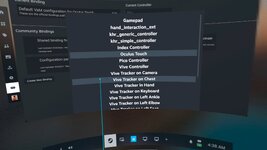
Hey I really appreciate the guide, but when using Virtual Desktop and Hand Tracking with my Quest 3 I do not see the option for "Hand Tracking Controller" when I go to custom bindings and change the controller. The older version of emulating the Index Controllers works just fine, but obviously isn't ideal with how sensitive it is to moving the model on accident.
Inserting a screenshot of my available controllers. I'm using the SteamVR Beta branch as was suggested in the guide, but I also tried non-beta as well to the same end result. I've made sure to restart my pc, headset, and Virtual Desktop. I also make sure to launch SteamVR through Virtual Desktop using only hand tracking and then pulling up the controller bindings all while only using hand tracking, but I still don't get the "Hand Tracking Controller" as an option when I choose custom bindings and to change the controller.
Inserting a screenshot of my available controllers. I'm using the SteamVR Beta branch as was suggested in the guide, but I also tried non-beta as well to the same end result. I've made sure to restart my pc, headset, and Virtual Desktop. I also make sure to launch SteamVR through Virtual Desktop using only hand tracking and then pulling up the controller bindings all while only using hand tracking, but I still don't get the "Hand Tracking Controller" as an option when I choose custom bindings and to change the controller.
Attachments

Is there a way to use it with ALVR? I am a vision pro user and I would love to just use my hands 
Is this only steamlink now? I only use VD becuase it seems faster and steamlink always glitches out. I mean how do you use passthrough of VD and steamlink at the same time?
I use VAM and VD with the vive emulation in VD. How come when im doing hand tracking in just passthrough on meta and not vam my hands track awesome all my fingers and everything copy exactly. Pinching, squeezing motions. But when I load VAM and get in it and put my controllers down the fingers and hands barely move and are stiff. The fingers track a little but not like in regular meta passthrough games. If they moved like in meta passthrough it would be way better, maybe im doing something wrong?
I use VAM and VD with the vive emulation in VD. How come when im doing hand tracking in just passthrough on meta and not vam my hands track awesome all my fingers and everything copy exactly. Pinching, squeezing motions. But when I load VAM and get in it and put my controllers down the fingers and hands barely move and are stiff. The fingers track a little but not like in regular meta passthrough games. If they moved like in meta passthrough it would be way better, maybe im doing something wrong?
That's weird, if you're using hand tracking to pull all that up and it's not showing up must be an error on SteamVR side. Try reinstalling SteamVR? If not you have to submit a bug to SteamVRHey I really appreciate the guide, but when using Virtual Desktop and Hand Tracking with my Quest 3 I do not see the option for "Hand Tracking Controller" when I go to custom bindings and change the controller. The older version of emulating the Index Controllers works just fine, but obviously isn't ideal with how sensitive it is to moving the model on accident.
Inserting a screenshot of my available controllers. I'm using the SteamVR Beta branch as was suggested in the guide, but I also tried non-beta as well to the same end result. I've made sure to restart my pc, headset, and Virtual Desktop. I also make sure to launch SteamVR through Virtual Desktop using only hand tracking and then pulling up the controller bindings all while only using hand tracking, but I still don't get the "Hand Tracking Controller" as an option when I choose custom bindings and to change the controller.
It's possible, but I haven't tested it myself: https://github.com/alvr-org/ALVR/wiki/Hand-tracking-controller-bindingsIs there a way to use it with ALVR? I am a vision pro user and I would love to just use my hands
It sounds like you didn't read the guide.Is this only steamlink now? I only use VD becuase it seems faster and steamlink always glitches out. I mean how do you use passthrough of VD and steamlink at the same time?
I use VAM and VD with the vive emulation in VD. How come when im doing hand tracking in just passthrough on meta and not vam my hands track awesome all my fingers and everything copy exactly. Pinching, squeezing motions. But when I load VAM and get in it and put my controllers down the fingers and hands barely move and are stiff. The fingers track a little but not like in regular meta passthrough games. If they moved like in meta passthrough it would be way better, maybe im doing something wrong?
thinoreos updated How to use Hand Tracking in VAM | 2.0 (Quest) with a new update entry:
2.2
Read the rest of this update entry...
2.2
No longer need to be in Beta, now live version
Read the rest of this update entry...
I've read the entire guide, but I don't quite understand. Do I still need Steam? It says SteamLink OR Virtual Desktop, but then I see that you have to use Steam.
I haven't used SteamVR/SteamLink for a long time because it crashes a lot and consumes too many resources. Just using Virtual Desktop doesn't work?
I haven't used SteamVR/SteamLink for a long time because it crashes a lot and consumes too many resources. Just using Virtual Desktop doesn't work?
Ok thanks I'll try re-installing SteamVR and see if that helps!That's weird, if you're using hand tracking to pull all that up and it's not showing up must be an error on SteamVR side. Try reinstalling SteamVR? If not you have to submit a bug to SteamVR
It's possible, but I haven't tested it myself: https://github.com/alvr-org/ALVR/wiki/Hand-tracking-controller-bindings
It sounds like you didn't read the guide.
I've read the entire guide, but I don't quite understand. Do I still need Steam? It says SteamLink OR Virtual Desktop, but then I see that you have to use Steam.
I haven't used SteamVR/SteamLink for a long time because it crashes a lot and consumes too many resources. Just using Virtual Desktop doesn't work?
I have the same confusion. Do you mean that hand tracking must be realized by launch vam through steamvr? So how does steamvr support passthrough?
There is no description of steamvr in the passthrough article.
I already mentioned a few times in this guide that you NEED SteamVR for hand tracking.I have the same confusion. Do you mean that hand tracking must be realized by launch vam through steamvr? So how does steamvr support passthrough?
There is no description of steamvr in the passthrough article.
View attachment 536814
Passthrough can be used with SteamVR or without SteamVR, it doesn't matter.
Full Hand Tracking NEEDS SteamVR
I knew that, but I thought it had changed with the "VR with Steam Link & Virtual Desktop" update. You need both; it's an AND, not an OR. Sorry for the inconvenience. Thanks for the work; I would have liked to use it, but Steam and I are on bad terms. So many bugs, crashes, and poor performance.
Thank you for your reply. I tried this step to solve this problem: I first opened virtual desktop, turned on passthrough to set the color value, then clicked to start steamvr in virtual desktop, and then started vam in steamvr, so that the finger bending could be recognized and the hand controller could be modified.I already mentioned a few times in this guide that you NEED SteamVR for hand tracking.
Passthrough can be used with SteamVR or without SteamVR, it doesn't matter.
Full Hand Tracking NEEDS SteamVR
I always thought that virtual desktop and steamvr were mutually exclusive, but it turns out that they can be used superimposed in this way. It seems that steamvr does not support passthrough. Maybe the tutorial can make it clearer. If you need to use complete steamvr hand tracking while passthrough, first run the virtual desktop streaming screen, and then start steamvr and open vam in it, so that it will be clearer.
Sorry I was a little confused about the concepts of steamvr, virtualdesktop, steamlink, meta link, openvr, and openxr runtime.
You are confusing Steam Link and SteamVR. They are not the same thing. It's not AND, it's OR because you can use either:I knew that, but I thought it had changed with the "VR with Steam Link & Virtual Desktop" update. You need both; it's an AND, not an OR. Sorry for the inconvenience. Thanks for the work; I would have liked to use it, but Steam and I are on bad terms. So many bugs, crashes, and poor performance.
1) Steam Link+SteamVR,
2) OR Virtual Desktop+SteamVR
SteamVR with Virtual Desktop/ALXR does support passthrough.Thank you for your reply. I tried this step to solve this problem: I first opened virtual desktop, turned on passthrough to set the color value, then clicked to start steamvr in virtual desktop, and then started vam in steamvr, so that the finger bending could be recognized and the hand controller could be modified.
I always thought that virtual desktop and steamvr were mutually exclusive, but it turns out that they can be used superimposed in this way. It seems that steamvr does not support passthrough. Maybe the tutorial can make it clearer. If you need to use complete steamvr hand tracking while passthrough, first run the virtual desktop streaming screen, and then start steamvr and open vam in it, so that it will be clearer.
Sorry I was a little confused about the concepts of steamvr, virtualdesktop, steamlink, meta link, openvr, and openxr runtime.
SteamVR with Steam Link does not support passthrough.
In fact in Virtual Desktop, any game, method, runtime whatever will support passthrough as passthrough is just picking a color and making it passthrough.
I didn't specify using SteamVR in my passthrough tutorial because it doesn't matter, passthrough works with EVERYTHING (including SteamVR)
But yeah I get you that it can be confusing with all these terms, I'm glad you got it working
Now that I'm thinking, maybe I should put this at the start of all my guides: STEAM LINK AND STEAMVR ARE DIFFERENT THINGS

Thank you for the detailed guide. Steam Link works fine, but I'm having some issues with Virtual Desktop.
When running with Steam Link, the "Hand Tracking Controller" appears clearly, as shown in the guide.
But when running with Virtual Desktop, Keys are bound to "vd_hand_controller" in the SteamVR controller list.
it's the same exe file with the same SteamVR runtime, so I can't understand why there's such a difference.
Anyway, the binding works, so it doesn't matter.

But it seems that only one-shot keys work. I've tested several times with double and hold keys, doesn't work.
Is there a solution?
one shot method has many malfunctions, so method 2.0 is needed.
When running with Steam Link, the "Hand Tracking Controller" appears clearly, as shown in the guide.
But when running with Virtual Desktop, Keys are bound to "vd_hand_controller" in the SteamVR controller list.
it's the same exe file with the same SteamVR runtime, so I can't understand why there's such a difference.
Anyway, the binding works, so it doesn't matter.
But it seems that only one-shot keys work. I've tested several times with double and hold keys, doesn't work.
Is there a solution?
one shot method has many malfunctions, so method 2.0 is needed.
Last edited:
Quest 3 + VD user here, can finger spread be tracked? Ive tried VD and ALVR but neither captured any fingers spread except for the thumb which tracks just fine.
I did try dollars mono with my webcam just to see if its a quest problem (despite it tracking finger spread just fine in the quest menu) and i couldnt get finger spread to register there either, so maybe its a vam/setting issue im missing.
I did try dollars mono with my webcam just to see if its a quest problem (despite it tracking finger spread just fine in the quest menu) and i couldnt get finger spread to register there either, so maybe its a vam/setting issue im missing.
Sorry by one-shot do you mean single click or single press? Yes that's the issue with it, a lot of functions don't work like double press or hold... Had to work around it. I doubt they will ever be properly working...Thank you for the detailed guide. Steam Link works fine, but I'm having some issues with Virtual Desktop.
When running with Steam Link, the "Hand Tracking Controller" appears clearly, as shown in the guide.
But when running with Virtual Desktop, Keys are bound to "vd_hand_controller" in the SteamVR controller list.
it's the same exe file with the same SteamVR runtime, so I can't understand why there's such a difference.
Anyway, the binding works, so it doesn't matter.
View attachment 542467
But it seems that only one-shot keys work. I've tested several times with double and hold keys, doesn't work.
Is there a solution?
one shot method has many malfunctions, so method 2.0 is needed.
VAM doesn't support finger spread with this method unfortunatelyQuest 3 + VD user here, can finger spread be tracked? Ive tried VD and ALVR but neither captured any fingers spread except for the thumb which tracks just fine.
I did try dollars mono with my webcam just to see if its a quest problem (despite it tracking finger spread just fine in the quest menu) and i couldnt get finger spread to register there either, so maybe its a vam/setting issue im missing.
Last edited:
Thanks for putting this guide together! It's still quite confusing for Virtual Desktop users as the updated guide says it works for VD but doesn't include the required details, but the old instructions are now wrong / include changes that aren't required. Suggestions to reduce confusion:
The controller for hands when using VD is called "vd_hand_controller" - I'm not able to find the bindings you made with this selected, maybe the bindings need to be added to this controller and published to show up? (haven't used SteamVR before, sorry if I've missed something)
- Change title from NEW METHOD (STEAM LINK) to NEW METHOD (STEAM LINK / VIRTUAL DESKTOP)
- Change Step 1 "latest version of Steam Link" to " latest version of Steam Link or Virtual Desktop" and remove the bit about not being in Beta and the crossed out section
- Add step "3: Virtual Desktop only: Open Virtual Desktop in VR and edit settings"
- Input -> Enable Hand Tracking (without this, there's no hand tracking)
- Streaming -> Forward tracking data to PC (without this, there's no finger tracking)
- Change Step 4 to Launch Steam Link or Virtual Desktop. If you use Virtual Desktop, launch SteamVR (not Steam, not Steam Link, they're separate!)
The controller for hands when using VD is called "vd_hand_controller" - I'm not able to find the bindings you made with this selected, maybe the bindings need to be added to this controller and published to show up? (haven't used SteamVR before, sorry if I've missed something)
Last edited:
How did you find the binding? It doesn't show up when I select vd_hand_controllerThank you for the detailed guide. Steam Link works fine, but I'm having some issues with Virtual Desktop.
When running with Steam Link, the "Hand Tracking Controller" appears clearly, as shown in the guide.
But when running with Virtual Desktop, Keys are bound to "vd_hand_controller" in the SteamVR controller list.
it's the same exe file with the same SteamVR runtime, so I can't understand why there's such a difference.
Anyway, the binding works, so it doesn't matter.
View attachment 542467
But it seems that only one-shot keys work. I've tested several times with double and hold keys, doesn't work.
Is there a solution?
one shot method has many malfunctions, so method 2.0 is needed.
Could anyone share screenshots of the controller binding configuration here so that they can be recreated manually for Virtual Desktop?
I can't get them to appear when using Steam Link either - I see hand_controller_ext, not Hand Tracking Controller, and the bindings from the guide aren't available to select.
I can't get them to appear when using Steam Link either - I see hand_controller_ext, not Hand Tracking Controller, and the bindings from the guide aren't available to select.
Edit: Been a day but I think the updated page is still not out, still waiting approval from mods
thinoreos updated How to use Hand Tracking in VAM | 2.0 (Quest) with a new update entry:
2.3
Read the rest of this update entry...
thinoreos updated How to use Hand Tracking in VAM | 2.0 (Quest) with a new update entry:
2.3
Virtual Desktop Update
Added Virtual Desktop bindings for hand tracking. Note that you still need to run with SteamVR
Read the rest of this update entry...
Last edited:
thinoreos updated How to use Hand Tracking in VAM | 2.0 (Quest) with a new update entry:
2.4
Read the rest of this update entry...
2.4
Removed the zip download as it's no longer needed.
Read the rest of this update entry...
where can I find those bindings preset on steam to download? For SteamLink
it's in the guidewhere can I find those bindings preset on steam to download? For SteamLink
Similar threads


- Replies
- 15
- Views
- 13K


