New resource discussions

Joined
Nov 5, 2020
Messages
44
Reactions
8
Very good. A few feedback:
  1. I wonder if there could be a more exposed variant of the second towel item in which the top part of the towel is pulled down to right under the breasts.
  2. What is that braided red ponytail hair over the shoulder in one of the pictures? I want that!
  3. This seem to suggest potential for future clothing items. Could this be potentially used, for example, to expose a bra?
Thanks and gratitude for the towel!
 

LinkStatic

Member
Joined
Aug 7, 2025
Messages
9
Reactions
43
Plugins + Scripts ClothingEraser Free
LinkStatic updated ClothingEraser with a new update entry:

Erase depth and triggers

- Added Load Preset trigger support for buttons and scene events.
- Added adjustable Erase Depth to reach thicker edges and overlapping clothing layers.
- Improved preset folder path handling when saving and reloading scenes.

Small guide how to load preset with trigger in next version -
In the buttons triggers, select Person - ClothingEraser - Preset JSON.
In Text To Send, enter your presets path, for example:
Custom/Textures/MyPresets/TornDress.json
Add a second action: Person -...

Read the rest of this update entry...
 

LinkStatic

Member
Joined
Aug 7, 2025
Messages
9
Reactions
43
Plugins + Scripts ClothingEraser Free
Hi, have a request, a question, an issue maybe, and a FYI. :)

(1) request: any chance you could make presets triggerable? unless not your interest? Idea being load clothing item with preset added via triggers for bigger scenes.
Did select "Clothing" item first in triggerables.
Adding a trigger did see 2 places to select eraser preset, but neither - no result when trigger fired. Tried after multiple save reloads.
Only way was in Eraser "Browse and load Preset".
(2) Q: How do you gradually make a preset "kick-in"?
This is what am referring to on your 1st page> " gradually reduce the visibility of selected areas directly in your scene."
(3) Issue:
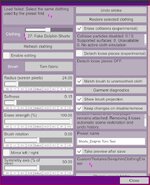
See screenshot #1
It appears? that the clothing has an item# beside it? 27?
What's if item number changes in a later scene dev?
Had made a scene, some small changes, reloaded scene.
Tried to activate my Eraser.Preset and error (see screenshot)
Also notice the saved preset Folder is now one i don't have on my PC?
Click "Browse and load Preset", click my image, and same error.
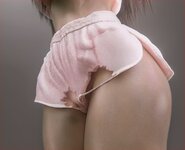
Click 'Refresh", reselect same shorts, and it works fine again.
That clothing item does have Stopper Clothing Manager and plugin Thick (see below)
So maybe that's why?
Or maybe because clothing in saved scene is already equipped? As opposed to load clothing later?

(4) fyi:
Using both this and https://hub.virtamate.com/resources/clothingthickness.70835/,
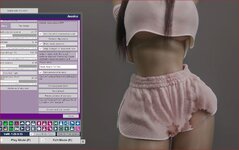
did have them both working (see screenshot).
Added Extra thickness for less clipping.
Is still a visible outer edge. LOL, but am pretty sure you didn't design this to work with thickness. So just an FYI.
Hey there!

1 - Will test it, probably addable, you see, initally i made it for fun, then i thought it could be great to store presets, then i thought it is annoing each time to chose them and it should be stored in scene.
But i can see your point that somebody could use it large scenes with triggers. Ty for advice!
2 - My bad choice of words, it is about tranceparency, since in 0.2 it is possible to change tranceparancy
3 - Will try to fix it in next version, forgot to remove my own path lol.
4 - Yes, some edges are pain in the ass, as clothes with weird geometry like spheres and cillinders, atm im working on "Erase depth" to fix it.

Thank you for feedback!

UPD:

Small update will be released as soon as hub allows it.

- Added Load Preset trigger support for buttons and scene events.
- Added adjustable Erase Depth to reach thicker edges and overlapping clothing layers.
- Improved preset folder path handling when saving and reloading scenes.

Small guide how to load preset with trigger in next version -
In the buttons triggers, select Person - ClothingEraser - Preset JSON.
In Text To Send, enter your presets path, for example:
Custom/Textures/MyPresets/TornDress.json
Add a second action: Person - ClothingEraser - Load preset.
Save and click the button. The required clothing must be equipped.

And im think im pretty much done here, not sure if this plugin needs anything else. Trying to keep it simple without overloading sliders etc.
 
Joined
Nov 10, 2026
Messages
1
Reactions
0
Plugins + Scripts ToySerialController Free
Why does my device keep moving at a constant speed after connecting to VaM, without responding to the game? I’ve tried several other plugins, but the issue persists. However, it works perfectly fine when I use other software, such as MFP.
 

Lamp

Member
Joined
Sep 15, 2020
Messages
80
Reactions
30
Plugins + Scripts CPU Performance Patch v2.0 Free
Good grief.

Anyone had luck uninstalling this patch? If I restore the backup files I made before installing, VAM will not fully post, it hangs on the default scene load.

I'm currently troubleshooting a nasty problem with stuttering. I get four or five freezes in a row ANY time I load a new atom, that includes, CUAs, empty, person, etc.

I am using leancore, and only now reading this thread. I tried removing the patch, but it bricks VAM.

Edit

Well. No idea, I reinstalled this patch, and now everything is fine, no stutters.
Only major change was I that deleted the cache in bepinex, no idea what the true problem was with the stuttering. I'll have to see if it comes back.


Edit again - stutters are back, but only in the scene I was working on before.
Going to keep digging. Something is fucked.

Edit edit edit - It's skynet's better bends plugin. 100%.
Don't know if this is something to do with leancore or not, I suspect it is.

Edit x4 - Yep, it's leancore. Sorry to drag the trouble into this thread, but there could be some relevance.
 
Last edited:

Servo

Well-known member
Joined
Mar 28, 2025
Messages
203
Reactions
274
Plugins + Scripts ClothingEraser Free
Hi, have a request, a question, an issue maybe, and a FYI. :)

(1) request: any chance you could make presets triggerable? unless not your interest? Idea being load clothing item with preset added via triggers for bigger scenes.
Did select "Clothing" item first in triggerables.
Adding a trigger did see 2 places to select eraser preset, but neither - no result when trigger fired. Tried after multiple save reloads.
Only way was in Eraser "Browse and load Preset".
(2) Q: How do you gradually make a preset "kick-in"?
This is what am referring to on your 1st page> " gradually reduce the visibility of selected areas directly in your scene."
(3) Issue:
See screenshot #1
It appears? that the clothing has an item# beside it? 27?
What's if item number changes in a later scene dev?
Had made a scene, some small changes, reloaded scene.
Tried to activate my Eraser.Preset and error (see screenshot)
Also notice the saved preset Folder is now one i don't have on my PC?
Click "Browse and load Preset", click my image, and same error.
Click 'Refresh", reselect same shorts, and it works fine again.
That clothing item does have Stopper Clothing Manager and plugin Thick (see below)
So maybe that's why?
Or maybe because clothing in saved scene is already equipped? As opposed to load clothing later?

(4) fyi:
Using both this and https://hub.virtamate.com/resources/clothingthickness.70835/,
did have them both working (see screenshot).
Added Extra thickness for less clipping.
Is still a visible outer edge. LOL, but am pretty sure you didn't design this to work with thickness. So just an FYI.

:rolleyes:
 
Joined
Dec 17, 2024
Messages
80
Reactions
25
Plugins + Scripts ClothingEraser Free
Hi, have a request, a question, an issue maybe, and a FYI. :)

(1) request: any chance you could make presets triggerable? unless not your interest? Idea being load clothing item with preset added via triggers for bigger scenes.
Did select "Clothing" item first in triggerables.
Adding a trigger did see 2 places to select eraser preset, but neither - no result when trigger fired. Tried after multiple save reloads.
Only way was in Eraser "Browse and load Preset".
(2) Q: How do you gradually make a preset "kick-in"?
This is what am referring to on your 1st page> " gradually reduce the visibility of selected areas directly in your scene."
(3) Issue:
See screenshot #1
Had made a scene, some small changes, reloaded scene.
Tried to activate my Eraser.Preset and error (see screenshot)
Also notice the saved preset Folder is now one i don't have on my PC?
Click "Browse and load Preset", click my image, and same error.
Click 'Refresh", reselect same shorts, and it works fine again.
That clothing item does have Stopper Clothing Manager and plugin Thick (see below)
So maybe that's why?
Or maybe because clothing in saved scene is already equipped? As opposed to load clothing later?
 

Attachments

  • clothing Eraser issue.JPG
    clothing Eraser issue.JPG
    85.8 KB · Views: 0
  • dance - show thickness with Eraser.JPG
    dance - show thickness with Eraser.JPG
    204.4 KB · Views: 0
Last edited:
Joined
May 1, 2025
Messages
2
Reactions
0
Scenes Need Your Love Free
Hmm I haven't experienced any issues with the guy not making sound, however I did see an error once or twice with vammoan not loading its resource pack so I updated it to the latest version. Hopefully that will fix any issues around the male voice.
Yup haven't seen any issues after. Amazing job on the scene.
 

cedarpen

Member
Joined
Oct 24, 2026
Messages
24
Reactions
50
Plugins + Scripts Fast Async Load Free
Today I was testing a slightly updated plugin (this version isn't on VamHub yet) and I started experiencing persistent, minor stutters. Have you encountered anything like this with this version? I haven't been able to pinpoint the source of the problem yet
 

CraSh.it

Member
Joined
Mar 17, 2025
Messages
46
Reactions
68
Plugins + Scripts PassthroughKey Free
CraSh.it updated PassthroughKey with a new update entry:

PassthroughKey 2.0

PassthroughKey 2.0
Your VaM characters in your real room

PassthroughKey puts your VaM characters into your real room using Virtual Desktop's passthrough on a Quest. It keeps the background exactly the colour Virtual Desktop removes, keeps the character and the VaM menu solid, and hides the scene around them.

What's new in 2.0
  • Real floor shadows – characters cast soft shadows on your actual floor, dark...

Read the rest of this update entry...
 

kretos

Active member
Joined
Feb 28, 2021
Messages
206
Reactions
62
Plugins + Scripts Offscreen Optimizer Free
I think via editing config file. I will recheck.

EDIT:
Disabled some bepinex plugins to have cleaner installation. Changed in interface and it seems to be working properly now. But Light Mirrors and Fast Async Load displays default one in interface. Also Light Mirrors have smaller font. Sorry if it would be another false alarm...


Interface tab:
1794342800828.png


Lite Mirrors:
1794342823644.png


Fast Async:

1794342842927.png
 
Last edited:

Saglinger

Active member
Joined
Jan 31, 2021
Messages
320
Reactions
102
Plugins + Scripts Static Clothing Ampliated Free
could you show me where's the tabs to disabled physics/sim?? Believe I did made sure to disabled the clothing sim/physics before am quite unsure if it was enough. i'd try and see if i can fix this on myself but will be thankful if you know any answers to this,
I think I might have misunderstood the issue? I saw the 'duplicate' and thought that you were seeing two versions of the same piece of clothing appear twice, instead of having issue with the offsets.

All I can say about the offsets is to adjust the clothing and save the adjustments as a preset.
 

Bplus

Well-known member
Joined
Jul 11, 2023
Messages
99
Reactions
272
Scenes Your new Cyborgmaid Free
Good scene, good animation, however I can't get other looks to work. Every time I change the maid to a different female model all I get back is floating hair, eyes, and mouth. I've tried to figure out what is making that happen but haven't had any luck. Unfortunately this makes me very unlikely to use this scene over others as I would honestly prefer a model of my choice...
😀 Disable the character transparency plugin (Its on the maid charakter). Then it will work. Or use a morph preset instead of an appearance preset; that way, the robot look will be preserved. have fun!🖤
 
Back
Top Bottom