

ClothingThickness
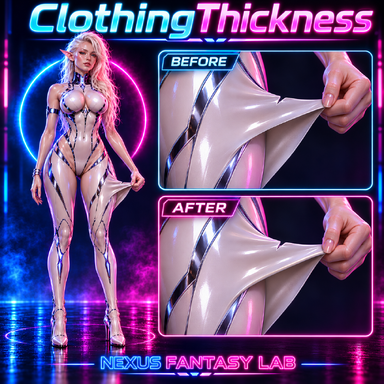
ClothingThickness adds adjustable thickness to clothing worn by a Person in VaM. Choose an equipped garment and adjust its outward and inward thickness independently. The added surfaces follow the clothing as the character moves, with connecting rims along its boundaries.You can configure an entire garment or work with its individual material groups. Optional indentation and tension tearing provide additional interaction, while several mesh display modes help inspect the resulting geometry.
Most of the ClothingThickness code was created by AI.
Features
- Independent outward and inward thickness. Adjust each side from 0 to 10 cm, with controls for preserving rim height and preventing upward expansion.
- Multiple garments. Use ADD to configure more clothing items. The dropdown updates automatically when clothing is equipped or removed and lists active clothing on the current Person.
- Per-part settings. Apply one configuration to the whole garment or disable Apply to All Parts to adjust its existing material groups individually. Each part keeps its own settings.
- Adjustable length. Start and end sliders trim the visible garment along a body- and limb-based direction field. Connecting rims are generated at the new boundaries.
- Rims that account for transparency. Clothing with alpha-defined cutouts can receive rims along its visible contours. The rim UVs extend the clothing’s texture across the added thickness.
- Adjustable rim quality. Global controls set 1–4 polygon rows across the thickness and 0–100% contour detail. Defaults are 4 rows and 75% detail.
- Local indentation. Contacts can compress the added layer, with separate controls for stiffness and elastic recovery. Optional physical resistance applies a reaction to the contacting object.
- Tearing under tension. Supported Sim-enabled clothing can develop tears along its native mesh edges. Stretch before Tearing controls the threshold.
- Mesh previews. Display the original surface, outer surface and connecting rims separately. Surface Wireframe provides an opaque neutral surface with dark mesh lines.
- Saved settings. Clothing selections, individual part settings and display options are stored with the plugin configuration.
Getting Started
Add ClothingThickness.cslistPlugins tab, or load it as a plugin on the clothing item itself.The first clothing row is available immediately. Select an equipped garment, then adjust Outward Thickness or Inward Thickness. Use ADD for additional garments.
Leave Apply to All Parts enabled to adjust the whole garment. Disable it to select a material group and configure that part separately.
Indentation, Physical Resistance and Tearing under Tension are disabled by default. Enable the interactions you want for each garment or part.
Usage Notes
Tearing requires the garment’s native SimLength controls change the visible geometry; the underlying native cloth simulation retains its original extent. Results depend on the garment’s mesh, transparency and simulation setup. Rim detail and enabled interaction features also affect processing cost.
Presets save configuration settings.