New resource discussions

Joined
Oct 12, 2022
Messages
5
Reactions
0
Plugins + Scripts PassthroughKey Free
Thanks, don't know what plugin is responsible for ClearUpscale though.

Thanks, the key pass is last now, good.
The solid bottom row in the test pattern is actually the good result: it means VD's image settings are right. See-through there would mean a problem.

Two checks:
ClearUpscale is still loaded. Its cameras are still in your scene. It's part of the same DLSS package or a separate plugin. Remove that as well and restart VaM.

Quick isolation test: Advanced → untick Use depth (off = key everything). The whole picture becomes the key colour.

If you now see your room everywhere, VD is fine and something in the scene is still in the way. Send me Log visible scene objects.

If it's still black everywhere, it's on the VD side. Check that passthrough is switched on in VD (Settings → Streaming → VR Passthrough), that VD has the Quest's passthrough / spatial data permission, and that the R G B in VD match the plugin's box exactly.

Which key colour are you using?
Tick Use depth back on afterwards.
Still black. I won't take more of your time on this. I will wait for a plugin update. Thank you
 

MiSiv

Active member
Joined
Apr 22, 2024
Messages
64
Reactions
145
Plugins + Scripts CPU Performance Patch v2.0 Free
But removing the patch completely bricks VAM. I did backup and restore all of the original files that this patch would overwrite, so I dunno what's happening.
I checked, and reverting to the default files doesn't cause any issues. You must have done something wrong, or something else you use had a negative impact on it
... So uh, leancore is gone. No announcement from wanderer, no notifications from the HUB that the plugin was dirty and has been removed.
Anyone know what happened?
You should ask Wanderer 🤔
 

CraSh.it

Member
Joined
Mar 17, 2025
Messages
46
Reactions
68
Plugins + Scripts PassthroughKey Free
Thanks, removed the plugin . It' still doesn't work with the correct settings (As far as I can tell). Test pattern bottom row shows a grayscale and no see through. Here's the new log, key pass seems to be correctly at the end of the chain now though:


FPSLimiter initialized with Unity target FPS and VR frame pacing enabled.
PassthroughKey: hair & cloth capsule floor added at the real floor.
PassthroughKey: floor shadows on (no PT main light - straight down, floor y 0.00)
PassthroughKey: body floor collider on layer 12 'Tongue' - collides with 6/8 body collider layers.
PassthroughKey: cameras (name / depth / clear / UI layer / stereo):
'ScreenCameraClear' depth -1 clear Color UI False eye None
'CenterEyeAnchor' depth 0 clear Color UI True eye Both <- protect pass
'ScreenUICamera' depth 10 clear Nothing UI True eye None
'PassthroughKey_UnderFloorCam' depth -101 clear Color UI False eye None (renders to texture)
'PassthroughKey_ShadowCam' depth -100 clear Color UI False eye None (renders to texture)
(disabled/manual) 'ClearUpscale_CharCamera' depth 2 clear Color UI False eye Both
(disabled/manual) 'ClearUpscale_BgCamera' depth 1 clear Color UI True eye Both
(disabled/manual) 'RightHandAnchor' depth 0 clear Nothing UI False eye None
(disabled/manual) 'LeftHandAnchor' depth 0 clear Nothing UI False eye None
(disabled/manual) 'RightEyeAnchor' depth 0 clear Color UI True eye Right
(disabled/manual) 'LeftEyeAnchor' depth 0 clear Color UI True eye Left
(disabled/manual) 'HiResScreenshotCamera' depth 0 clear Color UI True eye None
(disabled/manual) 'LoResScreenshotCamera' depth 0 clear Color UI True eye None
VR: True key pass: active
PassthroughKey: components on 'CenterEyeAnchor' (render order, hdr False, colour space Linear):
0. UnityEngine.Transform
1. UnityEngine.AudioListener
2. UnityEngine.Camera
3. MeshVR.PerfMonCamera
4. MK.Glow.MKGlow (disabled)
5. Leap.Unity.LeapXRServiceProvider (disabled)
6. LeapMotionProviderSwitcher
7. PassthroughKeyOpaquePass
8. PassthroughKeyPass
PassthroughKey: RIG CHAIN (head camera up to the root; local pos / world y):
0. 'CenterEyeAnchor' local (-0.075, 1.795, -0.094) world y 1.619 scale 1
1. 'TrackingSpace' local (0.000, 0.000, 0.000) world y -0.176 scale 1
2. 'OVRRig' local (0.000, 0.000, 0.000) world y -0.176 scale 1
3. 'HeightOffset' local (0.000, -0.176, 0.000) world y -0.176 scale 1
4. '[CameraRig]' local (0.000, 0.000, 0.000) world y 0.000 scale 1
5. 'NavRig' local (0.000, 0.000, 0.000) world y 0.000 scale 1
6. 'WorldScaleAdjust' local (0.000, 0.000, 0.000) world y 0.000 scale 1
7. 'CoreControl' local (0.000, 0.000, 1.500) world y 0.000 scale 1
8. 'SceneAtoms' local (0.000, 0.000, 0.000) world y 0.000 scale 1
navigationRig '[CameraRig]' world y 0.000
PassthroughKey: TRACKED under 'TrackingSpace' (world y / height above play-space origin):
'LeftEyeAnchor' world y 1.618 above origin 1.794
'CenterEyeAnchor' world y 1.619 above origin 1.795
'CenterEye' world y 1.619 above origin 1.795
'HUDReferenceDown' world y 1.209 above origin 1.385
'Capsule' world y 1.615 above origin 1.791
'Sphere1' world y 1.621 above origin 1.797
'Sphere2' world y 1.617 above origin 1.793
'HeadPossessPoint' world y 1.619 above origin 1.795
'AltHUDAttachPoint' world y 1.634 above origin 1.811
'ThoughtBubble' world y 1.760 above origin 1.936
'ClearUpscale_BgCamera' world y 1.619 above origin 1.795
'ClearUpscale_CharCamera' world y 1.619 above origin 1.795
'RightEyeAnchor' world y 1.621 above origin 1.797
'TrackerAnchor' world y -0.176 above origin 0.000
'RightHandAnchor' world y 1.232 above origin 1.408
'RightHandPossessPoint' world y 1.193 above origin 1.369
'RightHand' world y 1.232 above origin 1.408
Scene height offset 0.000, floor match False

Thanks, the key pass is last now, good.
The solid bottom row in the test pattern is actually the good result: it means VD's image settings are right. See-through there would mean a problem.

Two checks:
ClearUpscale is still loaded. Its cameras are still in your scene. It's part of the same DLSS package or a separate plugin. Remove that as well and restart VaM.

Quick isolation test: Advanced → untick Use depth (off = key everything). The whole picture becomes the key colour.

If you now see your room everywhere, VD is fine and something in the scene is still in the way. Send me Log visible scene objects.

If it's still black everywhere, it's on the VD side. Check that passthrough is switched on in VD (Settings → Streaming → VR Passthrough), that VD has the Quest's passthrough / spatial data permission, and that the R G B in VD match the plugin's box exactly.

Which key colour are you using?
Tick Use depth back on afterwards.
 
Joined
Oct 12, 2022
Messages
5
Reactions
0
Plugins + Scripts PassthroughKey Free
Thanks, that log helps. Two things are still changing the image after PassthroughKey:
  • VamDlssNr (NR) is still active on the VR camera and runs after PassthroughKey’s last pass. Turning it off in its menu apparently doesn’t remove it. Disable the plugin itself and restart VaM.
  • ClearUpscale renders the character and background with its own cameras and builds the final image, which replaces the key background. Turn that off too.
With both off, the background should key.
Advanced > Test pattern: the bottom row should be see-through.

Making PassthroughKey work together with DLSS / NR upscalers is on my list.
Thanks, removed the plugin . It' still doesn't work with the correct settings (As far as I can tell). Test pattern bottom row shows a grayscale and no see through. Here's the new log, key pass seems to be correctly at the end of the chain now though:


FPSLimiter initialized with Unity target FPS and VR frame pacing enabled.
PassthroughKey: hair & cloth capsule floor added at the real floor.
PassthroughKey: floor shadows on (no PT main light - straight down, floor y 0.00)
PassthroughKey: body floor collider on layer 12 'Tongue' - collides with 6/8 body collider layers.
PassthroughKey: cameras (name / depth / clear / UI layer / stereo):
'ScreenCameraClear' depth -1 clear Color UI False eye None
'CenterEyeAnchor' depth 0 clear Color UI True eye Both <- protect pass
'ScreenUICamera' depth 10 clear Nothing UI True eye None
'PassthroughKey_UnderFloorCam' depth -101 clear Color UI False eye None (renders to texture)
'PassthroughKey_ShadowCam' depth -100 clear Color UI False eye None (renders to texture)
(disabled/manual) 'ClearUpscale_CharCamera' depth 2 clear Color UI False eye Both
(disabled/manual) 'ClearUpscale_BgCamera' depth 1 clear Color UI True eye Both
(disabled/manual) 'RightHandAnchor' depth 0 clear Nothing UI False eye None
(disabled/manual) 'LeftHandAnchor' depth 0 clear Nothing UI False eye None
(disabled/manual) 'RightEyeAnchor' depth 0 clear Color UI True eye Right
(disabled/manual) 'LeftEyeAnchor' depth 0 clear Color UI True eye Left
(disabled/manual) 'HiResScreenshotCamera' depth 0 clear Color UI True eye None
(disabled/manual) 'LoResScreenshotCamera' depth 0 clear Color UI True eye None
VR: True key pass: active
PassthroughKey: components on 'CenterEyeAnchor' (render order, hdr False, colour space Linear):
0. UnityEngine.Transform
1. UnityEngine.AudioListener
2. UnityEngine.Camera
3. MeshVR.PerfMonCamera
4. MK.Glow.MKGlow (disabled)
5. Leap.Unity.LeapXRServiceProvider (disabled)
6. LeapMotionProviderSwitcher
7. PassthroughKeyOpaquePass
8. PassthroughKeyPass
PassthroughKey: RIG CHAIN (head camera up to the root; local pos / world y):
0. 'CenterEyeAnchor' local (-0.075, 1.795, -0.094) world y 1.619 scale 1
1. 'TrackingSpace' local (0.000, 0.000, 0.000) world y -0.176 scale 1
2. 'OVRRig' local (0.000, 0.000, 0.000) world y -0.176 scale 1
3. 'HeightOffset' local (0.000, -0.176, 0.000) world y -0.176 scale 1
4. '[CameraRig]' local (0.000, 0.000, 0.000) world y 0.000 scale 1
5. 'NavRig' local (0.000, 0.000, 0.000) world y 0.000 scale 1
6. 'WorldScaleAdjust' local (0.000, 0.000, 0.000) world y 0.000 scale 1
7. 'CoreControl' local (0.000, 0.000, 1.500) world y 0.000 scale 1
8. 'SceneAtoms' local (0.000, 0.000, 0.000) world y 0.000 scale 1
navigationRig '[CameraRig]' world y 0.000
PassthroughKey: TRACKED under 'TrackingSpace' (world y / height above play-space origin):
'LeftEyeAnchor' world y 1.618 above origin 1.794
'CenterEyeAnchor' world y 1.619 above origin 1.795
'CenterEye' world y 1.619 above origin 1.795
'HUDReferenceDown' world y 1.209 above origin 1.385
'Capsule' world y 1.615 above origin 1.791
'Sphere1' world y 1.621 above origin 1.797
'Sphere2' world y 1.617 above origin 1.793
'HeadPossessPoint' world y 1.619 above origin 1.795
'AltHUDAttachPoint' world y 1.634 above origin 1.811
'ThoughtBubble' world y 1.760 above origin 1.936
'ClearUpscale_BgCamera' world y 1.619 above origin 1.795
'ClearUpscale_CharCamera' world y 1.619 above origin 1.795
'RightEyeAnchor' world y 1.621 above origin 1.797
'TrackerAnchor' world y -0.176 above origin 0.000
'RightHandAnchor' world y 1.232 above origin 1.408
'RightHandPossessPoint' world y 1.193 above origin 1.369
'RightHand' world y 1.232 above origin 1.408
Scene height offset 0.000, floor match False
 
Last edited:

Servo

Well-known member
Joined
Mar 28, 2025
Messages
203
Reactions
274
Plugins + Scripts ClothingThickness Free
Played with it more, and seemed to have encountered an issue with one setting?
Noticed that my fps suddenly dropped 5 (use NR with FG4x on a 5090), so actual loss was 5x4=20fps.
Isolated it to Physical Resistance.
Disable that and get my FPS back.
My test consisted of 3 outfits worn at same time, each with Thickness PlugIn added.
VL 13's skirt was included. And a top with a bra under it.
Interestingly the bra when all on was good for about 30 seconds, and then it also lost that 5 fps too. Not sure bra delayed that long. 100% repeatable.
fyi: VL13 doesn't have PhyResist On, or few other things, but i added and made own presets.
Screencap just to show PhysRest toggle used,etc.
Hi. Yes, this problem with FPS drops when physics is enabled exists, and I haven't fully solved it yet. VaM is quite finicky when it comes to resources, and I need time to think about how to make it work better without reducing quality.
 

MiSiv

Active member
Joined
Apr 22, 2024
Messages
64
Reactions
145
Plugins + Scripts MMD Player Ultimate Free
1) The mini panel is a great idea. I wonder if you can consider doing something similar for VR. As you know, in VR, single click of the menu button on the controller brings up the native UI panel. It would wonderful if the mini panel could be docked to the native UI panel for ready access.
I've already implemented this for the next update. There will be an icon next to the UI that opens and closes the MiniPanel, and it will also be visible in vr
2) Is there a config file and an entry to turn the MiSiv camera off by default?
Solved this one too, using settings presets. You'll be able to save/load a new preset and overwrite the default one
3) It would be great if MMDPlayerUltimate could try more aggressively to identify and select the motion and audio files. I find that the fields are left blank when there are more than a single selection (of motions or audios) within the directory. Do you think it would make sense to populate with the first available?
4) Along the lines of selecting motion files, I wonder if you can better facilitate the selection of distinct motion files for each character in a multi-person dance routine. My previous go-to player, MMD2Timeline tended to assign the same motion file to all characters in the scene. This resulted in massive collisions and tessellation explosions since all the characters start in the same location. At a minimum, a simple check to ensure the same VMD is not used on multiple Atoms would be great.
I'm still testing how to handle everything. But I'll definitely do it
 

Spirison

Member
Joined
Nov 24, 2021
Messages
80
Reactions
24
Plugins + Scripts Clothing Editor Free

LightningBunny

Active member
Joined
Dec 13, 2023
Messages
86
Reactions
134
Plugins + Scripts Timeline: LightningBunnyWorkshop Free
LightningBunny updated Timeline: LightningBunnyWorkshop with a new update entry:

Attempted to fix some bugs and added new playback features.

  1. Attempted to fix a number of bugs.
  2. Added the Non-linear Noise bake tool. A walkthrough has been added to the Baking Help.
  3. Added Sections on top of Groups, together with the related operations.
  4. Overhauled the Clip Sequencer UI: added a tag paging system that makes clips much easier to manage, double-click to bake directly, and a rich set of right-click menus. (Right-click a tag group or a clip name to open its menu.)
  5. Added two experimental playback features to each...

Read the rest of this update entry...
 

TRSD

Well-known member
Joined
Apr 19, 2022
Messages
221
Reactions
524
Looks Olivia by Miracle Free
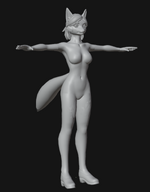
Lilly turned out a lot better than Olivia imo. So I've started from scratch with a new torso sculpt using references from an unreleased nude Olivia.
 

Attachments

  • 1794473749264.png
    1794473749264.png
    129.2 KB · Views: 0
Joined
Jun 23, 2024
Messages
21
Reactions
6
Plugins + Scripts Plugin Injector Free
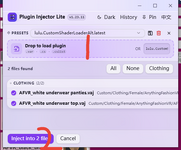
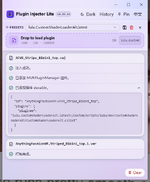
Excuse me. I tried many times but failed. First, I dragged the plugin into position 1, choosing cslist(I also tried cs), then dragged in the clothing var, clicked position 2, and deleted the original clothing file. The file generated from the "plugininjectorfixed" folder is placed in the "addpackages" folder. Then, the clothing file is re-scanned or this exe operation is used to inject it when vam is closed and then vam is opened to check that the clothing still has no plugin slot effect. Is there any requirement for the placement of this exe program, or are there any other omissions(Secondary editing) Although the result showed success, no matter whether the injection was performed with vam on and the clothing was re-scanned or the operation was performed with vam off, the clothing slot was not displayed after the clothing was finally opened
 

Attachments

  • Image_1794470560522_edit_215815032655610.png
    Image_1794470560522_edit_215815032655610.png
    60.1 KB · Views: 0
  • 9HCEFPXDPTO@MAPDYN%FY3S.png
    9HCEFPXDPTO@MAPDYN%FY3S.png
    81.4 KB · Views: 0
Last edited:

Mibkev

Well-known member
Joined
Nov 25, 2024
Messages
216
Reactions
337
Paid Scenes Citylights & Curves Paid
Mibkev updated Citylights & Curves with a new update entry:

CityLights Curves v2

Reworked
• All 6 poses re-authored from scratch — cleaner angles, fixed hip/foot placement, clipping removed
• Contact points and weight distribution corrected so bodies actually sit into each other

Added
• Post Processing stack: bloom, chromatic aberration, vignette, color grade 🎞️
• 4 lighting presets 💡
• Female voice / moan audio, triggered by the animation 🔊

Unchanged
• Pose count stays at 6 — this is a quality pass, not new content ⚠️
• Still model-agnostic, no...

Read the rest of this update entry...
 

KAI

Member
Joined
Oct 23, 2020
Messages
15
Reactions
31
Plugins + Scripts MMD Master Free
KAI updated MMD Master with a new update entry:

Hub Release#6 v3.2

New
  • Expression Morphs… (☸ tab): tune how each MMD expression looks on your character's face. Every expression shows MMD's reference model doing it, and opening one holds it on your dancer's face while you adjust the morphs. Save it as a profile for one appearance, or as your default for every dancer.
  • Mouth, Eyes and Brows under "Expression Strength": make one part of the face stronger or softer.
  • Loop (under ▶ ■ ↻): when the dance ends, it starts...

Read the rest of this update entry...
 

vamBear

Well-known member
Joined
Sep 5, 2023
Messages
66
Reactions
341
Plugins + Scripts HDRI Sky Studio Free
@Faucheuze3D - I got a shadows working. I'm just getting it running through the correct shadow setups and then I'll update the plug - after that I've got a setup nearly working for Hemisphere environments. Just means that the ground will be connected with the people .
1794462492610.png
 

VL_13

Invaluable member
Featured Contributor
Joined
Jul 27, 2020
Messages
663
Reactions
14,587
Clothing Skirt_B Free
pulling down/pushing up the cups of the bra covering the breasts
I don’t think so; at the moment, the clipping occurs along a curved trajectory.
You could use this plugin as a foundation to write a similar script for this task.
However, I don’t see much point in that—it’s better to "hide" parts of the clothing using an alpha map or by assigning a separate material.
paid version at least?
I’ll think about it, but probably not.
 

LinkStatic

Member
Joined
Aug 7, 2025
Messages
9
Reactions
43
Plugins + Scripts ClothingEraser Free
Thank you so much for adding preset triggers! Appreciate it Alot! :)

Is that Cheongsam dress available on Hub? Would like to try and see what i get as well, if it helps? First thought that pops into mind, but not sure, is it possible it's a really stretched xtra large UVs in that one spot?

Also, 2 Feedback on this latest .var, for your consideration:
(1) See that preset path option is now only yours. Is that intended? Did restart VAM from scratch. So it should have updated proper?
If that's the design, then cool cool. Just wanted you to know, as may have misunderstood your plan? :)
When click to choose my own path and VAM dir dialogue pops up, only your named folder shows, and can't even navigate to own folder as usually can.

(2) With Thickness added via servos plugIn, and using Erase depth at 100mm, the result is now Alot better. Nice!
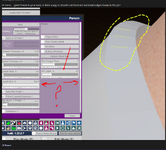
There are still some tinier residuals (see screenshot)
Tried to erase those loose islands remnants from the ripped tights brush, and some remnants from outer edge with torn brush using round brush at 100 strength.
Tried and tried but no angle worked.
Almost thinking, maybe, thickness and that ripped tights brush aren't quite working well together?
So much does look great already. :)
1 - Bloody hell, thats a bug, i somehow missed that my folder became constant root, good catch! Will take a note about it.
2 - Well, they are working together better at least, will see what i can do, core mechanics are pretty much done, but polishing takes time, im at that point where fixing one thing might brake another XD

It is vmax - se80 cheongsam dress
 
Joined
Dec 17, 2024
Messages
80
Reactions
25
Clothing Cute Sexy Outfit Free
Hi, just to let you know, on load got an error message saying was missing > https://hub.virtamate.com/resources/injectorpluginmanager.67024/
Do have most of lulu's plugIns, but didn't have that one, until now.
Once added and scene reloaded all was good again.

And Thank you very much for yet another high quality outfit!
Just so good! :)
 

Attachments

  • thickness and Physical Resistance.JPG
    thickness and Physical Resistance.JPG
    530.6 KB · Views: 0
Back
Top Bottom