• Hi Guest!

    We are extremely excited to announce the release of our first Beta1.1 and the first release of our Public AddonKit!
    To participate in the Beta, a subscription to the Entertainer or Creator Tier is required. For access to the Public AddonKit you must be a Creator tier member. Once subscribed, download instructions can be found here.

    Click here for information and guides regarding the VaM2 beta. Join our Discord server for more announcements and community discussion about VaM2.
  • Hi Guest!

    VaM2 Resource Categories have now been added to the Hub! For information on posting VaM2 resources and details about VaM2 related changes to our Community Forums, please see our official announcement here.
How to use Passthrough in VAM (VR/AR)

Guides How to use Passthrough in VAM (VR/AR)

Download [77.64 MB]
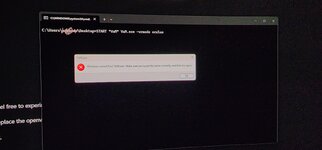
None of this works on quest 2 with win 11. It won't work wireless or wired, steam vr won't connect. I feel like I have to factory reset my headset after trying to do this.
You have a different issue related to PCVR, can check online forums or ask on Meta forums

Thanks for the tutorial, easy and clear.
I was wondering what is the scene (by who) from the gif below? (copied from the overview page)

This is by XXXA! Sorry I forgot the exact scene name, but I think it's Cumming Soon

Sorry for long as text...

I need help, the Passthrough doesn't work.
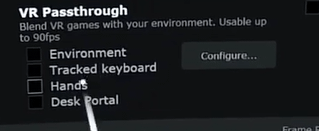
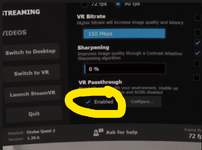
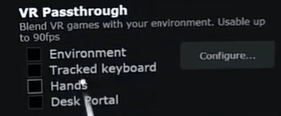
I downloaded the plugins from VamHub, then change both RBG numbers(Blue) VAM/VD streamers tab but still nothing( theirs not enable VrPasstrough Box that I can check on VD..... Just configured then the RBG Number codes only) which I again put (Blue) I'm using the latest of VD as of April 8 2026

I have a quest3. I loaded VD on meta, then launched VAM(Vr) @the moment SteamVr took over my controllers and I'm stuck in steamVr desktop menu without movement (only movement is when I double tap to go back to VD start up menu).

So I uninstalled SteamVr so I can bypass steamVr.
So I'm only using VD straight only. Again 90FPS 120hz 4070-4090(I have 4080super) 0,71,187 both on VAM Plugin/VD streamer tab. My user performance in Vam is on high(not max/ultra/custom)
Can you clarify what you mean by "doesn't work"? What does that mean exactly?

What does Steamvr took over my controllers mean? I am not understanding a lot of this, and uninstalling steamvr does not mean you will automatically bypass steamvr. I have another guide on how to bypass steamvr https://hub.virtamate.com/resources/how-to-launch-without-steamvr-performance-increase.30496/
 
Last edited:
You have a different issue related to PCVR, can check online forums or ask on Meta forums


This is by XXXA! Sorry I forgot the exact scene name, but I think it's Cumming Soon


Can you clarify what you mean by "doesn't work"? What does that mean exactly?

What does Steamvr took over my controllers mean? I am not understanding a lot of this, and uninstalling steamvr does not mean you will automatically bypass steamvr. I have another guide on how to bypass steamvr https://hub.virtamate.com/resources/how-to-launch-without-steamvr-performance-increase.30496/
So when I open virtual desktop on my Q3. I go to VAM(openVR) in my VAM folder, the steamVr will automatically open & jump to the steamVr menu while VAM(OpenVR) is loaded in the Background.

This will freeze my Q3 controller movement, so even if I wanted to go to VAM(openVr) that already loaded in the background, I can't because I'm stuck in the SteamVr menu without movement, and if I exit steamVR, this will close VAM(openVR).

Now, I uninstalled SteamVr. And i open VAM(openVR) in Virtual desktop, it will not go to Vr mode but stay the same window size as virtual Desktop. So it will Open like normal VAM but in VD small window size.

The other issue I have is that when I open a scene that has a black background and put the plugin (Camera Background Color) and enter the Blue RGB numbers - matching the Same numbers that I put in the virtual desktop steamer configuration. Nothing will happened. The background color in the scene is blue and the background in virtual desktop stay the same(default).

I'm sorry this is alot to read. But I will try the link that you send me
 
Back
Top Bottom