EZStaticCloth - Freeze rigid clothing parts onto bones, skin or cloth

Plugins + Scripts EZStaticCloth - Freeze rigid clothing parts onto bones, skin or cloth

Download [<1 MB]

lulu_c137

Well-known member
Joined
Oct 4, 2025
Messages
93
Reactions
503
lulu_c137 submitted a new resource:

EZStaticCloth - Freeze rigid clothing parts onto bones or skin - Keep gems, buckles and armor plates rigid - freeze clothing parts onto a bone or skin vertex.

中文说明见文末 ↓​
VaM wraps every piece of clothing onto the skin, so the hard parts of a garment - gems, buckles, metal trims, armor plates - bend and squash whenever the body underneath moves. EZStaticCloth freezes the parts you choose into a rigid copy and pins it to a bone or a skin vertex, so they keep their modeled shape in any pose.
Features
  • Three ways to...

Read more about this resource...
 
What a fantastic Plugin !
I'm already testing it... 😊


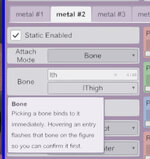
1.I have one small request : please make the tooltips - optional *(they block the menu and make it hard to select).
2026-10-20_174628.jpg
2.question:
How do I position elements like buckles?
I assigned these buckles to a new Group and selected (lThigh) as the parent >
Both options (bind_point) - shift the mesh...
2026-10-20_180421.jpg


Is there any way to keep them in their original positions?
 
Last edited:
What a fantastic Plugin !
I'm already testing it... 😊


1.I have one small request : please make the tooltips - optional *(they block the menu and make it hard to select).
View attachment 633465
2.question:
How do I position elements like buckles?
I assigned these buckles to a new Group and selected (lThigh) as the parent >
Both options (bind_point) - shift the mesh...
View attachment 633474

Is there any way to keep them in their original positions?
I'll address the first issue in an upcoming update.

As for the second one — for this outfit, I'd recommend binding it to the skin vertices instead. The bone attachment points don't always line up well.
 
I'd recommend binding it to the skin vertices
I tried both options — the final positioning turns out to be unpredictable.
*To be honest, using your plugin for this particular task isn't the best solution (the buckles still don't align properly with the fabric they’re sewn onto).
In any case, thank you for creating such a fantastic plugin :love:; I’ll continue testing it..
 
I tried both options — the final positioning turns out to be unpredictable.
*To be honest, using your plugin for this particular task isn't the best solution (the buckles still don't align properly with the fabric they’re sewn onto).
In any case, thank you for creating such a fantastic plugin :love:; I’ll continue testing it..
Not sure I fully understand what you need. If you don't mind, could I add you? It'd make it easier to talk this through.
 
lulu_c137 updated EZStaticCloth - Freeze rigid clothing parts onto bones or skin with a new update entry:

v13 - Cloth mode, Auto Fit, pick preview, group flash

New
  • Cloth attach mode - pin a frozen part to a point on another part of the same garment. It follows that cloth, cloth simulation included: on a simulated garment the parts are placed on the GPU straight from the simulation, with no lag, and the anchor uses smoothed normals so they don't jitter.
  • Auto Fit button - puts the frozen copy back where the garment wraps the group right now and solves Position, Rotation and Scale Overall. Vertex and Cloth modes...

Read the rest of this update entry...
 
Cloth attach mode and Auto Fit - That’s Brilliant !

It’s exactly what I had in mind 💯🙏
 
Hi! I've been using the plugin and so far I've noticed that `Scale Overall` parameter isn't relative to the Person's scale, would it be possible to fix this anytime soon? Or if I'm doing something wrong let me know, I haven't been able to see any parameters to keep it size linked/relative 😵‍💫
 
Hi! I've been using the plugin and so far I've noticed that `Scale Overall` parameter isn't relative to the Person's scale, would it be possible to fix this anytime soon? Or if I'm doing something wrong let me know, I haven't been able to see any parameters to keep it size linked/relative 😵‍💫
Its feature design isn't tied to character scaling — after you resize the character, you have to adjust the clothing size yourself, manually.
 
Fantastic plugin, simply a must-have! What's not quite perfect is the auto-fit on shoes and shirts, but other than that, it's simply brilliant. However, there's one thing I haven't been able to figure out... how can I save the clothing modifications? Because the next time I start VaM, everything resets to default for me
 
Fantastic plugin, simply a must-have! What's not quite perfect is the auto-fit on shoes and shirts, but other than that, it's simply brilliant. However, there's one thing I haven't been able to figure out... how can I save the clothing modifications? Because the next time I start VaM, everything resets to default for me
https://hub.virtamate.com/resources/injectorpluginmanager.67024/
The clothing plugin's values have to be saved with this plugin, or with Stopper's Cloth Plugin Manager.
 

I’ll try to describe the core of the problem:
I select a vertex > click auto-fit > the selection vertex Resets.
While the automatic selection of the nearest vertex might be convenient in some cases, it’s certainly not always the desired behavior.
There are a lot of problems with earrings because of this, for some reason they try to get fixed on the inside.
-
My suggestion is simple: in addition to selecting a vertex (via the picker), allow for the manual entry of a vertex number, and ensure that the "Auto-fit" function does not change the vertex selected in the first step.
 
View attachment 642552
I’ll try to describe the core of the problem:
I select a vertex > click auto-fit > the selection vertex Resets.
While the automatic selection of the nearest vertex might be convenient in some cases, it’s certainly not always the desired behavior.
There are a lot of problems with earrings because of this, for some reason they try to get fixed on the inside.
-
My suggestion is simple: in addition to selecting a vertex (via the picker), allow for the manual entry of a vertex number, and ensure that the "Auto-fit" function does not change the vertex selected in the first step.
Good idea — I'll fix that in the next version. By default, when no vertices are selected, Adaptive will pick the vertices automatically; if you've selected vertices and then click Adaptive, the calculation will be relative to the selected vertices.
 

Similar threads

Back
Top Bottom