I think I'm your target audience since I've always found Timeline kind of overwhelming and hard to grasp. To be honest, I find your plugin to be the same, although I think it's fantastic you made the effort. Unfortunately there are too many tabs and options for me to get interested in using this.
For me the perfect VaM simple animation plugin would be something that let's you click on a body part to move it, then press a key on your keyboard (maybe the space bar) to record that movement (setting it as a key frame), and continue doing this, with the plugin figuring out the correct animation between each key frame. No menus with a bunch of tabs and options, basically just two things you would press to create an animation: your mouse to identify the body part to move and the space bar to lock in the movement. Oh, I guess other keys would be needed to start and stop the recording. But my point is, I think a super simple animation plugin would get more people interested in making their own scenes. But again, thanks for making this. It looks like many people find it helpful.
Hey Jocks3D

Actually this was the reason i wanted to make Animatis in the first place. it was intended to be easy to use, and what you describe is totaly doable in Animatis, there is no need to use all the functions there, What i would suggest if youd like to use Animatis is the following :
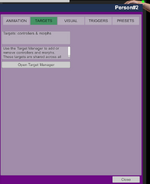
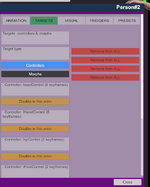
1.once your inside the UI, go to the "Target" tab.(this is essential hand have to be done no matter plugin your using) what it does is selecting which part of the atom you want to animate, i suggest using the "add Default Controllers" button.
2.After that simply go back to the "animation" tab and start making an animation you want.
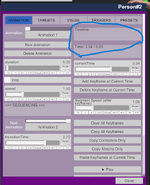
3.your correct that you need"start and stop"- this is why you have the Timeline. see my refference video on youtube
. a bit outdated but should show you how to make a simple animation.
There are some basics for making animations that is needed to be pre set to make even the simplest of animations. thats why i added the "add Default Controllers" so you wouldnt have to set it up yourself.
the timeline itself gives you much more control over the animation, if we did as you suggested youd just make an animation based on moving with the mouse and no way to edit it. with a timeline you can setup for example basic moves starting at 0 then next is 1 and then final is 2(on the timeline) . then later you can add more animation in between those timelines to make the animation more livable.
As you progress and start to see more possibilities for your animations, things you want to add such as clothes falling off etc, this is where the triggers comes into play. but these are not needed for a simple animation.
So i understand you want it simple but really you dont get it much simpler than this.
The pics shows you the only two tabs you need to create a simple animation:
UPDATE: Actually i have a version that might fit better for you. il have it uploaded soon
(waiting for aproval : "Kimowal`s Simple Recorder") .
It much like what you describe i think. hope it will work better for you




 Animatis 1.4.6 — New Features, Improvements & Bug Fixes
 1. JSONStorable Actions for External Control
 New: Per-Segment Speed (between keyframes)

 What’s new
 Bug Fixes
 Animatis Update 1.5 : Segment Speed & Keyframe Workflow Improvements (thnx Moleculo for the feedbacks
  Two Speed Modes (Now Fully Separated)
 CRITICAL
 UI Overhaul: Collapsible Sections + Cleaner Workflow


