• Hi Guest!

    We are extremely excited to announce the release of our first Beta1.1 and the first release of our Public AddonKit!
    To participate in the Beta, a subscription to the Entertainer or Creator Tier is required. For access to the Public AddonKit you must be a Creator tier member. Once subscribed, download instructions can be found here.

    Click here for information and guides regarding the VaM2 beta. Join our Discord server for more announcements and community discussion about VaM2.
  • Hi Guest!

    VaM2 Resource Categories have now been added to the Hub! For information on posting VaM2 resources and details about VaM2 related changes to our Community Forums, please see our official announcement here.
Animatis

Plugins + Scripts Animatis

Download [1.17 MB]
so im working on update 1.4.8 .
what is finished:
1. Looping animations with triggers (camera changes, sound FX, scene events) now work reliably
2. Crossfade transitions between animations are smoother and more predictable
3. No more morph popping during transitions when using similar morph values

what is comming before update is complete :
1.Per-animation target control (enable/disable controllers/morphs per animation instead of global-only)
2.Enhanced copy/paste tools (copy only morphs, only controllers, or specific groups)
3.Additional JSONStorable actions (PlayByName, Next, Previous — easier integration with triggers/plugins)

This will take some time i think but will be well worth it.

I hope you all find Animatis worth while and usable. have fun animating! :)
 
Kimowal updated Animatis with a new update entry:

1.4.6- bug fixes and new futures!

Animatis Update – New Features & Improvements


✔ Feature 1: JSONStorable Actions for External Control


Animatis can now be controlled directly from other plugins (LogicBricks, Timeline, scene triggers, etc.) through new JSONStorable Action endpoints.


New actions added:


  • PlayTargetAnimation – Play an animation by name
    (Set the TargetAnimationName string parameter first)
  • PlayNextAnimation – Jump...

Read the rest of this update entry...
 
Ok new update released :), As of now the "visual" tab is just that and not still implemented. actually im not sure we would need it as we have that in Timeline by Accid Bubbles, however please give me feedback on what you guys think. if its a future you want i could try implement it, this way Animatis would be for both advanced users and also beginners i think. What do you guys think?
 
This resource has been removed and is no longer available.
 
Kimowal updated Animatis with a new update entry:

1.4.6

⭐ Animatis 1.4.6 — New Features, Improvements & Bug Fixes


This update introduces several powerful new features that expand how Animatis can be used inside scenes — including full external trigger control, selective keyframe copying, per-animation target settings, and improved stability across the system.


🔧 1. JSONStorable Actions for External Control


Animatis can now be controlled directly from other plugins or scene...

Read the rest of this update entry...
 
Kimowal updated Animatis with a new update entry:

1,4,7

Animatis Update — Per-Segment Speed + UI Polish​


This update adds a feature that was requested: variable playback speed between keyframes, so you can control pacing realistically without adding a ton of extra keys.

Big thank you to Moleculo for the suggestion!🍺

🚀 New: Per-Segment Speed (between keyframes)​


You can now set a speed multiplier per keyframe segment (the...

Read the rest of this update entry...
 
Very good!:giggle:
1. I noticed a bug that was difficult to reproduce. By setting different speeds for 1 and 2 frames, the duration of my animation went beyond the limit. The total animation length was 1 second, and the timeline was 1.2 seconds. After restarting the plugin, the problem disappeared.
2. There is also a bug with adjusting the animation duration. If you go into the negative zone in the duration settings, the playback timeline will break, although it will show a negative time, it will not be able to play it.
 
I've played around with this and like it so far. I'm more familiar with timeline so it took a minute to get used to. I play in VR mostly and don't really have any VR specific feedback but I am a sucker for filter/search boxes where long drop downs are involved.
You may have covered these already, I only skimmed the discussion and update notes.
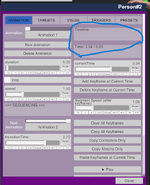
1. In the animation tab, the Timeline and Time boxes seem to be taking up a bunch of space. Is this unavoidable? I've seen it in other plugins as well.
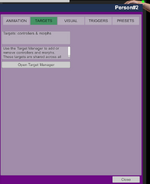
2. In the Targets tab, is the target overview necessary? Could it go directly to the Target Manager page?
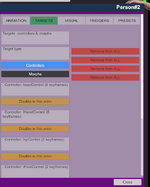
3. After adding targets, the red Remove From All buttons show up. They correspond to the controls in the list on the left, but that may not be apparent to newer users. Possibly add a numbering system or put the buttons near the Disable buttons to make it more clear.

4. Can each instance of Animatis only work on the person on which its installed? I put it on 2 people and could animate them individually but didn't have a "master" timeline, if that makes sense. Would I just have to sync the animations according to time and play them both at the same time?
5. You might also consider adding a "controller" version that could be added to a simple sign like vamtimeline.controller. That way you could choose which instance of Animatis to edit and not have to open the person atoms plugin menu.

Are 4 and 5 beyond the scope of this plugin? I know Animatis isn't a Timeline replacement but those are nice features.
 

Attachments

  • ss1.png
    ss1.png
    109.6 KB · Views: 0
  • ss2.png
    ss2.png
    39.6 KB · Views: 0
  • ss3.png
    ss3.png
    64.2 KB · Views: 0
Kimowal updated Animatis with a new update entry:

1,4,8

Animatis Update 1.4.8 - MULTI-PLAY Tab + Controller Exclusions (Layered Playback)​


This update introduces multi-animation playback clean, predictable, and easy to manage.


✅ What’s new​


  • Added a dedicated “MULTI-PLAY” tab
  • New CreateMultiPlayTab() UI:
    • Clear header + master/slave explanation
    • Per-animation controls (Play / Stop / Follow Master Time / Exclusions)
  • Removed the old multi-play...

Read the rest of this update entry...
 
Kimowal updated Animatis with a new update entry:

1.4.9

Animatis 1.4.9 Update Summary​


This update focuses on stability, cleanup, and correctness.
No new features were added.


🐛 Bug Fixes​


1. Fixed critical compilation error (CS1061)


  • Issue: ControllerAnimation.keyframeSpeeds and MorphAnimation.keyframeSpeeds did not exist
  • Fix: Updated references to use SimpleAnimation.segmentSpeeds
  • Files: TimelineUI.cs (lines 364, 376, 729)

2...

Read the rest of this update entry...
 
Kimowal updated Animatis with a new update entry:

1.5- Segment speed & keyframe workflow improvements

🔄 Animatis Update 1.5 : Segment Speed & Keyframe Workflow Improvements (thnx Moleculo for the feedbacks :) )​


This update focuses on improving timing control, stability, and usability, especially when working with segment-based animation speed.


🕒 Two Speed Modes (Now Fully Separated)​


Animatis now uses two clearly defined speed modes:


  • Global Speed – one speed value for the entire animation
  • Segment Speed –...

Read the rest of this update entry...
 
I think I'm your target audience since I've always found Timeline kind of overwhelming and hard to grasp. To be honest, I find your plugin to be the same, although I think it's fantastic you made the effort. Unfortunately there are too many tabs and options for me to get interested in using this.

For me the perfect VaM simple animation plugin would be something that let's you click on a body part to move it, then press a key on your keyboard (maybe the space bar) to record that movement (setting it as a key frame), and continue doing this, with the plugin figuring out the correct animation between each key frame. No menus with a bunch of tabs and options, basically just two things you would press to create an animation: your mouse to identify the body part to move and the space bar to lock in the movement. Oh, I guess other keys would be needed to start and stop the recording. But my point is, I think a super simple animation plugin would get more people interested in making their own scenes. But again, thanks for making this. It looks like many people find it helpful.
 
Kimowal updated Animatis with a new update entry:

1.6

Animatis – Update v1.6​


⭐ Visual Timeline Upgrade (Click-to-Jump + Keyframe Markers)​


Animatis now has an improved Visual Timeline to make scrubbing and editing much faster—without adding Timeline-level complexity.


Added​


  • Keyframe markers: All keyframes are displayed as vertical markers on the timeline bar
  • Click-to-jump: Click anywhere on the timeline bar to instantly jump to that time...

Read the rest of this update entry...
 
I think I'm your target audience since I've always found Timeline kind of overwhelming and hard to grasp. To be honest, I find your plugin to be the same, although I think it's fantastic you made the effort. Unfortunately there are too many tabs and options for me to get interested in using this.

For me the perfect VaM simple animation plugin would be something that let's you click on a body part to move it, then press a key on your keyboard (maybe the space bar) to record that movement (setting it as a key frame), and continue doing this, with the plugin figuring out the correct animation between each key frame. No menus with a bunch of tabs and options, basically just two things you would press to create an animation: your mouse to identify the body part to move and the space bar to lock in the movement. Oh, I guess other keys would be needed to start and stop the recording. But my point is, I think a super simple animation plugin would get more people interested in making their own scenes. But again, thanks for making this. It looks like many people find it helpful.
Hey Jocks3D :) Actually this was the reason i wanted to make Animatis in the first place. it was intended to be easy to use, and what you describe is totaly doable in Animatis, there is no need to use all the functions there, What i would suggest if youd like to use Animatis is the following :
1.once your inside the UI, go to the "Target" tab.(this is essential hand have to be done no matter plugin your using) what it does is selecting which part of the atom you want to animate, i suggest using the "add Default Controllers" button.
2.After that simply go back to the "animation" tab and start making an animation you want.
3.your correct that you need"start and stop"- this is why you have the Timeline. see my refference video on youtube
. a bit outdated but should show you how to make a simple animation.

There are some basics for making animations that is needed to be pre set to make even the simplest of animations. thats why i added the "add Default Controllers" so you wouldnt have to set it up yourself.
the timeline itself gives you much more control over the animation, if we did as you suggested youd just make an animation based on moving with the mouse and no way to edit it. with a timeline you can setup for example basic moves starting at 0 then next is 1 and then final is 2(on the timeline) . then later you can add more animation in between those timelines to make the animation more livable.

As you progress and start to see more possibilities for your animations, things you want to add such as clothes falling off etc, this is where the triggers comes into play. but these are not needed for a simple animation.

So i understand you want it simple but really you dont get it much simpler than this.

The pics shows you the only two tabs you need to create a simple animation:
1767092345844.png
1767092394821.png


UPDATE: Actually i have a version that might fit better for you. il have it uploaded soon :) (waiting for aproval : "Kimowal`s Simple Recorder") .
It much like what you describe i think. hope it will work better for you :)
 
Last edited:
Kimowal updated Animatis with a new update entry:

1.6 critical bug fixes update

Animatis v1.6 - Critical Bug Fixes Update

Overview

This update fixes 6 critical bugs that were affecting animation quality and stability. All fixes focus on improving reliability and user experience.

---
🔧 What's Fixed

Major Fixes:

1. Rotation Animation Bug ⭐ HIGH IMPACT
- Problem: Controllers would sometimes rotate "the long way around" when updating keyframes in the middle of animations
- Fixed: Rotation interpolation now correctly chooses the shortest path between...

Read the rest of this update entry...
 
Kimowal updated Animatis with a new update entry:

1.7 Segment Speed & Loop Fixes

Animatis v1.7 Segment Speed & Loop Fixes

Overview

This update fixes 2 critical bugs related to the segment speed system and looping animations. If you use segment speeds (variable animation speed per segment), this update is essential.

---
🔧 What's Fixed

Major Fixes:

1. Segment Speed Now Works for Short Intervals ⭐ CRITICAL FIX
- Problem: Segment speeds weren't working for short time intervals (0.2s or less)
- Cause: When frame deltaTime was larger than the segment...

Read the rest of this update entry...
 
Kimowal updated Animatis with a new update entry:

Animatis v1.8 – Stability & Performance Update

Animatis v1.8 – Stability & Performance Update


This update focuses on preventing freezes/crashes and making playback more reliable in long sessions.


Major Bug Fixes & Improvements​


Critical Stability Fixes​


  • Fixed division by zero crashes in timeline UI and duration calculations
  • Fixed NaN propagation in segment speed calculations that could freeze animations
  • Fixed array index out of bounds errors during keyframe operations...

Read the rest of this update entry...
 
Can you make the UI persist or "pin" or "stay on top" even when we need to grab a controller to do things like move on the axis' or rotate? It's a small QoL thing that I think would go a long way. The entire idea being that if were animating we want to not have to change tabs or open and close windows. Everything should be right there.
 
Can you make the UI persist or "pin" or "stay on top" even when we need to grab a controller to do things like move on the axis' or rotate? It's a small QoL thing that I think would go a long way. The entire idea being that if were animating we want to not have to change tabs or open and close windows. Everything should be right there.
I advise you to use PosingHelper plugin, it helps a lot.
 
Kimowal updated Animatis with a new update entry:

1.9

Update v1.9-serious bug fixes.

So last update had critical issues i had overlooked which i hope now should be fixed.

Critical Bugs Fixed:

1. Timeline Scrubber Not Updating Current Time 🔴 CRITICAL

File: TimelineUI.cs line 66
Problem: Timeline scrubber had no callback - dragging it didn't update currentAnimation.currentTime
Fix: Added timeStorable.setCallbackFunction = OnTimeChanged;
Result: Scrubber now properly updates time, "Add Keyframe at Current Time" works correctly...

Read the rest of this update entry...
 
Can you make the UI persist or "pin" or "stay on top" even when we need to grab a controller to do things like move on the axis' or rotate? It's a small QoL thing that I think would go a long way. The entire idea being that if were animating we want to not have to change tabs or open and close windows. Everything should be right there.
Hey :) i saw Moleculo already answered you on this. he is right and PosingHelper is really a must, its very good :)

As for making the ui persist: As long as you dont click a part, like the handcontroller, and just "grab" it with your mouse then the UI should not dissapear
(you can also change direction by holding CTRL or Shift as you are "grabbing" and the chosen part will rotate.)

The reason for this happens is because how VaM is built and i dont think there is a way to change that, and for a reason.

the plugins and ui`s are in the Base of the atom and not in the parts of the atom, as such if you leave the "base" atom and choose hand or foot or whatever then the ui will naturally dissapear couse it got unselected. Hope this helps :)
 
I think I'm your target audience since I've always found Timeline kind of overwhelming and hard to grasp. To be honest, I find your plugin to be the same, although I think it's fantastic you made the effort. Unfortunately there are too many tabs and options for me to get interested in using this.

For me the perfect VaM simple animation plugin would be something that let's you click on a body part to move it, then press a key on your keyboard (maybe the space bar) to record that movement (setting it as a key frame), and continue doing this, with the plugin figuring out the correct animation between each key frame. No menus with a bunch of tabs and options, basically just two things you would press to create an animation: your mouse to identify the body part to move and the space bar to lock in the movement. Oh, I guess other keys would be needed to start and stop the recording. But my point is, I think a super simple animation plugin would get more people interested in making their own scenes. But again, thanks for making this. It looks like many people find it helpful.
Hey :) , did you try the simple recorder plugin? hope it was more something that would be helpful for you.
 
Kimowal updated Animatis with a new update entry:

2.1

Animatis – Update Version 2.1​


🧩 UI Overhaul: Collapsible Sections + Cleaner Workflow​


Animatis has received a major UI upgrade focused on clarity and speed. The interface is now easier to navigate, with advanced options tucked away until you need them.


✅ What’s New​


Collapsible Sections (Cleaner Tabs)​


  • Added collapsible UI blocks to keep the layout clean and beginner-friendly
  • Advanced...

Read the rest of this update entry...
 
Back
Top Bottom