

SIMTexturePainter | Paint SIM textures directly onto clothing in VaM
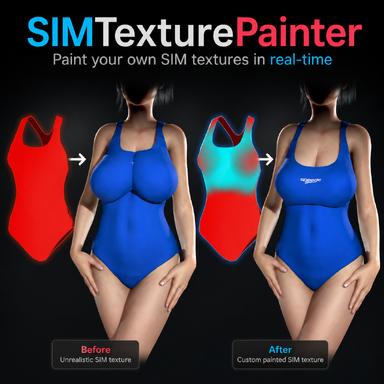
 Give them some breathing room!
 SIM textures control how cloth simulation behaves: black areas simulate freely and hang loose, red areas are pinned in place. By painting these values directly onto your clothing, you can fix clipping, shape how fabric drapes, and get realistic cloth behavior without ever leaving the game. A big use case (which was my main reason for making this plugin), is that often times clothing is designed for the base G2 model, and not models with larger breasts. This would lead to unrealistic wrapping of clothing around the breasts. Using SIMTexturePainter, you can easily make your own SIM textures for you models to give them more "breathing room"
How to use:
NOTE: There are some clothing items for which the creator hasn't generated any Sim Data. Because of that, nothing will happen when you try to make a sim texture for it. For these items, do this:
Open the clothing item in Clothing Creator → Generate Sim Data → Clear Package → enable Sim → Save → Load the newly created Clothing Item → Refresh Clothing List in the Plugin → Select the new Clothing Item
(How to) Paint the SIM texture
Add a mask
Preview SIM texture as a decal
Hide/Show parts + Paint across materials
Keyboard Shortcuts:

Give them some breathing room!How to use:
- Add the SIMTexturePainter.cs to a Person atom
- Select a clothing item from the dropdown.
- Click Enable Painting, then hold Space while hovering over the overlay to paint.
- When done, press Save Final Texture, then Save Clothing Preset
- Next time you load this clothing item, just add the CustomSimPaint preset from the clothing tab
NOTE: There are some clothing items for which the creator hasn't generated any Sim Data. Because of that, nothing will happen when you try to make a sim texture for it. For these items, do this:
Open the clothing item in Clothing Creator → Generate Sim Data → Clear Package → enable Sim → Save → Load the newly created Clothing Item → Refresh Clothing List in the Plugin → Select the new Clothing Item
(How to) Paint the SIM texture
Add a mask
Preview SIM texture as a decal
Hide/Show parts + Paint across materials
Keyboard Shortcuts:
| Key | Action |
| Space | Paint (active color) |
| CTRL + Space | Paint Black (full SIM / loose) |
| Shift + Space | Paint Red (fully pinned to skin) |
| [ / ] | Decrease / Increase brush size |
| Shift + [ / ] | Decrease / Increase brush opacity |
| Alt + [ / ] | Decrease / Increase brush hardness |
| CTRL + Z | Undo |
| CTRL + Shift + Z | Redo |
Clothing used in the videos:

20 MORE Free AFVR swimsuits part 2 - Clothing -
Part two with 20 MORE free AFVR swimsuits are now hubhosted ready to use. The 40 suimsuits collection was uploaded in 2 parts because the VAR file size was to large to be hub hosted. Part 1 with another 20 swimsuits can be downloaded HERE...hub.virtamate.com
Cute sweatshirt - Clothing -
LOOK by Yahoi https://hub.virtamate.com/resources/hyeyoung.61360/ https://hub.virtamate.com/resources/shin.61181/ outfit https://hub.virtamate.com/resources/sojeong.46072/ https://hub.virtamate.com/resources/twintails.61109/...
Where to find your custom Clothing Preset: