• Hi Guest!

    We are extremely excited to announce the release of our first Beta1.1 and the first release of our Public AddonKit!
    To participate in the Beta, a subscription to the Entertainer or Creator Tier is required. For access to the Public AddonKit you must be a Creator tier member. Once subscribed, download instructions can be found here.

    Click here for information and guides regarding the VaM2 beta. Join our Discord server for more announcements and community discussion about VaM2.
  • Hi Guest!

    VaM2 Resource Categories have now been added to the Hub! For information on posting VaM2 resources and details about VaM2 related changes to our Community Forums, please see our official announcement here.
Threads regarding the original VaM 1.x
Joined
Sep 26, 2025
Messages
6
Reactions
6
Hello, my dears

I'm having a lot of trouble creating assets with good lighting.

In this case, I created a house in SweetHome3D and exported it as an .obj file to Unity, added some simple lighting, and exported it to VAM.

I set up a directional light with shadows in Unity, and it actually looks good in Unity. Then I create the asset bundle and export it to VAM, but in VAM it looks terrible. The baked lighting applies in some rooms, but not in others...

I’d like some help from you guys to figure out a good lighting setup for exporting from Unity to VAM with decent quality. I don't need anything revolutionary. Since I don't have much experience with this, I just wanted to understand what people who design environments do.

Tutorials are also welcome. Literally anything helps. I’ve been trying to find something like this but haven’t found anything yet.

Thank you very much in advance <3
 
You didn’t specify exactly what the issue is, but based on your description it’s pretty clear 🙂
I’d recommend not relying on the standard Lightmapper (Progressive CPU/GPU). Quite often, issues like this are caused by overlapping UV shells in the lightmap space. You might want to try Bakery – GPU Lightmapper. It allows you to organize assets into groups, each with its own lightmap and separate UV space, which helps avoid those overlaps.
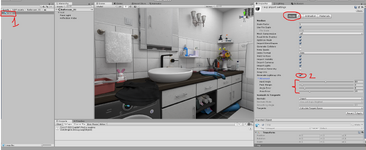
As for me,I moved away from using Unity for baking a while ago. I bake my lighting directly into textures in Blender using diffuse or combined passes. It’s just simpler and faster for me than dealing with Unity’s baking tools. I’m not sure what kind of mesh you’re getting from SweetHome3D. Most likely, the issue is with the angle settings used for auto UV unwrapping in unity. I’ve attached a screenshot where you can adjust the auto-unwrap settings, select your mesh file and check the settings in the Model tab. Just keep in mind that the values shown there are the default ones. Personally I usually create UVs manually or semi-automatically in blender so I don’t really rely on these settings in unity.
123123.png
 
Just dropping by to say thanks, EvilBox!

Thanks to your suggestion, I realized it’s really impractical to do this using built-in lights.

So I created the UV maps like you said, and then I went to the walls, ceiling, and floor (SweetHome3D generates a lot of assets, so you can’t apply them to everything in the house) and checked the “Static Light” option.

I got the result shown in the image.

I used the LightManager plugin and created basic 3-point directional lighting. Then I started adding light elements.

I don’t know if this is the best way to do it, but at least I managed to get off the ground. Thanks again! <3

1774913239.jpg


You didn’t specify exactly what the issue is, but based on your description it’s pretty clear 🙂
I’d recommend not relying on the standard Lightmapper (Progressive CPU/GPU). Quite often, issues like this are caused by overlapping UV shells in the lightmap space. You might want to try Bakery – GPU Lightmapper. It allows you to organize assets into groups, each with its own lightmap and separate UV space, which helps avoid those overlaps.
As for me,I moved away from using Unity for baking a while ago. I bake my lighting directly into textures in Blender using diffuse or combined passes. It’s just simpler and faster for me than dealing with Unity’s baking tools. I’m not sure what kind of mesh you’re getting from SweetHome3D. Most likely, the issue is with the angle settings used for auto UV unwrapping in unity. I’ve attached a screenshot where you can adjust the auto-unwrap settings, select your mesh file and check the settings in the Model tab. Just keep in mind that the values shown there are the default ones. Personally I usually create UVs manually or semi-automatically in blender so I don’t really rely on these settings in unity.
View attachment 578517
 
Just dropping by to say thanks, EvilBox!

Thanks to your suggestion, I realized it’s really impractical to do this using built-in lights.

So I created the UV maps like you said, and then I went to the walls, ceiling, and floor (SweetHome3D generates a lot of assets, so you can’t apply them to everything in the house) and checked the “Static Light” option.

I got the result shown in the image.

I used the LightManager plugin and created basic 3-point directional lighting. Then I started adding light elements.

I don’t know if this is the best way to do it, but at least I managed to get off the ground. Thanks again! <3

Note: you apparently have some issue on the walls which are not either casting or receiving shadows and/or are not casting double sided shadows.

Note 2:
Creating lightmap UVs through Unity is generally somewhat "eventually" ok for basic stuffs... it will be bad in most situations. The idea is to clean and rewrap the lightmap channel in Blender. Which will work and allow padding management in a couple of clicks with the auto unwrap feature for each of your meshes.

You are probably only at the beginning of your lightmapping journey. But if you go down in complex stuffs, you will not be able to rely only on Unity's auto UVs for lightmaps. @EvilBox kind of said it gently... Unity's UV thingy is crap :p
 
Note: you apparently have some issue on the walls which are not either casting or receiving shadows and/or are not casting double sided shadows.

Note 2: Creating lightmap UVs through Unity is generally somewhat "eventually" ok for basic stuffs... it will be bad in most situations. The idea is to clean and rewrap the lightmap channel in Blender. Which will work and allow padding management in a couple of clicks with the auto unwrap feature for each of your meshes.

You are probably only at the beginning of your lightmapping journey. But if you go down in complex stuffs, you will not be able to rely only on Unity's auto UVs for lightmaps. @EvilBox kind of said it gently... Unity's UV thingy is crap :p

Thanks for the reply, Hazmhox!

And brutally honest as always :ROFLMAO:

I have to admit I don’t know anything about Blender; I really need to start learning it ASAP so I can stop struggling.

It’s a bit tough with my schedule, but I understand that it’s much faster and produces better results to do it in Blender than in Unity.

Thanks guys! ❤️
 
And brutally honest as always :ROFLMAO:

I try to be more gentle with people, but I rarely restrain my wording with stoopid features in game engines ^^

If you plan on trying Bakery (which is a massive boost of productivity and quality imho) and you have troubles, don't hesitate to ask.
 
I try to be more gentle with people, but I rarely restrain my wording with stoopid features in game engines ^^

If you plan on trying Bakery (which is a massive boost of productivity and quality imho) and you have troubles, don't hesitate to ask.
From some of your comments I’ve read, I can tell you really hold back a lot. But I personally appreciate your honesty and objectivity—it’s a rare thing these days.

About the Bakery: I’m already checking out some tutorials on how to do it. I think the fact that you veterans have mentioned this is just the little nudge I needed to start understanding how Blender works, at least a little bit.

But you can be sure I’ll be back to ask for your help :ROFLMAO:
 
From some of your comments I’ve read, I can tell you really hold back a lot. But I personally appreciate your honesty and objectivity—it’s a rare thing these days.

Well! it's never meant to be mean or whatever. I guess I'll have to be more gentle if it can be interpreted as is :p
( I do indeed, appreciate people being straightforward )
 
Back
Top Bottom