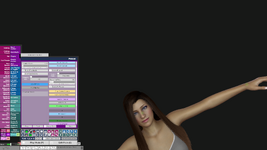
LookCam Assistant

Plugins + Scripts LookCam Assistant

Download [<1 MB]
Glad you liked it🤗🫡 If you see something else i might have missed then just shout out!🤗🍺
I’ve tested it for about 30 minutes now, and I think I may have found an issue when loading a captured camera position. Please let me know if
I’m missing something in the workflow.

My steps are as follows:

I capture the camera with the view tilted.

Then I scroll the mouse wheel upward to move the camera (Y position).

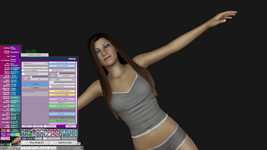
When I press the previously saved ‘Load Position’, the camera switches while keeping the scrolled-up Y position instead of returning exactly to the captured camera view.

As a result, the camera does not return to the exact captured framing, and the position appears offset. I’ve attached an image to show this behavior.
 

Attachments

  • 1.png
    1.png
    1.4 MB · Views: 0
  • 2.png
    2.png
    656.2 KB · Views: 0
  • 3.png
    3.png
    898 KB · Views: 0
I’ve tested it for about 30 minutes now, and I think I may have found an issue when loading a captured camera position. Please let me know if
I’m missing something in the workflow.

My steps are as follows:

I capture the camera with the view tilted.

Then I scroll the mouse wheel upward to move the camera (Y position).

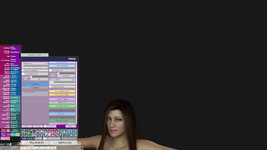
When I press the previously saved ‘Load Position’, the camera switches while keeping the scrolled-up Y position instead of returning exactly to the captured camera view.

As a result, the camera does not return to the exact captured framing, and the position appears offset. I’ve attached an image to show this behavior.
i had the same issue at first before i realised i had not pressed "update" on each camera, did you do that?
 
i had the same issue at first before i realised i had not pressed "update" on each camera, did you do that?
By ‘update’, do you mean that I need to press ‘Update Position’ every time the camera position changes?
The main way I’m planning to use this is to save camera positions and then switch between them during playback using Timeline trigger receivers set to ‘Load Position’.
For example, I capture a camera focused on the face, move the camera elsewhere, and when I press ‘Load Position’ it correctly returns to the captured face view.
However, if I move the view using the mouse wheel (Y-axis) and then press ‘Load Position’, the camera moves while keeping that Y-offset, so it doesn’t return exactly to the originally captured camera view.
The video labeled ‘Test’ was recorded using the updated version, and ‘Test2’ was recorded while testing version 7
Am I misunderstanding the intended workflow, or am I missing a step?
 

Attachments

  • Test.mp4
    20.8 MB
  • Test2.mp4
    34.7 MB
Last edited:
By ‘update’, do you mean that I need to press ‘Update Position’ every time the camera position changes?
The main way I’m planning to use this is to save camera positions and then switch between them during playback using Timeline trigger receivers set to ‘Load Position’.
For example, I capture a camera focused on the face, move the camera elsewhere, and when I press ‘Load Position’ it correctly returns to the captured face view.
However, if I move the view using the mouse wheel (Y-axis) and then press ‘Load Position’, the camera moves while keeping that Y-offset, so it doesn’t return exactly to the originally captured camera view.
Am I misunderstanding the intended workflow, or am I missing a step?
ok i tested it same way as you + i added rotations, there is some issues yes. im at it. il see if i can find out how to do this properly. Update : so i think ive figured it out, but im gonna do some more testing before next release. i want to make sure it works properly.
 
Last edited:
ok i tested it same way as you + i added rotations, there is some issues yes. im at it. il see if i can find out how to do this properly.
Sorry for bothering you. I’ve uploaded one more test video. If you watch both videos, you should be able to see the difference. As always, thank you very much.
 
Sorry for bothering you. I’ve uploaded one more test video. If you watch both videos, you should be able to see the difference. As always, thank you very much.
yes i see it, i think ive fixed it now though but im gonna use some more time to be sure, i made a test where i made diff rotation on diff cameras, went back and updated them(yes update postition-button) and it seems to work fine now. but il do some more testing first before im sure enough to release a new update. Hey and ur not bothering me 🍺 i want my plugins to be good for you guys so the feedback you provide is vital for me so i appreciate it. ok new update is pending🫡
 
Last edited:
Kimowal updated LookCam Assistant with a new update entry:

1.1.0

Issues Found and Fixed:​

  1. Camera offset calculation - Changed to use fixed offset from start of transition instead of recalculating during movement
  2. lastCameraPosition tracking - Now reads actual mainCamera.transform.position after movement instead of using pre-calculated target
  3. Unused variable - Removed startRigRot that was captured but never used
  4. ViewRotation slider corruption - Added isTransitioning flag to prevent slider...

Read the rest of this update entry...
 
Kimowal updated LookCam Assistant with a new update entry:

Manual capture fix, triggers now saved, better tabs

Thanks to _Blinky_ for reporting the capture bug!

NEW
• Disco light effect for each camera: Cycle, Strobe, Pulse and Random patterns, with Rainbow, Warm, Cool, Neon or your own custom colours, and adjustable speed (BPM) and intensity.
• Effect presets: apply ready-made looks (Night Vision, Film Noir, Warm Glow, Dramatic Fade, Disco and more), or save your own camera effects as a preset to reuse later.

FIXED
• "Manual Capture Now" always saves a new camera now. Before, a new view that was...

Read the rest of this update entry...
 
i get the following error when exporting my captures:

!> Exception during SaveJSON: System.IO.DirectoryNotFoundException: Could not find a part of the path "C:\Users\sella\Downloads\VaM_1.22.0.3\VaM_1.22.0.3\Custom\Scripts\LookCamCaptures_20260911_065006.json\ExpressionBlushingAndTears_currentSettings.json".
at System.IO.FileStream..ctor (System.String path, FileMode mode, FileAccess access, FileShare share, Int32 bufferSize, Boolean anonymous, FileOptions options) [0x00000] in <filename unknown>:0
at System.IO.FileStream..ctor (System.String path, FileMode mode, FileAccess access, FileShare share) [0x00000] in <filename unknown>:0
at (wrapper remoting-invoke-with-check) System.IO.FileStream:.ctor (string,System.IO.FileMode,System.IO.FileAccess,System.IO.FileShare)
at System.IO.StreamWriter..ctor (System.String path, Boolean append, System.Text.Encoding encoding, Int32 bufferSize) [0x00000] in <filename unknown>:0
at System.IO.StreamWriter..ctor (System.String path) [0x00000] in <filename unknown>:0
at (wrapper remoting-invoke-with-check) System.IO.StreamWriter:.ctor (string)
at MVR.FileManagement.FileManager.OpenStreamWriter (System.String path) [0x00000] in <filename unknown>:0
at SuperController.SaveJSONInternal (SimpleJSON.JSONClass jc, System.String saveName) [0x00000] in <filename unknown>:0
 
i get the following error when exporting my captures:

!> Exception during SaveJSON: System.IO.DirectoryNotFoundException: Could not find a part of the path "C:\Users\sella\Downloads\VaM_1.22.0.3\VaM_1.22.0.3\Custom\Scripts\LookCamCaptures_20260911_065006.json\ExpressionBlushingAndTears_currentSettings.json".
at System.IO.FileStream..ctor (System.String path, FileMode mode, FileAccess access, FileShare share, Int32 bufferSize, Boolean anonymous, FileOptions options) [0x00000] in <filename unknown>:0
at System.IO.FileStream..ctor (System.String path, FileMode mode, FileAccess access, FileShare share) [0x00000] in <filename unknown>:0
at (wrapper remoting-invoke-with-check) System.IO.FileStream:.ctor (string,System.IO.FileMode,System.IO.FileAccess,System.IO.FileShare)
at System.IO.StreamWriter..ctor (System.String path, Boolean append, System.Text.Encoding encoding, Int32 bufferSize) [0x00000] in <filename unknown>:0
at System.IO.StreamWriter..ctor (System.String path) [0x00000] in <filename unknown>:0
at (wrapper remoting-invoke-with-check) System.IO.StreamWriter:.ctor (string)
at MVR.FileManagement.FileManager.OpenStreamWriter (System.String path) [0x00000] in <filename unknown>:0
at SuperController.SaveJSONInternal (SimpleJSON.JSONClass jc, System.String saveName) [0x00000] in <filename unknown>:0
oooOOPPSS!!! yeah my fault for not setting the save location correctly🙈 it gets confused by other files in ur Custom/Scripts folder(your ExpressionBlushingAndTears file), i have fixed it and releasing a update shortly, sorry for the trouble and thank you for telling🤗
a workaround: temporarily move any loose .json files out of the top level of Custom\Scripts (the folders inside it don't matter), export, then move them back.
UPDATE: new update is pending and waiting for acceptence.

Guys too all of you who uses my plugins thank yo so much and keep the feedback comming!
 
Last edited:
Kimowal updated LookCam Assistant with a new update entry:

small savefix

FIXED
• "Export Captures" and "Export to Timeline" failed with a "Could not find a part of the path" error if you had other files directly in your Custom\Scripts folder.

CHANGED
• Exports are now saved to Saves\PluginData\Kimowal\LookCamAssistant\Exports\ and the status text shows the full file path.
• "Import Captures" opens in that folder. Older exports in Custom\Scripts can still be imported by browsing to them.

Thank you to bigdude12 for feedback,

Read the rest of this update entry...
 
so the fix is pending, meanwhile i have been looking at improvements i could do , so here is whats coming as soon as the first update is released :
NEW
• New trigger actions for scenes and buttons: "Load Next Camera", "Load Previous Camera" and "Load Camera By Name". Unlike the "Load Cam 1: ..." actions, these keep working when you reorder or delete cameras. The old actions still work, so existing scenes are fine.

FIXED
• "Export Captures" and "Export to Timeline" failed with a "Could not find a part of the path" error if you had other files directly in your Custom\Scripts folder.
• In VR, loading a camera now turns you to face the saved direction.
• The camera no longer jitters when Director or Autoplay switch faster than the transition time, or when you click Load twice quickly.
• Turning the plugin off now removes any active effects (disco, fade, vignette, tint) from the screen.
• Trigger actions that use a timer now run to the end.
• Camera triggers keep working after you rename the atom they target.
• Deleting the camera you're on no longer fires its On Exit trigger later.

CHANGED
• Exports are saved to Saves\PluginData\Kimowal\LookCamAssistant\Exports\, and "Import Captures" opens there.
• Thumbnails were removed (they were never shown). Scenes get smaller the next time you save them.
• Small memory leaks fixed.
 
Kimowal updated LookCam Assistant with a new update entry:

Export fix, VR camera direction, new trigger actions

NEW
• New trigger actions for scenes and buttons: "Load Next Camera", "Load Previous Camera" and "Load Camera By Name". Unlike the "Load Cam 1: ..." actions, these keep working when you reorder or delete cameras. The old actions still work, so existing scenes are fine.

FIXED
• "Export Captures" and "Export to Timeline" failed with a "Could not find a part of the path" error if you had other files directly in your Custom\Scripts folder.
• In VR, loading a camera now turns you to face the...

Read the rest of this update entry...
 
Back
Top Bottom