• Hi Guest!

    We have posted a new VaM2 dev log on Patreon, starting a monthly cadence of written progress updates between Beta releases. Highlights include the new Gizmos System, Selection Carousel, and Modes System with Context-Specific Editing. Beta1.2 is 15 of 21 items complete.

    Read the full post on Patreon, or follow progress on the public Trello roadmap.
LookCam Assistant

Plugins + Scripts LookCam Assistant

Download [<1 MB]
Glad you liked it🤗🫡 If you see something else i might have missed then just shout out!🤗🍺
I’ve tested it for about 30 minutes now, and I think I may have found an issue when loading a captured camera position. Please let me know if
I’m missing something in the workflow.

My steps are as follows:

I capture the camera with the view tilted.

Then I scroll the mouse wheel upward to move the camera (Y position).

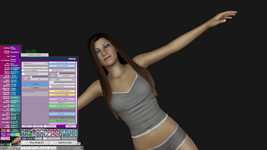
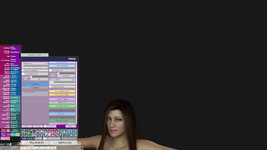
When I press the previously saved ‘Load Position’, the camera switches while keeping the scrolled-up Y position instead of returning exactly to the captured camera view.

As a result, the camera does not return to the exact captured framing, and the position appears offset. I’ve attached an image to show this behavior.
 

Attachments

  • 1.png
    1.png
    1.4 MB · Views: 0
  • 2.png
    2.png
    656.2 KB · Views: 0
  • 3.png
    3.png
    898 KB · Views: 0
I’ve tested it for about 30 minutes now, and I think I may have found an issue when loading a captured camera position. Please let me know if
I’m missing something in the workflow.

My steps are as follows:

I capture the camera with the view tilted.

Then I scroll the mouse wheel upward to move the camera (Y position).

When I press the previously saved ‘Load Position’, the camera switches while keeping the scrolled-up Y position instead of returning exactly to the captured camera view.

As a result, the camera does not return to the exact captured framing, and the position appears offset. I’ve attached an image to show this behavior.
i had the same issue at first before i realised i had not pressed "update" on each camera, did you do that?
 
i had the same issue at first before i realised i had not pressed "update" on each camera, did you do that?
By ‘update’, do you mean that I need to press ‘Update Position’ every time the camera position changes?
The main way I’m planning to use this is to save camera positions and then switch between them during playback using Timeline trigger receivers set to ‘Load Position’.
For example, I capture a camera focused on the face, move the camera elsewhere, and when I press ‘Load Position’ it correctly returns to the captured face view.
However, if I move the view using the mouse wheel (Y-axis) and then press ‘Load Position’, the camera moves while keeping that Y-offset, so it doesn’t return exactly to the originally captured camera view.
The video labeled ‘Test’ was recorded using the updated version, and ‘Test2’ was recorded while testing version 7
Am I misunderstanding the intended workflow, or am I missing a step?
 

Attachments

  • Test.mp4
    20.8 MB
  • Test2.mp4
    34.7 MB
Last edited:
By ‘update’, do you mean that I need to press ‘Update Position’ every time the camera position changes?
The main way I’m planning to use this is to save camera positions and then switch between them during playback using Timeline trigger receivers set to ‘Load Position’.
For example, I capture a camera focused on the face, move the camera elsewhere, and when I press ‘Load Position’ it correctly returns to the captured face view.
However, if I move the view using the mouse wheel (Y-axis) and then press ‘Load Position’, the camera moves while keeping that Y-offset, so it doesn’t return exactly to the originally captured camera view.
Am I misunderstanding the intended workflow, or am I missing a step?
ok i tested it same way as you + i added rotations, there is some issues yes. im at it. il see if i can find out how to do this properly. Update : so i think ive figured it out, but im gonna do some more testing before next release. i want to make sure it works properly.
 
Last edited:
ok i tested it same way as you + i added rotations, there is some issues yes. im at it. il see if i can find out how to do this properly.
Sorry for bothering you. I’ve uploaded one more test video. If you watch both videos, you should be able to see the difference. As always, thank you very much.
 
Sorry for bothering you. I’ve uploaded one more test video. If you watch both videos, you should be able to see the difference. As always, thank you very much.
yes i see it, i think ive fixed it now though but im gonna use some more time to be sure, i made a test where i made diff rotation on diff cameras, went back and updated them(yes update postition-button) and it seems to work fine now. but il do some more testing first before im sure enough to release a new update. Hey and ur not bothering me 🍺 i want my plugins to be good for you guys so the feedback you provide is vital for me so i appreciate it. ok new update is pending🫡
 
Last edited:
Kimowal updated LookCam Assistant with a new update entry:

1.1.0

Issues Found and Fixed:​

  1. Camera offset calculation - Changed to use fixed offset from start of transition instead of recalculating during movement
  2. lastCameraPosition tracking - Now reads actual mainCamera.transform.position after movement instead of using pre-calculated target
  3. Unused variable - Removed startRigRot that was captured but never used
  4. ViewRotation slider corruption - Added isTransitioning flag to prevent slider...

Read the rest of this update entry...
 
Back
Top Bottom