• Hi Guest!

    We have posted a new VaM2 dev log on Patreon, starting a monthly cadence of written progress updates between Beta releases. Highlights include the new Gizmos System, Selection Carousel, and Modes System with Context-Specific Editing. Beta1.2 is 15 of 21 items complete.

    Read the full post on Patreon, or follow progress on the public Trello roadmap.

VaM 1.x Is there any way to change how the default UI looks?

Threads regarding the original VaM 1.x

Clyde Cash

New member
Joined
Mar 29, 2025
Messages
7
Reactions
0
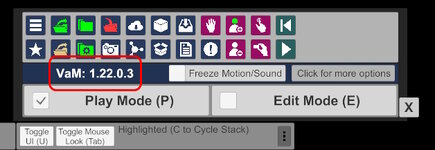
Is there any way to modify how the default UI looks through a plugin? The UI serves its purpose but if possible I would like to make it look modern/more monotone.

Preferably through something in the format of CSS elements if it exists. Although I doubt VAM uses it for UI, if there is a way to modify the UI then it would be greatly appreciated to share how to.
 

Attachments

  • currentVerUI.jpg
    currentVerUI.jpg
    88.1 KB · Views: 0
VaM uses Unity's UI system. So, yes, you can change it. But its meant to be setup in the Unity Editor...not at runtime through code. Therefore, it can be changed through plugins, yes, but not easily. In fact many plugins make minor changes to the UI, you would want to make sure not to break them by whatever changes you do.
 
Upvote 0
Is there any way to modify how the default UI looks through a plugin? The UI serves its purpose but if possible I would like to make it look modern/more monotone.

Preferably through something in the format of CSS elements if it exists. Although I doubt VAM uses it for UI, if there is a way to modify the UI then it would be greatly appreciated to share how to.
There is a paid plugin that makes things monochrome. Be aware that it uses BepInEx.

See https://hub.virtamate.com/resources/monochrome-ui-customizable.31736/
 
Upvote 0
Back
Top Bottom