![[ForgeLab] Steam Forge](https://1424104733.rsc.cdn77.org/data/resource_icons/68/68680.jpg?1786442911)


Join the Shadow Venom's Workshop Discord Server!
Check out the Shadow Venom's Workshop community on Discord - hang out with 3266 other members and enjoy free voice and text chat.
ForgeLab
Things VAM did not have, built so that dropping them on an atom is the whole setup.
Things VAM did not have, built so that dropping them on an atom is the whole setup.
 What the line is for: building the things that are not there
Or maybe some of these things did exist before, but even for me, they were simply too complicated to actually use.
Which is also why nothing here is a prop pack, and nothing here is a simplified version of something else: there was nothing to simplify. These are capabilities added to VAM, generated in code at runtime, with no Unity in the loop and nothing extra for you to install.
The design philosophy: two halves, and the whole point is that you never have to pick one
Plugins usually choose. Either it is simple and you find its ceiling in an afternoon, or it is powerful and you spend that afternoon reading before anything appears on screen. Refusing that choice is the shape of this entire line.
 If you just want to play, it is already done. The test we hold ourselves to is specific: load the plugin, do nothing else, and the right thing is on screen. No asset to find, nothing to model, nothing to point at anything. If you have to configure it before it works, we got the defaults wrong, and that is a bug on our side rather than a step on yours.
 If you are building something serious, the ceiling is a long way up. Nothing is hidden to keep a panel tidy, and no control gets deleted because the list got long. Every parameter is an ordinary VAM storable, so all of it is drivable from Timeline, from triggers, and from other plugins.
A player never meets the complexity. A creator never has to fight the simplicity.
 The line so far
| Plugin | What it is |
|---|---|
 Lumen Forge Lumen Forge | Volumetric light you can see. Eight plugins across god rays, follow spots, full stage rigs and cold pyro, generated in code, spending none of VAM's six pixel lights unless you ask. |
 Tail Forge Tail Forge | Every kind of tail, in one plugin, with real physics. Drop it on a Person and it is already moving. |
 Steam Forge Steam Forge | Steam off her skin, water running down it, and room-scale volumetric fog that takes the shape of anything already in your scene. |
More in the line. Each one ships finished, plug and play, and measured.
STEAMFORGE V1.0
The heat was always the missing part.
Steam that rises off her. Water that runs down her. Fog that fills the room.
Two plugins. Drop them on and the bathroom starts breathing.
 Made for the VAM community
Part of ForgeLab by Shadow Venom.
The wipeable fogged glass isn't included in this plugin. It'll be released separately.
 Late. You let yourself in and the place is dark except for the strip of light under the bathroom door, and behind it, water moving.
You push the door and the warm air reaches you first. Thick enough to see. It hangs where it is and turns slowly where it meets the cooler air of the hall, and the lamp above the mirror is standing in it like a shaft.
She is rising out of the tub. The water has not finished leaving her: it is still running the length of her back, finding the small of it, pooling for a moment at the inside of a thigh before it lets go, and every line it takes is a line you were not going to look away from anyway. The heat comes off her shoulders in the light, and it is coming off her, not off the room.
Then she sees you. She waves, and the water that leaves her hand with it lands on your face.
It is still warm.
Now count how much of that VAM cannot do. It cannot fill a room with air you can see. It cannot run a bead down a body and leave the wet behind it. It cannot throw water off a moving arm. And it has never once made a bathroom feel like the temperature it looks.
The scene looks like a bathroom. It never feels like one.
SteamForge is the heat, the water, and the air between them.
Two plugins. One goes on her, one goes on the room. Neither asks you to model anything, bake anything, or find a single asset. Add them and the effect is already running.
And every part of it can be switched off independently, including all of it.
 SKINWATER
Everything that happens on her skin
Goes on a Person atom. Nothing to pick, nothing to place, nothing to point at anything.
Three effects share one plugin because they share one subject: a body that is warm and wet. You can run all three, or one, or none, and each costs only what it costs.
 Body Steam
Steam that leaves her, not a particle box she happens to be standing in.
The emitter is the body surface itself, so the heat comes off shoulders and collarbones and the small of a back, follows her when she turns, and thins out where she is not. It rises, it drags in the air, and it picks up your scene's own lamps, so a warm key light means warm steam and a cold rim means the wisps catch cold along the edge.
Turn up Motion emission and she steams harder when she moves. Stand still and it settles. It is the cheapest thing in the whole package by a wide margin, and you will almost never be turning this one off.
Skin DripsA bead does not slide down a person in a straight line, and this one does not either.
The drips live on the real skin mesh. They pin where the surface is flat and let go where it steepens, they wander instead of falling on rails, they follow the pose because they are attached to the geometry rather than floating near it. And each one leaves a wet trail behind it, which is the part your eye actually reads as "she is soaked" rather than "there are dots on her".
One slider runs the whole thing. Amount is a budget for how much visible water is on her; Trail style then spends that budget either as a few long runs or a lot of short ones. Same price, completely different body.
 The one that is really a directing handle
Detach & fall. Leave it off and the beads gather along her jaw, her chin, the underside of everything, and stay there. Frame your shot. Then switch it on, and all of it lets go at once.
That is not a side effect. It is why the switch is on the main panel.
 Water Splash
She moves, and the water leaves her.
Two sources, and they are independent switches rather than a mode you pick between. Motion spray needs nothing at all: a wet body above a speed threshold throws droplets, so the effect reveals itself the moment she moves and stays quiet when she does not. Water Line Splash wants an actual water surface: just set the water level, and every limb that crosses it will kick up splashes. It works with pretty much any water asset or plugin you already have.
Ships off, because it is the one that has nothing to show on a first load. Switch it on and shake her.
Drips and Splash both draw fine white water on and around the body. Let one lead and keep the other subtle. Both at full strength usually reads as noise rather than as water. The panel will remind you. ENVFOG
The air in the room
Goes on an Empty. The atom is where the floor of the fog is.
Not a card that turns to face you. A real raymarched volume that you walk into, that a wall stops, and that your lamps shine through, so a bathroom window throws a shaft across the room and the shaft is in the steam rather than painted over it.
It fogs on landing. Factory footprint is 2 × 2 metres and 3 metres tall, which is already a small bathroom. No framing step, no volume to draw first.
Four presets to start from: Bathtub Steam, Shower Steam, Room Haze and Dry Ice / Ground Fog. Then a fifth, Custom, which is where you land the moment you touch a slider and which remembers absolutely everything.
 Point at anything in your scene, and the fog takes its shape
Rooms are not boxes. Wet rooms turn a corner, shower cubicles have glass on two sides and a doorway on a third, pools have a shape somebody drew. A rectangular volume of fog in a room like that either stops short of the walls or leaks through them.
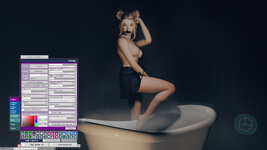
And it is not only rooms. Sometimes the thing you want steaming is one object with a shape of its own: an oval freestanding tub, a clawfoot, a stone basin, a hot spring somebody sculpted. You do not want a box of mist standing over it. You want the steam to sit in it and stop at the rim.
Either way the usual fix is to go and model the shape, in Unity, as an asset, which is exactly the kind of afternoon this package exists to give you back.
So do this instead. Set Shape to Masked Box, point Mask Source at any mesh atom already in your scene (a CUA prop, the bathroom set itself, the tub, the shower tray, the pool), and press Capture Mask. The fog is now cut to that object's outline seen from above.
You never author the shape. The shape is already in your scene.
That is the whole idea. The object that defines the space is sitting right there, and it already knows its own outline better than you could trace it. We just borrow it. One dropdown, one button, no modelling, no image editor, no second application.
It works at either scale, and the small one is the one people do not expect: a whole wet room, or a single bathtub. Same dropdown, same button.
 Steam sitting in the exact silhouette of a shapely tub, stopping at its rim, moving with it if you move it
 Mist that stays inside the shower cubicle instead of filling the bathroom
- Steam that fills an L-shaped wet room and stops at the doorway, because the doorway is in the outline
 Ground fog that pools in a sunken lounge and climbs no higher than the step
 A pool that fogs over the water and nowhere else
It saves with the scene at the footprint it was cut for, so a reload brings the crop back exactly as it was rather than stretched to whatever the sliders happen to say. Clear the field and the fog returns to the uncut shape immediately. And if you would rather draw it yourself, any black-and-white image works: white is mist.
 What it costs: 0.7% of what the fog already costs, measured twice, independently. Which is why cropping is not a quality tier and not something you switch off to save frames. It is simply on, at every setting.
 And if you want her to part it
Person interaction makes the mist clear around a body and trail behind it as she walks. It ships off, for two reasons, and both are worth a sentence.
The creative one. Hot wet skin makes steam far more than it shoves it aside. In a bathroom, what you were reaching for is almost always SkinWater's Body Steam, which comes off the body itself, is the cheapest thing in the package, and needs nothing from the room. Displacement is the right tool for a different job: walking through dry ice, a wake across ground fog, someone wading.
The expensive one. This is the one cliff in SteamForge. "How close is this point in mid-air to her" is a question asked at every marched sample of every ray, so it does not add a flat amount, it multiplies. Fully on, it costs around 3.5× the entire base fog.
But the price is not where you would put it. Clearing the mist around her body is +0.74×. The wake she trails behind her is +2.7×, nearly four times as much for the half you notice less. So "the mist parts around her" is an affordable request: turn Wake Clearing down and keep the part you actually came for.
Full table in the technical section below, including the unflattering row: a person standing ten metres away, out of range of every sample, still costs about 0.61× today. We measured it, and it is first on the list for this plugin.
PUT THEM TOGETHERThe five-minute bathroom.
- Empty atom on the bathroom floor → EnvFog → preset Shower Steam. Pull Radius X/Z out to the walls, Height to the ceiling.
- One warm light, low and to the side. Switch on Scene Lighting in EnvFog and the room stops being grey haze and becomes steam with light in it.
- SkinWater on her. Steam and drips are already running. That is the whole step.
- Switch on Water Splash if there is movement in the scene, and leave Motion spray as the source.
 Sorting. If the fog draws in front of the shower glass when it should be behind it, that is the Render Queue slider. One number, per scene, in both plugins.
Then turn the key light down until the steam is the brightest thing in frame, and let her breathe.
 HOW TO USE
- SkinWater → select a Person → Plugins → Add → SkinWater.cslist. Done. Steam and drips start immediately.
- EnvFog → add an Empty where the fog's floor should be → Plugins → Add → EnvFog.cslist. Mist appears at bathroom scale.
- Everything is a normal VAM storable, so every switch and slider is drivable from Timeline and triggers, including the master switches and Detach & fall.
 Both plugins have a Report button and a Copy report button. If something does not appear, paste that into the thread instead of describing it. It prints the bound person, the readiness gates, every control's current value and the live particle counts, and it usually answers the question in one message.
The same guidance ships inside the package as README files, in English, Traditional Chinese, Japanese and Korean.
 MEASURED, NOT ESTIMATED
The bench, the method, the numbers, and where a number is arithmetic rather than a reading, it says so.
Water and volumetric fog are two of the easiest things in VAM to make expensive, so this package was built around measurement rather than impressions. What follows is the same data that drove the design decisions, including the ones that went against the first guess.
Every row below is marked. MEASURED is a reading off the bench. INFERRED is arithmetic on a reading: useful for planning, not a benchmark. We are not going to blur the two.
The machine
8K is deliberate. It is four times the pixels of 4K and sixteen times 1080p. For anything that costs fill-rate it is a stress test, not a typical setting, which is exactly why we measured there. A number taken at a comfortable resolution tells you nothing about the resolution someone else runs.
The method
A measuring tool drives the whole run unattended: it sets a configuration, lets it settle, samples, writes a row, restores the previous state explicitly, and moves on.
The honest part
At 8K this bench was GPU-bound for the fog and CPU-bound for the water, which is the useful arrangement: each effect was measured where its own cost actually lives. But it does mean the two families of numbers below travel differently to your machine, and the next spoiler is entirely about that.
| Item | Value |
|---|---|
| GPU | NVIDIA RTX 5090 |
| Render resolution | 7680 × 4320 (DSR 8K), fullscreen |
| MSAA | 4× |
| Pixel lights | 6 |
| VSync | off |
| Scene | One Person, static, camera fixed, VAM UI closed |
| Baseline frame time | 3.43 ms with every SteamForge switch off |
8K is deliberate. It is four times the pixels of 4K and sixteen times 1080p. For anything that costs fill-rate it is a stress test, not a typical setting, which is exactly why we measured there. A number taken at a comfortable resolution tells you nothing about the resolution someone else runs.
The method
A measuring tool drives the whole run unattended: it sets a configuration, lets it settle, samples, writes a row, restores the previous state explicitly, and moves on.
 Frame time, never FPS. Frame time is linear, so it can be added and compared. FPS cannot be averaged honestly.
 Repeats, with the spread published. Every configuration ran multiple passes and the per-configuration spread is what decides whether a difference is readable at all. A single pass cannot separate a real effect from noise, and it cannot see the machine drifting overnight.
 Ablation with explicit restore. Each feature is switched off individually with everything else held fixed, and every step puts the previous toggle back by name, so no step can silently inherit the one before it.
 The pass/fail criteria were written before the numbers were read. Every "must change" was paired with a "must not change": a control that is expected to move, and a control that is expected to sit still. If the second one moves, the run is void, not interesting.
 UI closed, camera parked. VAM's own open panel costs frames. Measuring with it open measures the panel.
The honest part
At 8K this bench was GPU-bound for the fog and CPU-bound for the water, which is the useful arrangement: each effect was measured where its own cost actually lives. But it does mean the two families of numbers below travel differently to your machine, and the next spoiler is entirely about that.
The single most important thing on this page is not a number, it is which way each cost scales.
That the water is CPU-side is not an assumption. Body Steam's cost at 8K and at 4K was identical to three decimal places, and Water Splash differed by 0.012 ms. Dropping resolution does not buy you water performance. It buys you fog performance.
 The thing we are deliberately NOT going to tell you
On this bench the fog measured +3.08 ms at 8K and +0.002 ms at 4K. It would be very easy to write "the fog is basically free at 4K", and it would be wrong.
At 4K this machine was no longer GPU-bound. The fog's GPU work, around 0.77 ms of it, went underneath a CPU floor and stopped showing up in frame time. That is a property of this machine, not a property of 4K. Put the same 4K on a card with less fill-rate and the frame becomes GPU-bound again, the 0.77 ms surfaces in full, and it hurts proportionally more because the whole frame budget is smaller.
So: no resolution verdicts, and no formula. What we will give you is a band, clearly labelled as arithmetic.
Indicative band for EnvFog: planning aid, not a benchmark
Read those last three rows as "which order of magnitude, and which direction", not as measurements. They are one measured quantity divided by pixel counts and multiplied by a fill-rate guess. They assume the fog covers a similar fraction of your screen, and screen coverage is a straight multiplier that you control with Radius, Height and framing. We have not benchmarked a mid-range card. When we do, these rows get replaced by readings.
The water rows need no band at all. CPU-side cost does not move with your resolution, so the millisecond figures below are the figures, and what changes them is your CPU rather than your GPU.
| Effect | Where the cost lives | Lower resolution helps? | Weaker GPU costs more? | Basis |
|---|---|---|---|---|
| EnvFog | GPU fill-rate | Yes, roughly with pixel count | Yes | MEASURED |
| Skin Drips | CPU | No | No | MEASURED |
| Water Splash | CPU | No | No | MEASURED |
| Body Steam | CPU | No | No | MEASURED |
That the water is CPU-side is not an assumption. Body Steam's cost at 8K and at 4K was identical to three decimal places, and Water Splash differed by 0.012 ms. Dropping resolution does not buy you water performance. It buys you fog performance.
The thing we are deliberately NOT going to tell youOn this bench the fog measured +3.08 ms at 8K and +0.002 ms at 4K. It would be very easy to write "the fog is basically free at 4K", and it would be wrong.
At 4K this machine was no longer GPU-bound. The fog's GPU work, around 0.77 ms of it, went underneath a CPU floor and stopped showing up in frame time. That is a property of this machine, not a property of 4K. Put the same 4K on a card with less fill-rate and the frame becomes GPU-bound again, the 0.77 ms surfaces in full, and it hurts proportionally more because the whole frame budget is smaller.
So: no resolution verdicts, and no formula. What we will give you is a band, clearly labelled as arithmetic.
Indicative band for EnvFog: planning aid, not a benchmark
| Setup | EnvFog, GPU-side | Basis |
|---|---|---|
| 8K DSR · RTX 5090 | 3.08 ms (shown in frame time) | MEASURED |
| 4K · RTX 5090 | ~0.77 ms of GPU work, hidden under this machine's CPU floor | MEASURED |
| 4K · card with roughly half this fill-rate | order of 1.5 ms | INFERRED |
| 1440p · card with roughly half this fill-rate | order of 0.7 ms | INFERRED |
| 1080p · card with roughly half this fill-rate | order of 0.4 ms | INFERRED |
Read those last three rows as "which order of magnitude, and which direction", not as measurements. They are one measured quantity divided by pixel counts and multiplied by a fill-rate guess. They assume the fog covers a similar fraction of your screen, and screen coverage is a straight multiplier that you control with Radius, Height and framing. We have not benchmarked a mid-range card. When we do, these rows get replaced by readings.
The water rows need no band at all. CPU-side cost does not move with your resolution, so the millisecond figures below are the figures, and what changes them is your CPU rather than your GPU.
All figures are frame-time increase over the same scene with every SteamForge switch off. Bench conditions as above.
The ranking is the counter-intuitive part
The room costs about four and a half times what all three body effects cost put together. Steam coming off a person, the thing that looks like it should be the expensive one because it has the most particles on screen, is the cheapest item in the package by an order of magnitude.
If a bathroom scene is heavy, the fog is the budget. The water on her is rounding error next to it.
Body Steam under motion
Measured separately, because a static bench is exactly the wrong place to price an effect whose whole point is that it reacts to movement: with motion emission driving roughly three times the puff count, the frame-time cost did not move. Still +0.02 ms. MEASURED
| Effect | Δ frame time | Basis |
|---|---|---|
| EnvFog (room volume) | +3.08 ms | MEASURED |
| Skin Drips (factory settings) | +0.62 ms | MEASURED |
| Water Splash (400 droplets) | +0.07 ms | MEASURED |
| Body Steam | +0.02 ms | MEASURED |
| All three body effects together | +0.68 ms | MEASURED |
The ranking is the counter-intuitive part
EnvFog ≫ Skin Drips > Water Splash > Body Steam
The room costs about four and a half times what all three body effects cost put together. Steam coming off a person, the thing that looks like it should be the expensive one because it has the most particles on screen, is the cheapest item in the package by an order of magnitude.
If a bathroom scene is heavy, the fog is the budget. The water on her is rounding error next to it.
Body Steam under motion
Measured separately, because a static bench is exactly the wrong place to price an effect whose whole point is that it reacts to movement: with motion emission driving roughly three times the puff count, the frame-time cost did not move. Still +0.02 ms. MEASURED
Every other switch here is worth what it costs. This one is a cliff, so it ships off and it gets its own table.
The mist parting around a body is not a pass over the body. It is a question asked at every marched sample of every ray: how close is this point in mid-air to her? So it rides the same fill-rate axis the fog does, and it multiplies with Quality and with how much of your screen the fog covers rather than adding a flat amount.
Figures are ratios against the base fog, because that is the part that travels. The bench framing for this run was deliberately punishing (fog filling the frame at 8K, 24 steps), so its absolute milliseconds belong to that framing and nothing else. The ratios do not.
The body is cheap. The trail is not.
That is the part nobody guesses, and it is the part you can act on. Clearing the mist around her costs +0.74×. The wake she leaves behind costs +2.7×, which is close to four times as much for the thing you notice less.
So if what you want is "the mist parts around her", you can have it for roughly a quarter of the full price by keeping Wake Clearing down. The wake is also strictly linear at about 0.58 ms per wake point (12, 24 and 48 points measured), so it is a dial rather than a switch, and the three parts of interaction add up independently: predicted 50.25 against 50.94 measured, inside 1.4%.
And the one we are not going to hide
Put the person ten metres away, far outside any distance at which she could affect a single sample of the volume, and interaction still costs +0.61× of the base fog.
The shader asks the question at every sample and does not currently skip the ones that are provably out of range. We measured it, it is real, and it is the first thing on the list for this plugin. It is also a good argument for the default: an effect that charges you for a body it cannot even reach is an effect that should be opt-in.
If you do want it, in this order
The mist parting around a body is not a pass over the body. It is a question asked at every marched sample of every ray: how close is this point in mid-air to her? So it rides the same fill-rate axis the fog does, and it multiplies with Quality and with how much of your screen the fog covers rather than adding a flat amount.
Figures are ratios against the base fog, because that is the part that travels. The bench framing for this run was deliberately punishing (fog filling the frame at 8K, 24 steps), so its absolute milliseconds belong to that framing and nothing else. The ratios do not.
| Configuration | Cost, relative to the base fog | Basis |
|---|---|---|
| Base fog, interaction off | 1× (the reference) | MEASURED |
| + Body clearing, 11 body capsules | +0.74× | MEASURED |
| + Wake trail, 48 wake points | +2.7× | MEASURED |
| Everything on | +3.5× | MEASURED |
| Scene Lighting, for comparison | +0.42× | MEASURED |
The body is cheap. The trail is not.
That is the part nobody guesses, and it is the part you can act on. Clearing the mist around her costs +0.74×. The wake she leaves behind costs +2.7×, which is close to four times as much for the thing you notice less.
So if what you want is "the mist parts around her", you can have it for roughly a quarter of the full price by keeping Wake Clearing down. The wake is also strictly linear at about 0.58 ms per wake point (12, 24 and 48 points measured), so it is a dial rather than a switch, and the three parts of interaction add up independently: predicted 50.25 against 50.94 measured, inside 1.4%.
And the one we are not going to hidePut the person ten metres away, far outside any distance at which she could affect a single sample of the volume, and interaction still costs +0.61× of the base fog.
The shader asks the question at every sample and does not currently skip the ones that are provably out of range. We measured it, it is real, and it is the first thing on the list for this plugin. It is also a good argument for the default: an effect that charges you for a body it cannot even reach is an effect that should be opt-in.
If you do want it, in this order
- Lower Quality. It cuts the number of samples, and the interaction question is asked per sample, so this one helps twice.
- Wake Clearing down, or off. It is the majority of the cost and the minority of the effect.
- Smaller volume in frame. Same multiplier as everything else fill-rate.
- Or use SkinWater's Body Steam instead. For a bathroom, "steam coming off her" is what you were reaching for anyway, it is the cheapest thing in the package, and it does not ask the room any questions.
Skin Drips is the only effect in the package with a cost worth tuning, and almost all of it is the wet trail rather than the beads.
High is not a linear step. It doubles the budget and costs about 3.7×, the only part of this package where the price curve bends upward against you. If you want more water, going up one tier from factory is cheap; going to the top is a decision.
Why the Amount slider stops at 300
Not caution. Past roughly 300 the pool saturates and deposits start being discarded, measured at two different resolutions, same result both times. Above that line you pay more and see less. The slider ends where the good range ends, so there is no way to dial yourself into a worse picture at a higher price. MEASURED
Water Splash scales linearly
| Setting | Δ frame time | What you give up | Basis |
|---|---|---|---|
| Wet trail OFF (beads only) | 0.05 ms | The wet look. Beads still run and still fall. | MEASURED |
| Amount: Low | 0.26 ms | Sparse. Reads as "damp". | MEASURED |
| Amount: Medium (factory) | 0.66 ms | Nothing | MEASURED |
| Amount: High | 2.41 ms | Nothing, but see below | MEASURED |
High is not a linear step. It doubles the budget and costs about 3.7×, the only part of this package where the price curve bends upward against you. If you want more water, going up one tier from factory is cheap; going to the top is a decision.Why the Amount slider stops at 300
Not caution. Past roughly 300 the pool saturates and deposits start being discarded, measured at two different resolutions, same result both times. Above that line you pay more and see less. The slider ends where the good range ends, so there is no way to dial yourself into a worse picture at a higher price. MEASURED
Water Splash scales linearly
| Droplets alive | Δ frame time | Basis |
|---|---|---|
| 0 | 0.00 ms | MEASURED |
| 400 | +0.07 ms | MEASURED |
| 800 | +0.11 ms | MEASURED |
The most useful property for planning a scene: switching on two effects costs what the two cost separately. There is no hidden interaction term, so you can price a scene by adding up the rows you turned on.
That is not an assumption either. It was tested as an explicit interaction term, three times, across two resolutions and two builds:
Three independent runs, both signs, all inside the noise band. MEASURED
Switched off means the work is gone
Turning an effect off empties its pool, deactivates its renderer and stops its per-frame work. Measured with the plugin OFF, the residual against baseline was −0.004 ms, which is zero with a rounding error on it.
One caveat, stated rather than buried: EnvFog and Body Steam both request VAM's depth texture, and that request is not handed back on a mere toggle, because other plugins in a scene may be relying on it. So "off costs nothing" is strictly verified for Water Splash, and for the other two it means "the effect's own work is gone", which is not quite the same sentence. We would rather write the longer one.
That is not an assumption either. It was tested as an explicit interaction term, three times, across two resolutions and two builds:
| Run | Interaction term | Verdict |
|---|---|---|
| 8K · earlier build | −0.030 ms | indistinguishable from zero |
| 8K · later build | +0.078 ms | indistinguishable from zero |
| 4K · later build | +0.022 ms | indistinguishable from zero |
Three independent runs, both signs, all inside the noise band. MEASURED
Switched off means the work is gone
Turning an effect off empties its pool, deactivates its renderer and stops its per-frame work. Measured with the plugin OFF, the residual against baseline was −0.004 ms, which is zero with a rounding error on it.
One caveat, stated rather than buried: EnvFog and Body Steam both request VAM's depth texture, and that request is not handed back on a mere toggle, because other plugins in a scene may be relying on it. So "off costs nothing" is strictly verified for Water Splash, and for the other two it means "the effect's own work is gone", which is not quite the same sentence. We would rather write the longer one.
A stutter that the average and the 95th percentile both hid
An unattended soak at factory settings reported a healthy 7.32 ms mean and an 8.6 ms 95th percentile, and a 260 ms freeze every 1.63 minutes. Both summary statistics were blind to it, because one hitch in six thousand frames does not move either of them.
The cause was ours: the drips were asking VAM's skinning system to rebuild its plan every single frame, which allocates around 57 KB each time regardless of how little actually changed. That filled the managed heap in about a minute and a half, and every collection was the freeze.
The obvious fix did not work, and the measurement said so
"Only rebuild when the set of vertices actually changes" was the first idea. The probe's own report already contained the number that killed it: the set changes several times per frame in every configuration, so the condition would have been true every frame and saved nothing. It was implemented anyway, kept, and reported, so the run could show it saving nothing rather than anyone taking our word for it.
What worked was making the rebuild a rate instead:
−93% allocation for a thousandth of a millisecond. Frame time showed no trend at all across a 17× range of allocation, which is what makes the choice free rather than a trade. MEASURED
What it costs you, stated plainly
The trade is that a teleport, meaning a pose preset load, a hard cut in Timeline or a controller written directly, leaves the beads about a fifth of a second behind before they re-attach. Continuous animation, at any speed we could drive, never shows it: everything lags by the same amount and a smooth path has nothing to compare against.
We tested it the wrong way four times before getting it right. Every one of those attempts looked for the effect in smooth motion, and it does not live there. It only appears on a step change. The test that finally separated the settings was loading a pose preset and watching.
And one defect no benchmark in this package could have caught
Late in QA, adding the plugin to a Person by hand, in a running scene turned out to cost about 1.4 ms/frame more than the same plugin arriving with a saved scene. Worse, that cost stayed behind after the plugin was deleted. It was a claim on VAM's skinning system that could not be handed back, and only reloading a scene cleared it.
The reason no table caught it is worth saying out loud: every A/B in this package pre-places the plugins in a fixture and toggles them. "Add a plugin at runtime" was a path no instrument covered. It was found by a person doing the thing users actually do.
Fixed, and verified the way it should have been testable all along: baseline, add, remove.
MEASURED on the shipping build. Removing the plugin now returns the frame rate to the baseline it started from, and that is a check we will keep running.
An unattended soak at factory settings reported a healthy 7.32 ms mean and an 8.6 ms 95th percentile, and a 260 ms freeze every 1.63 minutes. Both summary statistics were blind to it, because one hitch in six thousand frames does not move either of them.
The cause was ours: the drips were asking VAM's skinning system to rebuild its plan every single frame, which allocates around 57 KB each time regardless of how little actually changed. That filled the managed heap in about a minute and a half, and every collection was the freeze.
The obvious fix did not work, and the measurement said so
"Only rebuild when the set of vertices actually changes" was the first idea. The probe's own report already contained the number that killed it: the set changes several times per frame in every configuration, so the condition would have been true every frame and saved nothing. It was implemented anyway, kept, and reported, so the run could show it saving nothing rather than anyone taking our word for it.
What worked was making the rebuild a rate instead:
| Rebuild interval | Allocation | Time between collections | Frame-time cost |
|---|---|---|---|
| every frame (original) | 68 970 B/frame | 1.6 minutes | not measured |
| 16 ms | 19 231 B/frame | 5.9 minutes | not measured |
| 200 ms (shipping) | 5 082 B/frame | ~24 minutes | +0.001 ms |
| 2000 ms | 4 035 B/frame | ~30 minutes | not measured |
−93% allocation for a thousandth of a millisecond. Frame time showed no trend at all across a 17× range of allocation, which is what makes the choice free rather than a trade. MEASURED
What it costs you, stated plainly
The trade is that a teleport, meaning a pose preset load, a hard cut in Timeline or a controller written directly, leaves the beads about a fifth of a second behind before they re-attach. Continuous animation, at any speed we could drive, never shows it: everything lags by the same amount and a smooth path has nothing to compare against.
We tested it the wrong way four times before getting it right. Every one of those attempts looked for the effect in smooth motion, and it does not live there. It only appears on a step change. The test that finally separated the settings was loading a pose preset and watching.
And one defect no benchmark in this package could have caught
Late in QA, adding the plugin to a Person by hand, in a running scene turned out to cost about 1.4 ms/frame more than the same plugin arriving with a saved scene. Worse, that cost stayed behind after the plugin was deleted. It was a claim on VAM's skinning system that could not be handed back, and only reloading a scene cleared it.
The reason no table caught it is worth saying out loud: every A/B in this package pre-places the plugins in a fixture and toggles them. "Add a plugin at runtime" was a path no instrument covered. It was found by a person doing the thing users actually do.
Fixed, and verified the way it should have been testable all along: baseline, add, remove.
| State | Before the fix | After the fix |
|---|---|---|
| Clean scene, no plugin | 301.1 fps | 301.1 fps |
| SkinWater added by hand, running | 188.7 fps | 263.8 fps |
| Plugin then removed | 202.7 fps ← never came back | 300.9 fps ← back to baseline |
MEASURED on the shipping build. Removing the plugin now returns the frame rate to the baseline it started from, and that is a check we will keep running.
In the order that actually helps
Things that are not settings, on purpose
One more on the crop, since it is a headline feature
Mask resolution does not matter to speed. Sampling the mask at lod 1 against lod 4 came out at −0.024 ms, inside the noise band, so the lookup is not bandwidth-bound and shrinking the captured mask buys nothing. Capture at whatever resolution makes the outline clean. MEASURED
VR
Not benchmarked in a headset. What carries over cleanly is the shape of the cost: the water is CPU-side and should behave much as it does on desktop; the fog is fill-rate and VR is where fill-rate hurts. Start the fog's Quality lower than you think and raise it until it stops paying for itself.
- The room fog is the budget. Lower Quality first: it is the raymarch step count and a straight multiplier. Lower quality gets cheaper, never absent: there is no setting at which the fog stops being there, and we will never tell you to switch it off for VR.
 Make the volume smaller in frame. Radius, Height, or simply not filling the view with it. Screen coverage multiplies everything else.
- Then Wet trail. It is the overwhelming majority of what the drips cost: 0.66 ms becomes 0.05 with one toggle, and the beads keep running.
 Then Amount. It is a budget, so it moves cost close to proportionally, and one tier down from factory is a much better deal than the top tier is.
- Leave Body Steam alone. At +0.02 ms there is nothing to win.
Things that are not settings, on purpose
 Depth-aware clipping is always on, at every quality level. The fog stops at walls and props rather than passing through them. Its cost could not be separated from the noise at all, so making it optional would only have given you a way to make the fog look wrong.
- Shape cropping is always on too, and it is not free but it is close: masked box against plain box measured +0.076 ms, 0.70% of the base fog, twice, independently. All three domain shapes cost the same within noise (ellipse against box: −0.010 ms, inside the band). So the shape you pick is a look decision and never a performance one, which is the only reason it could be made standard rather than a tier.
 The Amount slider ends at 300 because that is where the good range ends, not because we are being careful with your hardware.
One more on the crop, since it is a headline feature
Mask resolution does not matter to speed. Sampling the mask at lod 1 against lod 4 came out at −0.024 ms, inside the noise band, so the lookup is not bandwidth-bound and shrinking the captured mask buys nothing. Capture at whatever resolution makes the outline clean. MEASURED
VR
Not benchmarked in a headset. What carries over cleanly is the shape of the cost: the water is CPU-side and should behave much as it does on desktop; the fog is fill-rate and VR is where fill-rate hurts. Start the fog's Quality lower than you think and raise it until it stops paying for itself.
Numbers you can check: both plugins print a full state report with a one-press copy button.
If yours disagrees with this page, that report is the fastest way to show us.
If yours disagrees with this page, that report is the fastest way to show us.
HONEST NOTES & LIMITSUp front about the edges, so nothing surprises you.
- EnvFog is the expensive one, and it is expensive because of screen coverage. A volume that fills the frame costs more than the same volume seen from the doorway. If you are hunting frames in a bathroom scene, start with the room, not with the water on her.
- Transparent things crossing transparent things have no correct draw order. Mist through shower glass, drips against a wet-look dress. VAM's transparent surfaces pin themselves around 2400 to 3000, so which one wins changes with camera angle. Both plugins carry a Render Queue slider for exactly this, and it is an author's call per scene rather than a bug to be fixed.
- Drips and Splash overlap visually. Both are small white water on and near the body. Both at full strength reads as noise. Pick a lead.
 Person interaction in EnvFog is off on purpose, and it is the one cliff here. Fully on it costs about 3.5× the entire base fog, because the question "how close is this point to her" is asked at every marched sample of every ray. Most of that is the wake, not the body. And we will say the awkward part too: a person standing ten metres away, out of range of every sample, still costs about 0.61× today. It is measured, it is first on the list for this plugin, and it is a large part of why the switch ships off. For a bathroom the effect you actually wanted is SkinWater's Body Steam, which comes off the body instead of being pushed by it.
 Loading a pose preset teleports the body, and for about a fifth of a second the beads are catching up with where she went. Continuous animation, however violent, does not do this. It costs nothing to leave alone and it is the reason the water does not allocate memory every frame; see the technical section.
 Not benchmarked in VR. The figures below are desktop. Water is CPU-side so it carries over close to unchanged; the room fog is fill-rate, so treat the quality slider as your VR knob and start lower than you think.
 Found something odd? Want an effect that is not here? Post in the discussion. This started as three separate whitebox probes and grew on what the measurements said, so it will keep growing on what you report.
 What's new
v1.0
 Initial release. Two plugins. SkinWater: Body Steam, Skin Drips and Water Splash on a Person. EnvFog: room-scale volumetric mist with presets, floor-plan masking and optional person interaction.
 Special Thanks
Special thanks to @Zero Lambda for all the great ideas, suggestions, and inspiration throughout development, and also a big thanks to @Mxx for the valuable feedback and for helping test the early builds.
Special thanks to @Skynet for his Skin Vertex Link plugin. Studying how it works helped me solve a few key problems and saved me from going down quite a few rabbit holes along the way.
Made so a bathroom scene can finally be warm,
without modelling a single drop of it.
without modelling a single drop of it.





![[ForgeLab] Lumen Forge](https://1424104733.rsc.cdn77.org/data/resource_icons/68/68538.jpg?1785906791)
![[ForgeLab] Tail Forge](https://1424104733.rsc.cdn77.org/data/resource_icons/68/68311.jpg?1785112307)
![[Project CRAFT] ASSET CUA STUDIO: Open Source Release](https://1424104733.rsc.cdn77.org/data/resource_icons/67/67353.jpg?1781153072)

![[Project CRAFT] AUDIO CUA STUDIO](https://1424104733.rsc.cdn77.org/data/resource_icons/67/67256.jpg?1781146550)