![[Project CRAFT] AUDIO CUA STUDIO](https://1424104733.rsc.cdn77.org/data/resource_icons/67/67256.jpg?1780733551)



Contains executable files or external scripts. Ensure you trust the creator and apply your own security measures.
Creators Reclaiming Art From Tech
You have a story. You shouldn't need to become an engineer to tell it.
Technology should serve craft, not gatekeep it
A campaign by Shadow Venom · Instance #01
You have a story. You shouldn't need to become an engineer to tell it.
Technology should serve craft, not gatekeep it
A campaign by Shadow Venom · Instance #01
 AUDIO CUA STUDIO
 Make game-ready CUA audio. No Unity. No pipeline. Just your voice and your story.
 Made for the VAM community
Somewhere along the way, "making" got buried under "building."
This is a campaign to dig it back out — one tool at a time.
This is a campaign to dig it back out — one tool at a time.
 Say goodbye to Unity 2018.
 You don't need to learn it. You don't even need to install it.
 Drag audio in → click once → done.
  Making a CustomUnityAsset for audio used to mean installing Unity 2018, learning the AssetBundle pipeline, and fighting import settings — just to get your music or voice lines into a scene.
 Not anymore. Drop your audio, hit one button, get a ready-to-use
 .assetbundle. That's the whole workflow. Why CUA audio?
When a scene needs more than a handful of clips — say hundreds of voice lines
 — mounting every clip directly in the scene just isn't realistic. A CUA packs them all into one bundle the scene loads on demand. This tool builds that bundle for you, without the Unity wall that's kept it out of reach.


 What it does
 Create CUA — turn one track or hundreds of clips into a single audio bundle (BGM, voice packs, SFX).
 Extract Audio — open any audio
 .assetbundle, browse its clips, preview them, export them back out.
Features No Unity, no install — one self-contained
 .exe. Just run it. Drag & drop — drop files or a whole folder; build a pack in seconds.
 Compact by default — packaged size ≈ your source size (no surprise 4× bloat).
 Built-in player — preview every clip before you extract.
 One-click normalize — even out loudness across clips.
 Live size estimate — file count + estimated package size as you go.
 4 languages — English / 한국어 / 日本語 / 繁體中文.
 How to use
- Run
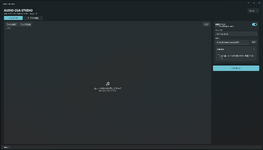
AudioCuaStudio.exe. - Create: drag audio or a folder onto the left → name it + pick an output folder → Create CUA.
- Extract: drag a
.assetbundleonto the left → preview with → Extract all.
 Supported input MP3 · WAV · OGG · FLAC · M4A
 What's in the download
AudioCuaStudio.exe— the app (everything bundled in).
ffmpeg.exe— reads/converts audio (official FFmpeg build; license included).
README.txt
 Just unzip and run — keep the files together!
 Requirements
 Windows 10/11 (64-bit). Nothing else to install.
 Update v1.41 — Folders & Speed
 Folder hierarchy
- Drag a structured folder and its layout is kept inside the CUA. Organize big packs however you like — ambient, voice1/angry, voice2 — and the subfolder structure is preserved, not flattened.
- What you drag is what you get. The folder you drop becomes the top level, so it round-trips exactly. (Want to omit an outer wrapper? Just drag the inner folders instead.)
- Extract rebuilds the same tree on disk — the folder structure comes back exactly as it was packed.
- Tip: keep clip names unique across folders — VAM addresses clips by name, so the folders are for your organization.
Grouped file lists- Both the Create and Extract lists now show your files grouped under folder headers, so large packs are easy to scan and navigate.
Much faster on big batches- Encoding now runs across all your CPU cores. Packing hundreds or thousands of clips (think full voice packs) is dramatically faster — wall-time scales with your core count instead of grinding one file at a time.
Still one download, still zero-install. Unzip and run. Thanks to @DrRagon for the hierarchical-storage idea and for pushing on build speed for large libraries — both landed in this release. Update v1.3
 Fixes
Fixes Compressed audio now plays cleanly in VAM. Some compressed clips could glitch or go silent (most noticeably on short clips / certain MP3s). Compressed output now uses Vorbis — Unity's native audio format — so it plays correctly with every audio loader.
 Exact clip length. Fixed a case where some VBR MP3 sources produced a wrong clip length (clips getting cut short). Length is now read precisely from the audio.
New- Format selector — choose your output: Compressed (Vorbis, recommended) · Smaller · Uncompressed (PCM). Live size estimate updates as you pick.
- Preview on the Create side too — play buttons next to each file before you build, just like the Extract side.
- "Open folder when done" toggle — turn off the auto-opening Explorer window if you don't want it.
Still one download, still zero-install — unzip and run. (The Vorbis encoder is bundled in, so there's nothing extra to set up.) Huge thanks to @cyberdelique — who not only reported the compressed-audio issue but went the extra mile and packaged up debug sample files (working vs. non-working) that pinpointed the exact cause. That made this fix possible. Plus both UX additions above were his suggestions. Legend. 
Contains executable files or external scripts. Ensure you trust the creator and apply your own security measures.