• Hi Guest!

    We are extremely excited to announce the release of our first Beta1.1 and the first release of our Public AddonKit!
    To participate in the Beta, a subscription to the Entertainer or Creator Tier is required. For access to the Public AddonKit you must be a Creator tier member. Once subscribed, download instructions can be found here.

    Click here for information and guides regarding the VaM2 beta. Join our Discord server for more announcements and community discussion about VaM2.
  • Hi Guest!

    VaM2 Resource Categories have now been added to the Hub! For information on posting VaM2 resources and details about VaM2 related changes to our Community Forums, please see our official announcement here.
Fake refraction shell

Clothing Fake refraction shell

Download [1.04 MB]
1.PNG


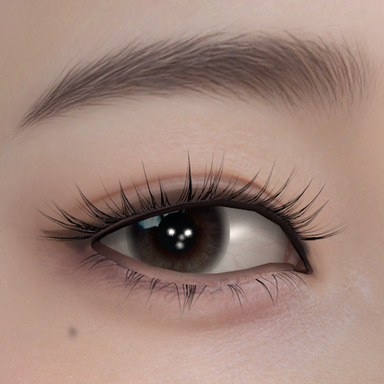
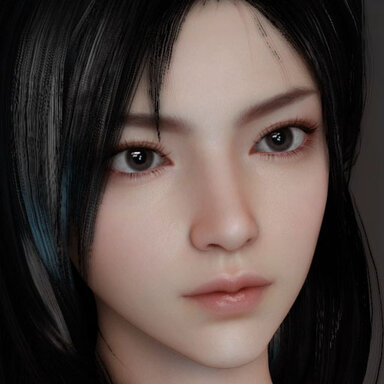
To be precise, the "Fake Refraction Shell" is essentially a false specular reflection. Its function is to replace the outermost shell of the female eye model in VAM. If I'm not mistaken, that outermost shell is likely meant to provide refraction and corneal convex reflection for the eyes during character rendering. In practice, this shell in VAM mostly produces only a poor, coarse reflection effect. To barely see any result, it often requires enabling VAM's built-in skybox and raising the Specular Intensity parameter. If you don't like it, you can use the "Fake Refraction Shell" instead.

Usage:
1 Use the Fake Refraction Shell parameter in the morph to push the outermost "Loser reflection shell" of the eye into the character's head interior.
2 Equip the Fake Refraction Shell clothing item, and select your preferred effect from the presets. If the layering order is incorrect, it can be adjusted by modifying the clothing shader render queue or by slightly nudging the position in the "Adjustments" tab.

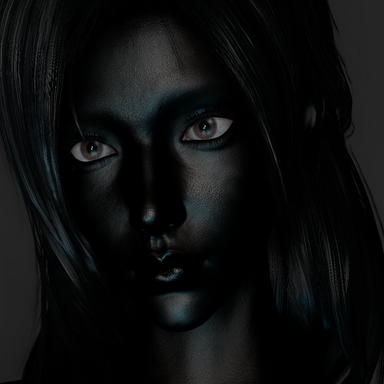
You can get some inspiration for creating those super realistic eyes in the video from my clothing combinations.
4.PNG

Other key Clothing for the eyes in the video,
VL_13.Lacrimal_gland_v2.2
Skynet.Eyes_shadow_Reflection.5
Photorealistic eye

Thank you to every talented creator.

Images and attachments
  • 4.jpg
    4.jpg
    294.8 KB · Views: 0
React to this content...

Share this resource

More resources from StudioMF

Latest reviews

Positive
Version: 2026-02-28
这个光影效果太好咯,尤其是用来当模特的这个人物,面部光影表现也是格外的好,从漫反射到高光到变形都很好,甚至不像是vam可以做出来的效果。方便透露是怎么做到的吗?
The lighting and shadow effect here is absolutely fantastic — especially on the model. The way the light falls on the face is particularly impressive, from the diffuse to the highlights and even the morph. Everything looks so good that it almost doesn’t seem like something VAM could pull off. Would you mind sharing how you achieved this?
StudioMF
StudioMF
I'm sorry I can't reveal too much, as it involves a lot of specialized knowledge in the art field. Even within the industry, professionals rarely share this kind of foundational, personal understanding of art with each other. What I can disclose is that achieving this level of realism requires significant effort in post-processing aspects like lens simulation, color grading, and simulated indirect lighting. Ultimately, it's the combination with a community plugin like the Hunting-Succubus subsurface scattering shader that produces this effect. You could even simplistically think of it as the complete version of the post-processing found in BDO(the original game made significant compromises for performance reasons).

As for the character work, I've actually been sharing in the community some of my past artistic optimizations aimed at addressing the visual shortcomings of VAM characters. For instance, things like the Fake Refraction Shell and Primary Specular are actually very core components, but it seems not many people recognize their significance. Ironically, the one I value the least—Perfect Eyelashes—turned out to be the most popular, haha… VAM's own architecture isn't necessarily perfect. I almost completely ignore features like VAM's default skybox-based global specular reflections, or only occasionally compromise by turning them on temporarily to provide some basic—if unsatisfying—metallic specular effects for clothing. To create good-looking character results in VAM, you can't rely solely on the scene's direct lighting. Rasterized rendering has always been about "faking it." It's also important for users to choose a suitable skybox lighting for their specific scene and control its intensity appropriately.
Upvote 0
Positive
PVP
Version: 2026-02-28
Posted:
Good stuff. TY for sharing.
Upvote 0
Positive
MXT
Version: 2026-02-28
Posted:
Game-changing for me, now that I can turn on and off the fake specular reflection or change the design anytime. Thanks so much for doing this!
Upvote 0
Back
Top Bottom