



We all know DLSS5 is out and people are coming addicted to it. My question is: Is DLSS5 really worth it using it with VAM? If so what's the difference when using it with Vam? and without it? Benefits?
As of now, I think the only major benefit is to take some cool looking screenshots, but imo it's virtually impossible to have acceptable framerate for proper gameplay, nevermind VR. Performance dips heavily even with good hardware.We all know DLSS5 is out and people are coming addicted to it. My question is: Is DLSS5 really worth it using it with VAM? If so what's the difference when using it with Vam? and without it? Benefits?
Yeah true! I know it has major fps drops.As of now, I think the only major benefit is to take some cool looking screenshots, but imo it's virtually impossible to have acceptable framerate for proper gameplay, nevermind VR. Performance dips heavily even with good hardware.

VR is no problem with UncleBurrito's version on a Ryzen 7 9800X3D & RTX 5090. Thanks to upscaling you don't even need that kind of hardware i would guess (?).As of now, I think the only major benefit is to take some cool looking screenshots, but imo it's virtually impossible to have acceptable framerate for proper gameplay, nevermind VR. Performance dips heavily even with good hardware.
But what are the benefits of playing Vam with DLSS5? Is there much of a difference?VR is no problem with UncleBurrito's version on a Ryzen 7 9800X3D & RTX 5090. Thanks to upscaling you don't even need that kind of hardware i would guess (?).
Didn't you notice the DLSS5 screenshots so far? The differences are very obvious i think. You can check out the DLSS5 albums to compare and decide for yourself:But what are the benefits of playing Vam with DLSS5? Is there much of a difference?

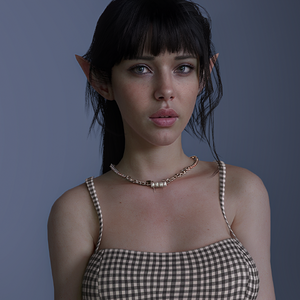
Oh wow!!!! This is sooo good it really dose make a difference! Thankyou! HOw do i set up DLSS5? apologies for the dumb questionDidn't you notice the DLSS5 screenshots so far? The differences are very obvious i think. You can check out the DLSS5 albums to compare and decide for yourself:
It may be a matter of taste at the end of the day, but i guess many people would say it increases the realism of scenes.
The following image is a good example, although it is important to notice that EvilBox's environments are great even without DLSS5:
Also this:

I'm no expert, but I think the difference is drastic. It will tank your fps a little, but for screenshots it's amazing. So pro's= better graphics. Cons= less fps.We all know DLSS5 is out and people are coming addicted to it. My question is: Is DLSS5 really worth it using it with VAM? If so what's the difference when using it with Vam? and without it? Benefits?
Yeah, but don't forget that the base "quality" of the scene/assets/looks + tweaking is important to get such awesome end results. EvilBox's environment looks already awesome without it, because his lighting is that good. Out of the box it is still impressive imho.Oh wow!!!! This is sooo good it really dose make a difference! Thankyou! HOw do i set up DLSS5? apologies for the dumb question
 hub.virtamate.com
You want uncle burritos plugin, the instructions are in his discord and his plugin page here on the hub, it's only $5, so hook the dude up so he can continue to hook us up! All you do is extract two folders into the vam directory and thats it. Run a scene Vam and hit f10 to open the DLSS UI.Oh wow!!!! This is sooo good it really dose make a difference! Thankyou! HOw do i set up DLSS5? apologies for the dumb question
Ive set but wildlife with dlss5. is it the same process to set up for Vam?You want uncle burritos plugin, the instructions are in his discord and his plugin page here on the hub, it's only $5, so hook the dude up so he can continue to hook us up! All you do is extract two folders into the vam directory and thats it. Run a scene Vam and hit f10 to open the DLSS UI.
Im not sure it's the first time I have ever added it to anything, Since you have basic computer knowledge it should not be too hard for you. All I did was download two zip files and extracted them into vam like I said in my other reply.Ive set but wildlife with dlss5. is it the same process to set up for Vam?
cheers thankyou!Im not sure it's the first time I have ever added it to anything, Since you have basic computer knowledge it should not be too hard for you. All I did was download two zip files and extracted them into vam like I said in my other reply.

I'd really like to know what kind of FPS people claiming "it's perfectly fine in VR" pull off, 'coz we just have the statement without ever having the average framerate in the headset.
If you want just information/facts @Gaming_2024 (in a random fashion) :
- 1, first and foremost, we're talking about Neural Rendering, not "DLSS5". DLSS 5 is still the upscaling technology and works perfectly without NR.
- So about Neural Rendering:
- It kills between 50 to 65% of your framerate depending on the GPU
- it makes GPU top it's consumption limits and even go above them, resulting in some people reporting dead GPU/connectors ( ex: https://www.techpowerup.com/352412/...ed-rtx-5090-connector-power-shoots-past-600-w ) (( let's not consider this a generality, just having the information is important ))
- It brings a very nice ambiant occlusion for both characters and enviros
- It changes contrast overall, pretty much a heavy tone mapper / LUT on the whole, differently depending on your settings, but always there
- It generates and changes faces drastically with a massive AI slop bias ( lifting up some aspects, toning down others )
- It can improve proper shots to scratch the 1/2% needed to look more photorealistic. But it won't make a bad scene/lighting look good (the dlss5 channel on the discord is a very good place to witness that effect).
- It can do it's job on somewhat "average lit" scenes... very very stylized scenes end up being somewhat very similar to the original (because it probably has not enough data to work with them).
- Stability of the algorithm is quite jarring in half the situations, with AO changing drastically depending on your orientation. Especially at close range. We'd need to see the production version to see if it is fixed or not. ( it is very obvious with flashing lights and massive particle systems going between you the player and what you're looking at )
So if we're talking about gaming in general, which covers VAM, my opinion on this:
We (as gamers and/or gamedevs) want techs that brings our games to new heights keeping a decent framerate. Bringing NR which is, overall, an overhyped Reshade filter if we exclude the AO pass and the AI slop factor for characters... making any of your game run at half its original framerate if not less and multiplying by 2 your GPU consumption... is not the kind of tech we're asking for, for a proper gaming experience.
The industry already has trouble running anything that has a bit of RTAO and some reflections. Putting that on top, and locking it behind a specific generation of GPU makes this tech an abysmal tool to use as a way to improve your game. If we can argue that it is a cool tool for screenshots, it makes it irrelevant as most people won't ever be able to run it in game.
And finally, "being able to run it" is not even the prime subject. Every gamer I know, especially PC players, have synced monitors... and pray on the altar of the great "120/144hz" god. And will not sacrifice that sort of perfs for a bit of AO and fancy face slop.
As mentionned in the other thread, maybe fun once a month to fantasize on your VAM girl. Beyond that, that stuff is not ready for production.
I don't want to come off as being mean!, Have you tried the plugin? I feel like you're coping with this extremely badly. This is actually extremely good for us consumers and this can and will be further optimized, As for the VR, Yeah, you can forget about that because most of the general public don't have $5000 GPU's, it is playable in the default scene right now on ultra performance mode in VR. Just give it time it will get better. At this point I have no intention on buying VAM2 when my PC already struggles with VAM, As long as they keep releasing stuff like this I am pretty content.I'd really like to know what kind of FPS people claiming "it's perfectly fine in VR" pull off, 'coz we just have the statement without ever having the average framerate in the headset.
If you want just information/facts @Gaming_2024 (in a random fashion) :
- 1, first and foremost, we're talking about Neural Rendering, not "DLSS5". DLSS 5 is still the upscaling technology and works perfectly without NR.
- So about Neural Rendering:
- It kills between 50 to 65% of your framerate depending on the GPU
- it makes GPU top it's consumption limits and even go above them, resulting in some people reporting dead GPU/connectors ( ex: https://www.techpowerup.com/352412/...ed-rtx-5090-connector-power-shoots-past-600-w ) (( let's not consider this a generality, just having the information is important ))
- It brings a very nice ambiant occlusion for both characters and enviros
- It changes contrast overall, pretty much a heavy tone mapper / LUT on the whole, differently depending on your settings, but always there
- It generates and changes faces drastically with a massive AI slop bias ( lifting up some aspects, toning down others )
- It can improve proper shots to scratch the 1/2% needed to look more photorealistic. But it won't make a bad scene/lighting look good (the dlss5 channel on the discord is a very good place to witness that effect).
- It can do it's job on somewhat "average lit" scenes... very very stylized scenes end up being somewhat very similar to the original (because it probably has not enough data to work with them).
- Stability of the algorithm is quite jarring in half the situations, with AO changing drastically depending on your orientation. Especially at close range. We'd need to see the production version to see if it is fixed or not. ( it is very obvious with flashing lights and massive particle systems going between you the player and what you're looking at )
So if we're talking about gaming in general, which covers VAM, my opinion on this:
We (as gamers and/or gamedevs) want techs that brings our games to new heights keeping a decent framerate. Bringing NR which is, overall, an overhyped Reshade filter if we exclude the AO pass and the AI slop factor for characters... making any of your game run at half its original framerate if not less and multiplying by 2 your GPU consumption... is not the kind of tech we're asking for, for a proper gaming experience.
The industry already has trouble running anything that has a bit of RTAO and some reflections. Putting that on top, and locking it behind a specific generation of GPU makes this tech an abysmal tool to use as a way to improve your game. If we can argue that it is a cool tool for screenshots, it makes it irrelevant as most people won't ever be able to run it in game.
And finally, "being able to run it" is not even the prime subject. Every gamer I know, especially PC players, have synced monitors... and pray on the altar of the great "120/144hz" god. And will not sacrifice that sort of perfs for a bit of AO and fancy face slop.
As mentionned in the other thread, maybe fun once a month to fantasize on your VAM girl. Beyond that, that stuff is not ready for production.
Please don't take this the wrong way but you're quite the negative Nancy. you don't speak for me as "we gamers" or infact the majority of other replies in the other dlss topic. ill embrace anything that brings me joy in this sandbox and if someone says its perfectly fine for them in vr then who are you to argue against their experience and denigrate that experience with your opinion as if it's the end of the discussion. let people enjoy what they are doing.
I don't want to come off as being mean!, Have you tried the plugin? I feel like you're coping with this extremely badly. This is actually extremely good for us consumers and this can and will be further optimized, As for the VR, Yeah, you can forget about that because most of the general public don't have $5000 GPU's, it is playable in the default scene right now on ultra performance mode in VR. Just give it time it will get better. At this point I have no intention on buying VAM2 when my PC already struggles with VAM, As long as they keep releasing stuff like this I am pretty content.
What do you mean locked behind certain gens? Uncle burritos plugin works for every RTX GPU. Do you know coping is trying to validate something you don't like?You enjoying something does not make facts disappear nor invalidates them. Enjoy what you want, however you want. You're quite the sensitive Nancy to feel like people should agree with you on a GPU tech.
You're feeling wrong. Do you really think I would give such a detailed set of information and actual technical facts without having tested the tech?
This is nowhere near close to "good for us consumers", nor production ready. This is a proprietary tech locked behind a specific generation when we know as modders/devs that it could be available for the whole 20/30 and 40 gen... and would probably require months if not several years of improvements or raw GPU power to be even remotely usable for a standard game.
You are free to have your opinion on the matter, or enjoy that thing. But it won't make the actual reality go away.
Since we can't have a proper conversation and anytime someone tends to bring facts on the tech, we end up in the "me liky so you wrongy" territory. This will be my last interaction on the subject.
You enjoying something does not make facts disappear nor invalidates them. Enjoy what you want, however you want. You're quite the sensitive Nancy to feel like people should agree with you on a GPU tech.
You're feeling wrong. Do you really think I would give such a detailed set of information and actual technical facts without having tested the tech?
This is nowhere near close to "good for us consumers", nor production ready. This is a proprietary tech locked behind a specific generation when we know as modders/devs that it could be available for the whole 20/30 and 40 gen... and would probably require months if not several years of improvements or raw GPU power to be even remotely usable for a standard game.
You are free to have your opinion on the matter, or enjoy that thing. But it won't make the actual reality go away.
Since we can't have a proper conversation and anytime someone tends to bring facts on the tech, we end up in the "me liky so you wrongy" territory. This will be my last interaction on the subject.
Constant 60+ FPS in VR with 2 atoms in CuddleMocaps cruise scene for example, feels smooth to me. I haven't optimize anything so far and also didn't change my previous max quality VaM settings. I would never say it is "perfectly fine", just that it isn't a problem vs "impossible" as mentioned before, just wanted to give a second experience/opinion.I'd really like to know what kind of FPS people claiming "it's perfectly fine in VR" pull off, 'coz we just have the statement without ever having the average framerate in the headset.

Well said. You've pointed out something many people haven't said aloud. This is what I meant by Nvidia's deception,I'd really like to know what kind of FPS people claiming "it's perfectly fine in VR" pull off, 'coz we just have the statement without ever having the average framerate in the headset.
If you want just information/facts @Gaming_2024 (in a random fashion) :
- 1, first and foremost, we're talking about Neural Rendering, not "DLSS5". DLSS 5 is still the upscaling technology and works perfectly without NR.
- So about Neural Rendering:
- It kills between 50 to 65% of your framerate depending on the GPU
- it makes GPU top it's consumption limits and even go above them, resulting in some people reporting dead GPU/connectors ( ex: https://www.techpowerup.com/352412/...ed-rtx-5090-connector-power-shoots-past-600-w ) (( let's not consider this a generality, just having the information is important ))
- It brings a very nice ambiant occlusion for both characters and enviros
- It changes contrast overall, pretty much a heavy tone mapper / LUT on the whole, differently depending on your settings, but always there
- It generates and changes faces drastically with a massive AI slop bias ( lifting up some aspects, toning down others )
- It can improve proper shots to scratch the 1/2% needed to look more photorealistic. But it won't make a bad scene/lighting look good (the dlss5 channel on the discord is a very good place to witness that effect).
- It can do it's job on somewhat "average lit" scenes... very very stylized scenes end up being somewhat very similar to the original (because it probably has not enough data to work with them).
- Stability of the algorithm is quite jarring in half the situations, with AO changing drastically depending on your orientation. Especially at close range. We'd need to see the production version to see if it is fixed or not. ( it is very obvious with flashing lights and massive particle systems going between you the player and what you're looking at )
So if we're talking about gaming in general, which covers VAM, my opinion on this:
We (as gamers and/or gamedevs) want techs that brings our games to new heights keeping a decent framerate. Bringing NR which is, overall, an overhyped Reshade filter if we exclude the AO pass and the AI slop factor for characters... making any of your game run at half its original framerate if not less and multiplying by 2 your GPU consumption... is not the kind of tech we're asking for, for a proper gaming experience.
The industry already has trouble running anything that has a bit of RTAO and some reflections. Putting that on top, and locking it behind a specific generation of GPU makes this tech an abysmal tool to use as a way to improve your game. If we can argue that it is a cool tool for screenshots, it makes it irrelevant as most people won't ever be able to run it in game.
And finally, "being able to run it" is not even the prime subject. Every gamer I know, especially PC players, have synced monitors... and pray on the altar of the great "120/144hz" god. And will not sacrifice that sort of perfs for a bit of AO and fancy face slop.
As mentionned in the other thread, maybe fun once a month to fantasize on your VAM girl. Beyond that, that stuff is not ready for production.


 if you want to use DLSS5, then do, if not, then don't.
