• Hi Guest!

    We are extremely excited to announce the release of our first Beta1.1 and the first release of our Public AddonKit!
    To participate in the Beta, a subscription to the Entertainer or Creator Tier is required. For access to the Public AddonKit you must be a Creator tier member. Once subscribed, download instructions can be found here.

    Click here for information and guides regarding the VaM2 beta. Join our Discord server for more announcements and community discussion about VaM2.
  • Hi Guest!

    VaM2 Resource Categories have now been added to the Hub! For information on posting VaM2 resources and details about VaM2 related changes to our Community Forums, please see our official announcement here.

VaM 1.x Scripting: Get VAM's internal assets path

Threads regarding the original VaM 1.x

Datel

Well-known member
Joined
Jul 23, 2024
Messages
113
Reactions
279
How can I get paths for internal VAM's assets to load them by scripts. For example, i check Vamifier plugin script and found
Code:
string VAM_SHADER_NAME = "Custom/Subsurface/GlossNMCull";

But how the author of plugin got it? And how can I get list of assets in VAM's filesystem to use it?
It is necessary to integrate the plugin into the VAM and use it's own shaders, meshes and other things.
 
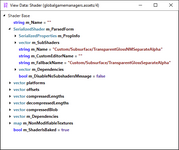
Grab all renderers in the scene, grab the material, then lookup the shader in the materials.
 
Upvote 0
Grab all renderers in the scene, grab the material, then lookup the shader in the materials.
What do you mean by lookup? What function can return the path to the shader I found?
If I need to replace CUA's shader to VAM's shader and currently scene does not have objects with desired shader, and I should to load shader using path, not stealing it from object.
 
Upvote 0
What do you mean by lookup? What function can return the path to the shader I found?
If I need to replace CUA's shader to VAM's shader and currently scene does not have objects with desired shader, and I should to load shader using path, not stealing it from object.

You might want to document yourself if you're diving that deep in asset modification and understand how unity works. You can actually steal any material, duplicate it and apply it... but that's not the subject.

A material instance contains the shader, you can grab it by doing material.shader
Then from the shader you can find out the name.

Unity's documentation is quite thorough, read it : https://docs.unity3d.com/ScriptReference/Material.html
 
Upvote 0
You might want to document yourself if you're diving that deep in asset modification and understand how unity works. You can actually steal any material, duplicate it and apply it... but that's not the subject.

A material instance contains the shader, you can grab it by doing material.shader
Then from the shader you can find out the name.

Unity's documentation is quite thorough, read it : https://docs.unity3d.com/ScriptReference/Material.html
Well, I already searched information about it, and in documentation too, before asking here. But who knows that need to use .name for shader, not material, to get desired paths.
Correct answer would be something like "Shader.name property returning path to this shader asset which can be used in Shader.find function". I think meshes and textures can be found the same way :unsure:
 
Upvote 0
Well, I already searched information about it, and in documentation too, before asking here. But who knows that need to use .name for shader, not material, to get desired paths.

That's logical : A renderer uses a material, a material is using a shader, the shader contains its path. Hence why Vamifier variable is called "VAM_SHADER...."
You know that if you understand how that works.


Correct answer would be something like "Shader.name property returning path to this shader asset which can be used in Shader.find function"

If what you're implying is that I should have told you directly the Shader.name thing, my reason behind that is because I'm assuming you actually know all this as your original question is quite technical.


I think meshes and textures can be found the same way

Kinda, obviously meshes and textures are not tied to the shader.
 
Upvote 0
Shader.find function can find shaders from:
  • Shapes tab objects, like Cube, Sphere, etc. Shader name is "Custom/Subsurface/TransparentGlossNMNoCullSeparateAlpha"
  • FloorsAndWalls tab. Shader name is "Custom/Subsurface/GlossNMCull"

But some other objects like different panels from Misc tab have shader name which could not be found via Shader.find:
  • ImagePanel: "Custom/Subsurface/GlossCutoutNoCull"
  • ImagePanelEmissive: "Custom/Subsurface/EmissiveCutout"
  • ImagePanelTransparent: "Custom/Subsurface/TransparentGlossNoCull"
Even AptCoffeeTable has "Custom/Subsurface/Transparent" but function Shader.find returns null shader. Should the name contain assetbundle path to make it work or something else?

Also, classes Mesh and Texture2D does not have .find functions, so how to find these asset types is not yet clear.
 
Upvote 0
I don't even know what you're trying to do. CUA do not need VAM Shaders to work properly. And they actually look kinda worst with Vamifier/VAM's shader than a proper custom PBR shader. But anyway.

What do you want to do with meshes and textures?
You can't access these assets up until they're loaded, you don't "Find" them, you have to grab their reference in the mesh renderers or the materials.
 
Upvote 0
I don't even know what you're trying to do. CUA do not need VAM Shaders to work properly. And they actually look kinda worst with Vamifier/VAM's shader than a proper custom PBR shader. But anyway.

What do you want to do with meshes and textures?
You can't access these assets up until they're loaded, you don't "Find" them, you have to grab their reference in the mesh renderers or the materials.
I need a proper methods to get different assets to use it in different future plugin ideas.

For example, in my plugin "Controllers Appearance" I made a feature to draw lines from controller to it's rigid body, but it needs material. My plugin just making copy of controller's material and change it. For now I tried to get shader and it returns "Custom/TransparentHUD", but Shader.find returns null from this name. And I should steal shader from existing object.

Default Unity's materials looks different in VAM, because developers wrote their own shaders to work differently with lights and some other stuff. I made a post about it some time ago https://hub.virtamate.com/threads/cua-shaders-vamifier-ignoring-roughness-gloss.67012/
Vamifier replacing standard materials with VAM's one, but ignoring important maps written in alpha channels. I wanted to experiment with this and make it work better.
 
Upvote 0
For example, in my plugin "Controllers Appearance" I made a feature to draw lines from controller to it's rigid body, but it needs material. My plugin just making copy of controller's material and change it. For now I tried to get shader and it returns "Custom/TransparentHUD", but Shader.find returns null from this name. And I should steal shader from existing object.

For UI, use builtin shaders from Unity, or create your own shaders in a custom assetbundle. That's not like these basic materials for UI/UX are really important.


Default Unity's materials looks different in VAM, because developers wrote their own shaders to work differently with lights and some other stuff. I made a post about it some time ago https://hub.virtamate.com/threads/cua-shaders-vamifier-ignoring-roughness-gloss.67012/
Vamifier replacing standard materials with VAM's one, but ignoring important maps written in alpha channels. I wanted to experiment with this and make it work better.

VAM Shader is a marmoset based shader, you won't have access to the source as it's licensed.
But you should be able to get proper assets without using vamifier. As I was saying build your own custom PBR shader for you assets.

Default Unity's material at the time were kind of basic, and today they are quite obsolete.

Also, VAMifier simply swaps a material, if your object does not react properly to it, it simply means your textures are not adequat for the material OR that you're providing information through your texture channel the material does not understand.
 
Upvote 0
Well, Unity standard shaders does not use VAM's scene global illumination, skybox, and for Light objects - shadow strength and point bias. Mixing cuas with character likely look unnatural. And making custom PBR shader will not help with this VAM's lights parameters.
Thanks for the answers, I just need more time to dig and experiment with all this things :unsure:
 
Last edited:
Upvote 0
Well, Unity standard shaders does not use VAM's scene global illumination, skybox, and for Light objects - shadow strength and point bias.

No.
This below is a set of 3 objects with Unity's default shader, shadow strength works, point bias works, global illumination color works. The only exception to the rule is the skybox information missing.
Which is not really a concern since pretty much no one uses default skyboxes anymore and can use SkyMagicLoader on custom skyboxes to compensate (if they are actual "real" hdri skyboxes).

And the second image is only with custom shaders and a proper skybox/custom reflection probe GI, which also works with all VAM's light settings, including GI color.
Maybe your Unity is not setup properly.

vam-unity-default.jpg
vam-custom-shader.jpg
 
Upvote 0
Guess where is standard material ✨
I've just copy albedo color and set smoothness to 0.75

Maybe your Unity is not setup properly.
We are talking about vam, and it's assets, setupping unity will not help to render images in vam.

That params, which I said before, did not work, or did not work properly. For example, shadow strength on standard material is inverted and changing opacity, not smoothness.

If you will say "Need to setup material in unity before exporting it to assetbundle to make it work properly", I would say that not sure about many other creators from hub. Not really sure that at least 50% of asset creators making assets with completely well configured materials and textures. This means I shouldn't use most of the content from other users, but making my own for every new scene with fully configured materials for my needs.

Vamifier plugin's idea was to fix this strange behavior, and make all assets look same, but it is not completed.

(And actually, this conversation starts with asset paths, but we are talking about materials)
 

Attachments

  • VAMMaterials0001-0600.mp4
    14 MB
Upvote 0
We are talking about vam, and it's assets, setupping unity will not help to render images in vam.

Of course it does.

Assets coming from Unity are compiled and built with YOUR Unity project. If your unity project is not setup properly, it will fail to render properly inside of VAM.
You can go as far as building assets that do not render properly for a mono stereoscopic VR pipeline just by building an assetbundle with incorrect settings.

Your video exactly shows the problem. The left cube does not render with NGSS ( see this ). And on top of that if I'm showing you a capture of a basic export I do in my project, working for both bias and shadow strength, you obviously have a problem on your end.

Beyond I don't know if it's a language barrier thing or what not, but it seems you have all the answers so I think I'll let you find out by yourself.
 
Upvote 0
Well, as you said, unity needs some special setup, and default settings making export material with light errors. Even if material is correct, unity from different persons compiling it differently. It seems that even fewer people have dug so deep, so a lot of cua assets potentially have materials errors.
Tried to check it with different random assets. Some of them have correct shadow smoothing, some of them not.

I'll read your tutorial, it will help to make better assets, but anyway, a lot of assets from other creators have wrong unity setup, which causing incorrect shadow smoothing by point bias and shadow strength params. And all cuas still dont use scene's global illumination settings and camera exposure.
It is not fixing problem of using assets from other creators, so the answer is still open :unsure:

I believe that default official workflow should make same result, but while we don't have official template for creators, we will have many assets with random issues.
 

Attachments

  • VAMMaterials20001-1840.mp4
    28.8 MB
Upvote 0
Back
Top Bottom