• Hi Guest!

    We are extremely excited to announce the release of our first Beta1.1 and the first release of our Public AddonKit!
    To participate in the Beta, a subscription to the Entertainer or Creator Tier is required. For access to the Public AddonKit you must be a Creator tier member. Once subscribed, download instructions can be found here.

    Click here for information and guides regarding the VaM2 beta. Join our Discord server for more announcements and community discussion about VaM2.
  • Hi Guest!

    VaM2 Resource Categories have now been added to the Hub! For information on posting VaM2 resources and details about VaM2 related changes to our Community Forums, please see our official announcement here.

VaM 1.x Package VAR with Video

Threads regarding the original VaM 1.x

BritishScenes

Member
Joined
Oct 3, 2024
Messages
37
Reactions
67
Hi all,

I'm struggling to package a scene I've made, a person is watching a video on the furniture SmartTv, this is a short low quality 40mb video, but is relevent to the scene.

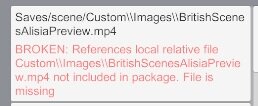
Whenever I try to add this video file to package builder, it started saying local files outside of installation but now It says it's missing even though I have included it?

Are we not allowed to include short video clips with a VAR, or am I doing something stupid?

pic for reference, thanks in advance.

1.jpg
 
You can add any files you want to a VAR, there's no limitation in place.

Two things of note:
  • You can see in the references screenshot that those paths don't look right. How did you manage a Saves/scene/A:\\Virt... path? Are you using some kind of external tool to move out stuff elsewhere or something unusual?
  • If you include a local file in the scene's smarttv atom, then Package Builder willl see that reference in the scene's JSON. It will show the button to import the video to the list of Contents, you don't need to manually add it.
Check the packaging guides to understand better how Package Builder works if you're not that experienced with it.
 
Thank you for your reply, it seems in my smart tv trigger path to play the video I referenced A:/virta5/custom/images instead of just custom/images/ so I have fixed that many thanks for your help.

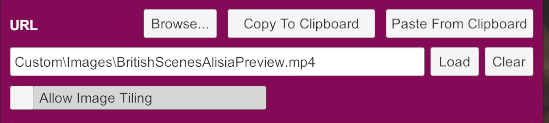
I still have this error. I have no idea what is causing it, the path is clearly wrong but I am not sure is referencing this path. :/

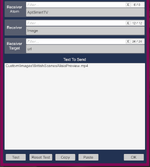
I have included my TV path to show it is not that causing it.
 

Attachments

  • 1.jpg
    1.jpg
    13.9 KB · Views: 0
  • 2.png
    2.png
    14.5 KB · Views: 0
  • 3.png
    3.png
    30.9 KB · Views: 0
The path in the first image continues to be incorrect: Saves/scene/Custom\\...
Open the scene JSON in Notepad or similar, search for your video and see what is referencing and anything weird related.
 
Thanks again,

the JSON file makes no reference to this incorrect path and both paths in the JSON are correct, not sure what to do from here :S

@atani , must have been a bug in the save file, started a new save file and error is gone.

Thanks for all your help especially clearing up first mentioned errors!
 
Last edited:
This is a known bug in VAM, it sometimes completely fucks up with rewrites in the paths (never found out why).
The only solution I found to that is by fixing it manually in the file.
 
This is a known bug in VAM, it sometimes completely fucks up with rewrites in the paths (never found out why).
The only solution I found to that is by fixing it manually in the file.
Thanks @hazmhox appreciate your reply, I couldn't even find this janky path in the JSON so not sure where it is recalling it from.. but all fixed :)
 
Back
Top Bottom