

Hey, there! First post on this forum, bit of an odd question-
I want to experiment with rendering the character and environment of a scene separately, so I can put post processing effects and a depth of field and more involved stuff separately than the character(s) on stage. The idea would be instead of messing with post magic depth of field effects and other stuff, you just make a blurry/stylized background and render the character in focus. So my question is, is there any way to hide objects/an environment but still keep the collision of the environment? I would still want the bed/room/couch/whatever to affect the characters, just not be visible in the render so I can still have transparent .pngs. I'm aware there are plugins for making characters/body parts invisible, but I'm relatively new to the scene and don't know if there's some obvious way to achieve what I'm going for here.
It may be impossible and I'll just maybe try using hold on body controllers to keep characters in place instead of falling through non-existent "stuff", but keeping the colliders and losing the graphics would be the ideal solution.
Thanks in advance if anybody has advice!
P.S.
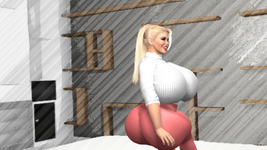
Just as a quick and dirty visual aid of what I mean, here the environment was run through a post processing deal but the character was left as is. The character isn't really interacting with the environment because it had to be rendered separately. I'm realizing now I'd also have to figure out a way to hide body parts which should be concealed by the environment, but one step at a time haha. How could I make it so this character actually is colliding with the bed while the bed isn't visible?
I want to experiment with rendering the character and environment of a scene separately, so I can put post processing effects and a depth of field and more involved stuff separately than the character(s) on stage. The idea would be instead of messing with post magic depth of field effects and other stuff, you just make a blurry/stylized background and render the character in focus. So my question is, is there any way to hide objects/an environment but still keep the collision of the environment? I would still want the bed/room/couch/whatever to affect the characters, just not be visible in the render so I can still have transparent .pngs. I'm aware there are plugins for making characters/body parts invisible, but I'm relatively new to the scene and don't know if there's some obvious way to achieve what I'm going for here.
It may be impossible and I'll just maybe try using hold on body controllers to keep characters in place instead of falling through non-existent "stuff", but keeping the colliders and losing the graphics would be the ideal solution.
Thanks in advance if anybody has advice!
P.S.
Just as a quick and dirty visual aid of what I mean, here the environment was run through a post processing deal but the character was left as is. The character isn't really interacting with the environment because it had to be rendered separately. I'm realizing now I'd also have to figure out a way to hide body parts which should be concealed by the environment, but one step at a time haha. How could I make it so this character actually is colliding with the bed while the bed isn't visible?
Attachments
Last edited:


