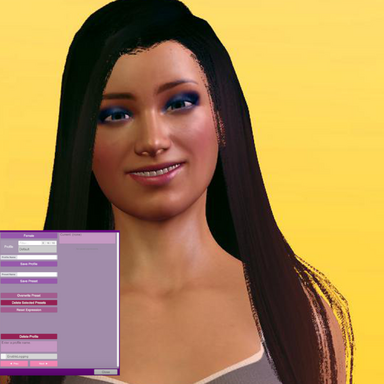
Expression Presets

Plugins + Scripts Expression Presets

Download [<1 MB]
starman updated starman's Expression Presets with a new update entry:

Expression Presets v2 - Auto detection

Update 30/11/2026

  • Added auto detection of expression morphs installed.
  • Session plugin no longer required at all.
  • Session plugin can still be used by advanced users to add supplementary morphs of whatever kind you like.
  • UI stuff
The facial expression morphs currently available on Hub are found automatically by the plugin including tongues with bone mod formulas ect. Duplicate morphs are handled and saved. Session plugin can still be used to add whatever body morphs...

Read the rest of this update entry...
 
Your plugin is absolutely amazing—I sincerely hope you can add a preview image feature. You know, when there are so many custom emojis, it’s impossible to distinguish them intuitively with just text.
 
Oh good, I'm glad it's working! There are several ways to hot save and not having through go the thumbnail snapping process is the slimmed down way for quick use. I will consider thumbnails if I return to this plugin!
 
Best expression plugin for me. In addition to optional thumbnails, it would be nice to have float on/off value for expressions (from 0 to 1), so that you can animate whole preset with just one node in a timeline with a trigger. Also copy/paste would be nice.
 
Good the plugin is getting use! Thumbnails I won't work with until Vam 2 because of the restrictive MVR plugin UI. I'd have to remake the plugin with a custom UI to do that.

As for a stored value for a preset to be "on"... It's a list of morphs and a static value. The morphs can be mutated in between applications. When you load a preset all morphs are first reset, and then preset is applied. Maybe a merge load function is what you mean.. but turning a preset off while remembering that other lists of morphs are "on" sounds like a state machine. The presets work just like the MVR native morph presets: the only real difference is it targets only expression morphs.

The plugin triggers can be used together with one of the state machines that are on the hub. For TL I don't use this, and instead use TL itself and a Expression Randomizer for these morphs.

Making a merge load trigger is possible if there is a use for it.
 
Last edited:
I 'm not familiar with vam api, i might be wrong here. I was referring to ability of appling presets gradually. For example, some preset has saved smile morph with value of 1 and eye morph with value of 0.5, and if you apply it on 50% you set smile to 1 * 50% = 0.5 and eye to 0.5*50% = 0.25. I checked up the script, loading should be straightforward to implement
Code:
private void LoadExpression(string name, float proportion = 1) // overload for partial preset load, proportion goes from 0 to 1
{
    //Bunch of stuff here
    
    //apparently here goes applying of saved morph values
    for (int i = 0; i < morphArr.Count; i++)
    {
        string id = morphArr[i]["id"].Value;
        float value = morphArr[i]["value"].AsFloat;

        float proportionalValue = value * proportion; // modify saved value by proportion from input
        if (resolvedMorphs.ContainsKey(id))
        {
            resolvedMorphs[id].morphValue = proportionalValue; // applying modified value
            string label = resolvedMorphs[id].resolvedDisplayName;
            if (string.IsNullOrEmpty(label)) label = id;
            sb.AppendLine(label + " " + value.ToString("F2"));
        }
    }
    
    
    //Bunch of stuff here also
}

No idea about how UI implementation works here though
 
Oh, that's what you mean of course. I read the request too quickly. Yes, that's very possible.

I didn't have a use case for this on presets but it's easy to do. I'll look at it when I find the time later this week. At the very least it can just be exposed to be driven by VAM's trigger system. So any slider or float driver plugin will work with it. For Timeline that is the use case.
 
Last edited:
starman updated Expression Presets with a new update entry:

Expression Presets v4 – Animatable Transition Weights

  • Added a per-preset float param: "Weight: ProfileName: PresetName"
  • Added a global float param that drives the last selected preset: "TransitionWeight"
These allow presets to be driven (animated) by VAM's transition trigger system, sliders, AcidBubble's Timeline or Everlaster's FloatParamRandomizer. Could be useful.

No UI for this in the plugin. These are things found in the list when defining an external transition trigger.

Note that driving multiple presets at the same time that contain the same morphs will conflict.

Read the rest of this update entry...
 
Last edited:
Hello there,

First of all, great plugin! Works very well! For me, this is the best expression plugin I have found.
I like it so much that I've experimented with adding some features myself.

I would like to get in touch with you to discuss if you would be interested in porting them back, or would rather let me work on a fork of this myself.

It started with a simple addition of an action with which you can play a random preset of a profile.
Then I also added animations. I just noticed you have done this as well lol.

Intensity slider 0.0 - 1.0
The intensity setting scales the effect of the morphs. IE. on intensity 0.5 all morphs will be applied at 50% of their preset value.
This slider can be manually controlled via UI or connected to something like vammoan or cheesyfx's plugin. Connect it to arousal or orgasm count for example.

Reactions
Action-triggerable "reactions", which is like activating another preset, but it remembers which preset you originally had active.
Once the reaction is done, it reverts to the preset it was before.
Reactions can be merged with a factor of 0.0 - 1.0, where 0.0 would be no reaction, 0.5 would be 50/50 merge of current preset and reaction preset and 1.0 would be completely the selected preset.
Only supports triggers, like StartReaction, StopReaction, FadeReaction(seconds)
Reactions also follow the intensity slider - unless the minimal reaction of the reaction's profile is set to 1.0.

Use case
You can now make a profile with "lewd faces" for basic expression presets with min-intensity 0.3. And a second profile for "orgasms" with min-intensity of 0.5.
You can make a button which loads a random lewd face. And you can connect it to CheesyFX's plugin suite to
- play a random orgasm face on orgasm
- fade back to the previous lewd face after orgasm
- control the intensity by the amount of orgasms, for example orgasm 0 = intensity 0.0 and orgasm 10 = intensity 1.0
 
Thanks! The plugin was made for the case of creating expressions without going through many steps. I plan on a release of this with the full freedom of VAM 2.

The uses cases are good. The load random preset from profile for one, is trivial and a good useable case.

I have a few thoughts and plans here and some unreleased ways in which I have solved this. Also, there are technical problems and design constraints for concept of intensity on a preset across the larger morph system - which is messy and not at all uniform. I'll return with a reply later, when I have the time.
 
Thanks! The plugin was made for the case of creating expressions without going through many steps. I plan on a release of this with the full freedom of VAM 2.

The uses cases are good. The load random preset from profile for one, is trivial and a good useable case.

I have a few thoughts and plans here and some unreleased ways in which I have solved this. Also, there are technical problems and design constraints for concept of intensity on a preset across the larger morph system - which is messy and not at all uniform. I'll return with a reply later, when I have the time.

Cheers. Well, if you're interested I already have these things working and can provide my code to you as a reference.
Granted, they might not be up to standard. But as far as I see, they are working great.

Just let me know if you're interested or if there's anything I can do to help improve this already great plugin even further.
 
Yes, I will be solving this. Upon considering the problem, I realize a big solution. I will make a big post at some time.
 
starman updated Expression Presets with a new update entry:

Expression Presets v5 - Big Update. Thumbnails, Blending, Random, Exclusions, and Stuff

  • Presets can have thumbnails
  • Added a string chooser param: "Blend Preset" - Empty means off.
  • Added a float param: "Blend Weight"
  • Added an action: "LoadRandomPreset"
  • Added an action with a profile picker: "LoadRandomPresetFromProfile"
  • Added param: "AutoLoadPresetAfterPoseChange"
  • Morphs can be marked as excluded, and excluded morphs are left out of presets you save
  • The Morph Editor sliders now show live morph values
  • Copy and Paste buttons for the morph list...

Read the rest of this update entry...
 
Now a big post.

Two things added will allow for you ideas. Blend and Transition weights. These two things composite on each other.

The things I added fit the plugin because they can be exposed as actions without changing the preset format and use case or adding more UI.

I don’t plan to add global intensity, per-profile minimum intensity, or a reaction system to the base plugin, however. That is architectural decision not a rejection of the use cases - they just belong elsewhere.

Expression Presets is to behave like VaM’s presets. Stable, lists of morph values that don't care about scene and can be used for anything. The plugin should save and expose those values while leaving any logic that drives them to other systems. Data such as minimum intensity, reaction duration, and animation behavior belongs to the scene or controlling plugin rather than the reusable preset JSON plugin.

There is also animation related reasons for separation. For it's actual use, a saved expression is an uncalibrated vector. It's a list of morps that look good in a snapshot, along with any junk morphs captured such as eyelid blinking. Different morph packs use very different ranges, some scale well only to 0.25 and others want 2. Scaling every morph uniformly can work well for some morph packs, but it is not a reliable animation model.

Creator level animation needs separate timing for different parts of the face. For example, the eyelids might react immediately while the brow and mouth move and recover at different speeds. That is better handled by an animation system with per-morph timing and curves.

I don't mention this to discourage a use of the presets that works and is easy to use, but this is also why it's not in the preset plugin itself, and why I use Timeline.

The Weight: Profile: Preset parameters provide the simple form of intensity control: 0 is no contribution and 1 is the expression exactly as the creator saved it. I deliberately keep that range at 0–1. It always looks good, if the user saved the expression at a good value. The saved preset is the intended maximum, which keeps the result predictable across presets and preserves compatibility with scenes already using these parameters. A controller can map any desired input range onto that weight. A preset for only animation would then be saved at a maximum wanted value and controlled by external drivers upon load.

Overlays provide the primitive needed for reactions: apply a reaction over the current expression, then reduce or remove its weight to reveal the original expression again. The timing, random selection, fade behavior, and state logic can then live in a dedicated controller.

I think your system could work well as a separate plugin. That would give you room for the controls and state it needs without making the preset manager responsible for a particular animation workflow. It could use my preset JSON files and exposed parameters as a stable source of expressions while storing its own configuration in the scene or its own data. I won't change the JSONs or params down the line because I want save compatibility for users, so this will be stable to build on.

Already, with the params that exist your mentioned case can be solved with MacGruber's logic and trigger managers on the Hub to work with something like the CheeseyFX plugin you mentioned to do all you wanted there. This could be tedious to set up so you might want a plugin board instead.

Good plugins do one thing very well, and don't do too much. There's plugins that try to do it all and end up in a not very good state. I wish to make plugins that do one thing well but can be integrated into any other things.

So this is not discouragement. What you can build is good for a real case, just not in a base preset plugin. I could make the base plugin have the extensions needed for any plugin that wishes to use the JSONs and params.

Personally, I use a modified Timeline for this case to remove the tedium of adding morphs but it's not releasable. I had put aside releasing some kind of plugin for this until VAM2, but I have started looking into it again. It depends on various alignments of astrological bodies if my attention wanders from these ideas.
 
Thank you very much for the update and your thoughts on what and why.

First of all, compliments to the huge update to the plugin! The UI is stunning and I'm impressed!
I will definitely check out how you have been able to do that. And the added features are super nice!

I like your reasoning and agree with you completely on the architectural vision for the plugin.
Always makes me happy to see when people are taking software development seriously.

I have never really gotten the hang of working with timeline and animations. Maybe I should look into that a bit more.
But in general, I am more interested in dynamic behavior and less interested in hard animation paths. I prefer not knowing what's coming up next.

I am currently working on some other things as well. But I have quite a few ideas for expression related components which would be a good fit to connect to Expression Presets.

Cheers for wanting to keep Expression Presets open for integration with plugins, that makes it even better.
 
starman updated Expression Presets with a new update entry:

Expression Presets v6 – Minor Fixes and Thumbnail Scaling

  • Fixed: Overwrite and Next/Previous no longer lose track of the loaded preset after a thumbnail snap or UI reopen.
  • The toast message at the top always shows the current preset used for Auto-load and weight params. If none, then it says none.
  • Added Thumbnail scaling. Thumbnails are saved at 265px so they look best around 260 on the slider.
  • Minor fixes.

Read the rest of this update entry...
 
Thanks! The patterns are all there to be seen. The customization is probably excessive but it was done for fun this time. The tabs and compact custom elements were easy to add as I had created them all months ago for an unreleased major project that needed many small UI pieces, but I lost interest in finishing.

Yes, I will keep the presets compatible for any external use. Add of course, there are patterns that can be re-used here.
 
Back
Top Bottom