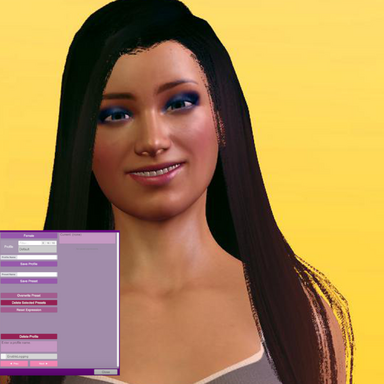
Expression Presets

Plugins + Scripts Expression Presets

Download [<1 MB]
  • Added Overlay target preset and Weight
  • Show/Save Thumbnails, Enable Logging and Thumbnail Size now save to a settings file on disk instead of saving to scene.
  • Added preset rename - just fill in a name before Overwrite.
  • Reset morphs now does not clear targets for Blend and Overlay. It just sets those sliders to zero.
  • The last loaded preset is now always remembered upon scene load.
  • Improved how Per-preset Weight floats were written to the scene so there is no save bloat.
  • Minor improvements.

Overlay target preset: Unlike Blend it sits on top of the loaded expression instead of crossfading with it, and holds through preset loads and pose changes. Good for pinning something like a mouth closed morph onto a look with a constant slack jaw. Or just whatever you can think of.

Obviously, running an Overlay using the same morphs as the base expression will conflict.

It's feature complete now and probably won't get updated again unless something really needs it.
  • Fixed: Overwrite and Next/Previous no longer lose track of the loaded preset after a thumbnail snap or UI reopen.
  • The toast message at the top always shows the current preset used for Auto-load and weight params. If none, then it says none.
  • Added Thumbnail scaling. Thumbnails are saved at 256px so they look best around 260 on the slider.
  • Minor fixes.
  • Presets can have thumbnails
  • Added a string chooser param: "Blend Preset" - Empty means off.
  • Added a float param: "Blend Weight"
  • Added an action: "LoadRandomPreset"
  • Added an action with a profile picker: "LoadRandomPresetFromProfile"
  • Added param: "AutoLoadPresetAfterPoseChange"
  • Morphs can be marked as excluded, and excluded morphs are left out of presets you save
  • The Morph Editor sliders now show live morph values
  • Copy and Paste buttons for the morph list
  • UI stuff and things

Things worth reading:

Blend crossfades a second preset over whatever preset is currently loaded. At weight 0 you only see the loaded preset, at weight 1 you only see the blend preset. The loaded preset can be changed while a blend is running and if done at Blend Weight=1, then you fade out to a different face than you faded in from seamlessly.

"Auto-load preset after pose change" This listens for Pose changes w/o polling, and resets and loads the selected preset after the Pose loads. Weight and Blend are respected. Animated morphs are not pose loads and are left alone. Essentially, this allows to set a base expression mood for the poses in a pose storyboard or all Timeline animations with one button, while leaving complementary morphs to the scrubber. Neato.

The Morph Editor screen: while it is open the params included in plugin itself stop driving morphs until you leave that screen. Other morph automations not from the plugin are not affected.

Blend and Weight params are not driven by the plugin itself. They are primitives to be driven by other automations.
  • Added a per-preset float param: "Weight: ProfileName: PresetName"
  • Added a global float param that drives the last selected preset: "TransitionWeight"
These allow presets to be driven (animated) by VAM's transition trigger system, sliders, AcidBubble's Timeline or Everlaster's FloatParamRandomizer. Could be useful.

No UI for this in the plugin. These are things found in the list when defining an external transition trigger.

Note that driving multiple presets at the same time that contain the same morphs will conflict.
  • Added morph slider browser/editor that shows only expressions
  • You can now create and save expressions on one screen. Luxury.
  • UI things
Yes, indeed.
Update 03/11/2026

  • Added auto detection of expression morphs installed.
  • Session plugin no longer required at all.
  • Session plugin can still be used by advanced users to add supplementary morphs of whatever kind you like.
  • UI stuff
The facial expression morphs currently available on Hub are found automatically by the plugin including tongues with bone mod formulas ect. Duplicate morphs are handled and saved. Session plugin can still be used to add whatever body morphs you feel like and it saves to disk as an extra list to handle.

This update is compatible with presets made with the old system.

Thanks to Everlaster and VamTimbo as the pattern in Expression Randomizer was very helpful.
Back
Top Bottom