• Hi Guest!

    We are extremely excited to announce the release of our first Beta1.1 and the first release of our Public AddonKit!
    To participate in the Beta, a subscription to the Entertainer or Creator Tier is required. For access to the Public AddonKit you must be a Creator tier member. Once subscribed, download instructions can be found here.

    Click here for information and guides regarding the VaM2 beta. Join our Discord server for more announcements and community discussion about VaM2.
  • Hi Guest!

    VaM2 Resource Categories have now been added to the Hub! For information on posting VaM2 resources and details about VaM2 related changes to our Community Forums, please see our official announcement here.
LookCam Assistant

Plugins + Scripts LookCam Assistant

Download [<1 MB]

Kimowal

Well-known member
Joined
Dec 27, 2022
Messages
276
Reactions
576
Kimowal submitted a new resource:

LookCam Assistant - Camera Camera Tools, Camera Control, Cinematics View Saver,

LookCam Assistant is a camera bookmarking and navigation tool for VirtaMate that lets you capture, organize, and replay camera views with ease.
It’s built for creators who move the camera a lot while building scenes, posing characters, or framing shots — and want a clean way to save and return to great angles.


The plugin watches the main camera and automatically saves a camera mark when you stop moving, or you can capture views manually at any time. Each view stores full...

Read more about this resource...
 
Hey everyone :) how does the plugin work for you? any futures you like to see or is it good as-is?
 
Kimowal updated LookCam Assistant with a new update entry:

Favorites & Category Overhaul

LookCam Assistant – Favorites & Category Overhaul​


This update focuses on making large camera lists easier to manage, especially in complex scenes with many bookmarks.


New layout & organization features


  • Favorites Filter
    Added a toggle to show only favorited cameras. Perfect when you have lots of captures but only use a handful during recording.
  • Category System (6 built-in categories)
    Each camera capture can now be assigned to...

Read the rest of this update entry...
 
Am I missing something?. How do you rename a camera position?. It says click on the search filter field and enter the new name (What is the search filter field?). Where the name is shown its a label not a text input box so you cannot enter or change the text.
 
Am I missing something?. How do you rename a camera position?. It says click on the search filter field and enter the new name (What is the search filter field?). Where the name is shown its a label not a text input box so you cannot enter or change the text.
No ur not, my fault i shouldve doublechecked before the release. there will be an update but right now im a bit occupied with the other plugins, but il get to it :)
 
No ur not, my fault i shouldve doublechecked before the release. there will be an update but right now im a bit occupied with the other plugins, but il get to it :)

Ok, thankyou for the quick reply. Look forward to next release
 
Kimowal updated LookCam Assistant with a new update entry:

1.0.3

⭐ LookCam Assistant — Favorites & Category Overhaul Update


This update focuses on solving one of the biggest challenges in scene building:
managing large lists of camera captures in complex scenes.


With new filtering tools, categories, and UI improvements, LookCam Assistant is now faster and much easier to navigate — especially during recording or animation work.


⭐ 1. Favorites Filter


A new Favorites Only...

Read the rest of this update entry...
 
Kimowal updated LookCam Assistant with a new update entry:

1.0.5 - Ui Structure & Workflow Update

⭐ LookCam Assistant 1.0.4 — UI Structure & Workflow Update


This update focuses on clean UI structure, improved workflow, and full consistency with PoseSaver’s layout pattern.
The goal was to make LookCam Assistant easier to understand, faster to use, and more reliable — especially in VR.


🧭 1. New Main Tab System


LookCam Assistant now uses a clear two-tab layout:


  • ⚙ CONTROLS — plugin status...

Read the rest of this update entry...
 
Kimowal updated LookCam Assistant with a new update entry:

1.0.6

🎥 LookCam Assistant , 1.0.6 Update​


This update adds Director Mode, allowing LookCam Assistant to automatically switch between your saved camera angles.

You can now:
  • Automatically cycle through saved camera angles
  • Choose sequential or random switching
  • Control how long each angle is held
  • Stop automatically after one full pass (No Repeat mode)
This makes LookCam Assistant usable for simple video creation, previews, and hands-free...

Read the rest of this update entry...
 
I have a question about the plugin features.
Is there a way to disable smooth camera transitions?
I want the view to switch immediately when I click a captured camera.
It would be great if the minimum value for TransitionSpeed could be set to 0.
 
Can't the camera position be updated? Maybe you can add this feature
 
I have a question about the plugin features.
Is there a way to disable smooth camera transitions?
I want the view to switch immediately when I click a captured camera.
It would be great if the minimum value for TransitionSpeed could be set to 0.
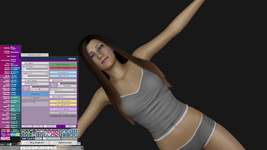
Hey and sorry for late answer 🙄 il look into this and il see what i can do. UPDATE : ok so transitionspeed is now set to 0 , an update will be up shortly
 
Last edited:
Kimowal updated LookCam Assistant with a new update entry:

1.0.7

LookCam Assistant - Update 1.0.7​

New Features​

1. Instant Camera Transitions​

  • TransitionSpeed can now be set to 0 for instant camera switching
  • No more forced smooth transitions - click and instantly switch views

2. Update Camera Position​

  • New "Update Position" button on each camera
  • Overwrites the saved position with your current camera view
  • Automatically...

Read the rest of this update entry...
 
Hello,

Thank you for the update.

After installing the plugin with this update, I tested the following workflow:
I captured a camera, saved it as cam1, and clicked Load Position. I confirmed that the feature worked correctly.

However, when I tried to resume my work and pressed F to focus the camera on a person, the camera focus became misaligned. If I press F repeatedly, the camera position continues to drift further away.

Even after deleting the plugin, pressing F continues to cause the camera focus to become misaligned.
At that time, the Session Plugin list was empty.
If I completely close VAM and launch it again, pressing F once correctly focuses the camera.
After that, even if I load LookCam Assistant again, the focus continues to work normally.
However, once I capture a camera and press Load Position, the issue starts again.
After using Load Position, pressing F causes the camera focus to become misaligned, and repeated presses make the camera drift further each time.

I would like to ask if the F key is assigned as a shortcut within this plugin.
If not, this behavior feels like a possible bug, so I wanted to report it to you.

Thank you for your time, and I appreciate your work on this plugin.
 
Last edited:
Hello,

Thank you for the update.

After installing the plugin with this update, I tested the following workflow:
I captured a camera, saved it as cam1, and clicked Load Position. I confirmed that the feature worked correctly.

However, when I tried to resume my work and pressed F to focus the camera on a person, the camera focus became misaligned. If I press F repeatedly, the camera position continues to drift further away.

Even after deleting the plugin, pressing F continues to cause the camera focus to become misaligned.
At that time, the Session Plugin list was empty.
If I completely close VAM and launch it again, pressing F once correctly focuses the camera.
After that, even if I load LookCam Assistant again, the focus continues to work normally.
However, once I capture a camera and press Load Position, the issue starts again.
After using Load Position, pressing F causes the camera focus to become misaligned, and repeated presses make the camera drift further each time.

I would like to ask if the F key is assigned as a shortcut within this plugin.
If not, this behavior feels like a possible bug, so I wanted to report it to you.

Thank you for your time, and I appreciate your work on this plugin.
Hey, no the F has no function for my plugin as such.. however i was combining the camera wrong, which interfered with the original camera. so ive done a new update that should fix this. The update is already sent in and is awaiting release.
 
Hey, no the F has no function for my plugin as such.. however i was combining the camera wrong, which interfered with the original camera. so ive done a new update that should fix this. The update is already sent in and is awaiting release.
Thank you very much. I hope the update will be approved soon.
By the way, your plugin is amazing. It is extremely useful and really enhances the experience of enjoying VAM.
I also wanted to share a small suggestion:
It would be great if Physics Attachment Engine had a feature to save Attach settings for desktop mode, not only VR controller–specific attachments, directly into the scene. I think this would be very helpful for desktop users.
Thank you again for all your hard work and dedication.
 
Back
Top Bottom