• Hi Guest!

    We have posted a new VaM2 dev log on Patreon, starting a monthly cadence of written progress updates between Beta releases. Highlights include the new Gizmos System, Selection Carousel, and Modes System with Context-Specific Editing. Beta1.2 is 15 of 21 items complete.

    Read the full post on Patreon, or follow progress on the public Trello roadmap.
VAMStory

Plugins + Scripts VAMStory

Download [26.86 MB]
Thanks for the response. Yeah i kinda figured that's not what it was meant for. I'm not aware of the "normal preset system", could you point me in the direction of where to find it?

Any atom contains a "preset" tab. So in your empty for VAMStory, go to that tab, after you did all the things in there (data, settings etc) and then load that preset.
This should do it : )
 
Any atom contains a "preset" tab. So in your empty for VAMStory, go to that tab, after you did all the things in there (data, settings etc) and then load that preset.
This should do it : )
Oh wow, cant believe i missed that lol. Thanks a bunch
 
So, finally took a dig into this suite of plugins. Really great for setting up UI layouts, and managing mode switches. I think I avoided checking it out because of the top billing as managing complex, branching stories. Little did I know.

Especially love the UI customization options, one of which I would love to be able to customize more: Toggle switches, the actual check box itself. It would be really nice to be able to scale the checkbox, independent of the element itself. I can sort of work around this by increasing the UI scale of an an individual UICustom atom, but this setting is global, and for a panel of buttons, it would scale all of them up.

I often like to use toggles, both for UX clarity, and logic reasons (rather than swapping overlapping buttons on/off).

- Metix
 
Hey Metix!

I recommend using the VAMActionsCustom plugin (the one I recently added), and use the Toggle Button mode for your checkbox.
You the do backgrounds for off and on that are simply two checkboxes states. You can then size/place using the padding and text size as you wish. Just like I did in the demo : )

1762125318-png.538583
 
hazmhox updated VAMStory with a new update entry:

Bug Fixes & new tool

VAMStoryActions
  • Added Canvas order like ActionsCustom
  • Added Layer like ActionsCustom ( as usual, only works with Post Process enabled )
    ( poke @Shadow Venom )

Tools
  • Fixed a UI issue in Collision Manager
  • Fixed a location/rotation issue in Bind To Cam ( when binding/unbinding multiple times in a row ).
  • Fixed an issue in Bind To Cam where atoms others than CUA were binding to an incorrect position
  • Added...

Read the rest of this update entry...
 
Don't forget you need post process! ;)

(but I know you always have one :p)
 
@hazmhox plugin request: I LOVE the Director plugin for scenes. I use it in all of mine. But would it be possible to create a variant of that one to work on figures? This way, if I save a plugin preset (I often have up to like 20 different plugins going) the setup can travel as I load the plugin preset into a different scene? For clarity, this isn't to replace the overall Scene director plugin, it's more for a very complex setup of specific figure triggers.
 
@hazmhox plugin request: I LOVE the Director plugin for scenes. I use it in all of mine. But would it be possible to create a variant of that one to work on figures? This way, if I save a plugin preset (I often have up to like 20 different plugins going) the setup can travel as I load the plugin preset into a different scene? For clarity, this isn't to replace the overall Scene director plugin, it's more for a very complex setup of specific figure triggers.

Figures? You mean Person atoms?
How would that make it any different than saving a preset on an empty?
 
Figures? You mean Person atoms?
How would that make it any different than saving a preset on an empty?
Yes, on Person atoms. I have a really complex setup of triggers, collision sensors (from the Person atom's built in collision triggers, plus another collision trigger for body parts that don't have them) and If I did it with an Empty and a person, when I load one, the links will break because it doesn't have the other one. Unless there's a way to load an empty preset and a figure preset at the same time?
 
That's not tide to the atom it resides on, it's tied to your scene atom structure.
A plugin will always address the target atoms the way it's saved. So more or less, let's say you have 1 girl and 1 toy/CUA tied through director scripts. You need to save presets for each (the girl, the CUA) because load order matters, and then load your preset for your director.

Most of the links breaking are tied to atom naming and plugin load order. If your atoms are set properly before you load direct, it should be no problem. And having it on a person will not solve the problem if you don't create your base atoms properly : )

Unless I'm misunderstanding your use of course.
 
That's not tide to the atom it resides on, it's tied to your scene atom structure.
A plugin will always address the target atoms the way it's saved. So more or less, let's say you have 1 girl and 1 toy/CUA tied through director scripts. You need to save presets for each (the girl, the CUA) because load order matters, and then load your preset for your director.

Most of the links breaking are tied to atom naming and plugin load order. If your atoms are set properly before you load direct, it should be no problem. And having it on a person will not solve the problem if you don't create your base atoms properly : )

Unless I'm misunderstanding your use of course.
I'll send you a scene containing what I'm talking about over the next few days. It's not an emergency. :)
 
Is there a way to change the order of the triggers in Director? Like we can in vamactions
 
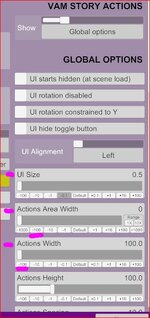
Would it be possible to have the ability to go way lower than 1000 with the Actions Area With?
So that it is possible to create vertical single columns for Actions with the lowest with.

With wider Action fields it's possible but with narrow fields i can only get down to 9 field in a row.

Vamstory Actions Area With2.JPG
 
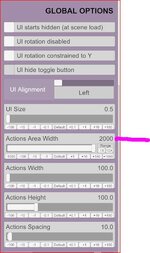
fyi: with 1st image managed to get my max per row as 9, same as you. With 2nd image, got all of my 14 on 1 row. Just did quick what i had, so maybe could get more than 14?
Having more than 9 in a horizontal row is not the problem.

My goal is, to have Actions with small Actions Width in one single vertical row ;)
 
Having more than 9 in a horizontal row is not the problem.

My goal is, to have Actions with small Actions Width in one single vertical row ;)
My bad. Apologies. Read too fast.
Saw "... narrow fields i can only get down to 9 field in a row.", and so thought this was part of issue.

Tried to replicate what you're trying to do with the goal of Very Slim Vertical Columns.
Can -100 Actions Area Width, and it goes below a 1000, even to negatives, but actually does nothing below 1000 regardless.
Only Actions Width makes em go Vertical eventually after dialing wider, but by then then soo wide.
Can see why you are requesting.

Thks for reiterating :)
 
Last edited:
hazmhox updated VAMStory with a new update entry:

Bug Fixes & new features

VAMStoryActions
  • Added the ability to setup a "deactivated" background color/opacity
  • Added both triggers to activate or deactivate an action ( makes the action visible, with another color/opacity but can't be interacted with )

VAMStoryActions Custom
  • Added the ability to setup a "deactivated" background color/opacity for each action
  • Added both...

Read the rest of this update entry...
 
Thank you for continuing making this plugin better. It's great and I use it in almost every scene, especially vamactions custom...
One thing I seem to miss in vamstory, could it maybe be added in the future?: It's the assignment of avatar image and position via a trigger (like, via vamstory director, one trigger could prepare everything for the active character(text alignment, text color, avatar and avatar position ))
 
Thank you :3

This is already possible, but not "in your face" as it's way more advanced scripting.

Any of the variables "Dial_X_Y-Something" is a variable tied to a specific dialog. You can control them at will if you want.
The ones you're asking for are "AvatarUrl" or "AvatarPosition" in place of "Something" above.

Some variables are easy to control (like the avatar position)... others, less. Url fields (like the avatar) is simply a full text path... you can specify it manually if you want.
I can't make this better as it is VAM's way of handling variables. So, changing/controlling the avatar position will be easy... the avatar itself tho, a bit more annoying.

Which is why myself, in my scenes, I simply prefer to duplicate/handle through a specific group, instead of doing scripting in another place.
If you think about it... unless it is a very basic change, if you're scripting through another source the behavior/content of a set of dialogs at a complex scale (several values, text change etc)... that's the litteral same thing as putting this in VAMStory and starting the group.
So, I would for instance create another VAMStory instance for specific situations/branching/dynamic systems to ease data management, instead of doing dynamic scripting which is gonna be a pain to manage or remember if you need to update that thing 3 months later. OR also because the "Dial_X_Y-..." prefix could change since you can order dialogs.
 
I was hoping it would not be that complex. Thought it could be like loading a clothing or pose preset via a trigger (just selecting it during the creation of the trigger via a button and choosing the file on disk).
With the Dial_X_Y... variables I maybe could figure something out by manipulating the json file...
Your advise of duplicating dialogs is better and safer. Only I tend to think of the avatars much later in the story progress...
But I have a lot I can try now. Thanks!
 
Back
Top Bottom