• Hi Guest!

    We have posted a new VaM2 dev log on Patreon, starting a monthly cadence of written progress updates between Beta releases. Highlights include the new Gizmos System, Selection Carousel, and Modes System with Context-Specific Editing. Beta1.2 is 15 of 21 items complete.

    Read the full post on Patreon, or follow progress on the public Trello roadmap.

Solved I can't make the sim work

engelkuchkuch

New member
Joined
Nov 19, 2025
Messages
23
Reactions
2
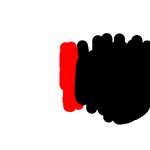
I've made the sim map.
Red = 255
red means stiff
black means loose.
save it as jpeg.
I uploaded the map.
Check sim enabled at physic tab
Check sim enabled at creator tab
But not working.

What am I missing?
 

Attachments

  • testMaterialLeftLowerSleeveSimTemplate.png
    testMaterialLeftLowerSleeveSimTemplate.png
    816.3 KB · Views: 0
  • sim.jpg
    sim.jpg
    223.8 KB · Views: 0
I've made the sim map.
Red = 255
red means stiff
black means loose.
save it as jpeg.
I uploaded the map.
Check sim enabled at physic tab
Check sim enabled at creator tab
But not working.

What am I missing?
Did you click on "Generate Sim Data" in the clothing creator after adding your sim texture?~

You shouldn't be using red 255, as full red means it is locked to the character and cannot be undressed later. Use 253/0.99. You don't want a white background either. Just have it black with a 253 red stripe in the middle.
 
Upvote 0
Generate Sim Data
IS what I'm missing.
The clothing now can be simulated.

But the Sim texture seems affecting the whole clothing.
How to control only some part of the cloth.
such as only the left lower sleever.

I loaded a sim map texture on creator tab > red 253.
I loaded a sim map texture on left lower sleeve all black.
But the black map doesn't make the left lower sleeve to get loose.

I can't paint only using the sim texture on creator page, because the position of each uv map of each part are on top of each other.
 

Attachments

  • Screenshot_4.png
    Screenshot_4.png
    450.5 KB · Views: 0
  • Screenshot_1.png
    Screenshot_1.png
    451.1 KB · Views: 0
Last edited:
Upvote 0
Okay, I've figured it out.
Check the Use Per Material Per Texture in creator tab.

And that means for each separate part of the cloth a sim map is needed.
 
Upvote 0
Okay, I've figured it out.
Check the Use Per Material Per Texture in creator tab.

And that means for each separate part of the cloth a sim map is needed.
You can merge them all into a combined tab when importing the clothes, see "combine materials" on top, if you prefer it.
 
Upvote 0
Back
Top Bottom