• Hi Guest!

    We have posted a new VaM2 dev log on Patreon, starting a monthly cadence of written progress updates between Beta releases. Highlights include the new Gizmos System, Selection Carousel, and Modes System with Context-Specific Editing. Beta1.2 is 15 of 21 items complete.

    Read the full post on Patreon, or follow progress on the public Trello roadmap.

VaM 1.x How to create a button for incremental changes?

Threads regarding the original VaM 1.x

Toddy

Active member
Joined
Aug 30, 2021
Messages
231
Reactions
44
I found a scene that by clicking on just one button the sound volume increased on every click. I have since deleted the scene and do not remember who made it. I would prefer to use a button with assigned increments instead of using a slider. Creating multiple buttons for this result is simple (I already created a subscene using multiple buttons) but I wish to reduce the number of buttons to only two. One to increase by 10 units on the scale and the other to decrease by 10.
 
Solution
I just tried to use LogicBricks Counter but I am having trouble setting it up. I wanted to set one click of the trigger to equal an increment of 10 or less on the audio volume scale. Consecutive clicks adds 10 until full volume is reached.
Build you a quick scene. Depends on LogicBricks.14:
  1. AptSpeaker atom
    1. EventAudioQueueEmpty brick to get a trigger signal whenever no audio is playing.
    2. RandomSound brick to play something random from VaM's build-in audio, in this case one of the Cyber modular tracks. So, 1+2 give us endless playing music 🔊.
    3. Counter brick is obviously the key.
      • OnChangeTrigger is set to change the volume AptSpeaker. We are mapping the 0.0 to 1.0 range of the...
You could use SequenceChoice and have each choice set volume in sequence: 0.000, 0.100, 0.200, 0.300, etc. One button trigger would use TriggerNext and the other would use TriggerPrevious.

 
Upvote 0
You could use SequenceChoice and have each choice set volume in sequence: 0.000, 0.100, 0.200, 0.300, etc. One button trigger would use TriggerNext and the other would use TriggerPrevious.

Exactly what I was looking for. Thanks
 
Upvote 0
Using a LogicBricks Counter is probably more suited. That way you don't have to setup a trigger for every step.
 
Upvote 0
Using a LogicBricks Counter is probably more suited. That way you don't have to setup a trigger for every step.
I just tried to use LogicBricks Counter but I am having trouble setting it up. I wanted to set one click of the trigger to equal an increment of 10 or less on the audio volume scale. Consecutive clicks adds 10 until full volume is reached.
 
Upvote 0
I just tried to use LogicBricks Counter but I am having trouble setting it up. I wanted to set one click of the trigger to equal an increment of 10 or less on the audio volume scale. Consecutive clicks adds 10 until full volume is reached.
Build you a quick scene. Depends on LogicBricks.14:
  1. AptSpeaker atom
    1. EventAudioQueueEmpty brick to get a trigger signal whenever no audio is playing.
    2. RandomSound brick to play something random from VaM's build-in audio, in this case one of the Cyber modular tracks. So, 1+2 give us endless playing music 🔊.
    3. Counter brick is obviously the key.
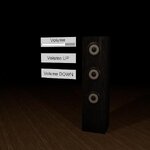
      • OnChangeTrigger is set to change the volume AptSpeaker. We are mapping the 0.0 to 1.0 range of the Counter brick to the same 0.0 to 1.0 of the volume. However, if we wanted, we could map 0.5 to 1.0 volume range for example.
      • OnChangeTrigger is ALSO setting the UISlider position. That's purely for visualizing what's happening.
      • Count is set to 10, meaning you got 10 steps to go from 0.0 to 1.0. That would be 0.0, 0.1, 0.2, ...., 0.9 and 1.0. If you want more or less steps, just change the Count.
  2. Two UIButton atoms
    1. The UP button is triggering CountUP on the Counter brick
    2. The DOWN button is triggering CountDOWN on the Counter brick
  3. UISlider
    1. Controlling the volume by trigger as well. So you can just control the volume by slider.....just in case that's what you actually want :ROFLMAO:
    2. (technically the Counter brick is setting the volume once directly and a second time again by setting the slider which then triggers the volume. So, it's a bit redundant.)
 

Attachments

  • VolumeExample.json
    16.4 KB · Views: 0
  • VolumeExample.jpg
    VolumeExample.jpg
    14.3 KB · Views: 0
Upvote 0
Solution
Build you a quick scene. Depends on LogicBricks.14:
  1. AptSpeaker atom
    1. EventAudioQueueEmpty brick to get a trigger signal whenever no audio is playing.
    2. RandomSound brick to play something random from VaM's build-in audio, in this case one of the Cyber modular tracks. So, 1+2 give us endless playing music 🔊.
    3. Counter brick is obviously the key.
      • OnChangeTrigger is set to change the volume AptSpeaker. We are mapping the 0.0 to 1.0 range of the Counter brick to the same 0.0 to 1.0 of the volume. However, if we wanted, we could map 0.5 to 1.0 volume range for example.
      • OnChangeTrigger is ALSO setting the UISlider position. That's purely for visualizing what's happening.
      • Count is set to 10, meaning you got 10 steps to go from 0.0 to 1.0. That would be 0.0, 0.1, 0.2, ...., 0.9 and 1.0. If you want more or less steps, just change the Count.
  2. Two UIButton atoms
    1. The UP button is triggering CountUP on the Counter brick
    2. The DOWN button is triggering CountDOWN on the Counter brick
  3. UISlider
    1. Controlling the volume by trigger as well. So you can just control the volume by slider.....just in case that's what you actually want :ROFLMAO:
    2. (technically the Counter brick is setting the volume once directly and a second time again by setting the slider which then triggers the volume. So, it's a bit redundant.)
Reading the description along with studying the scene was a great help. At first, I did not understand the Counter Brick. I assumed it only allowed an action to take place after a certain number of clicks were performed. So when I wanted a action to take place on the first click I set Counter Brick count to one. Thanks you very much for your help.
 
Upvote 0
Back
Top Bottom