
• Hi Guest!

    We have posted a new VaM2 dev log on Patreon, starting a monthly cadence of written progress updates between Beta releases. Highlights include the new Gizmos System, Selection Carousel, and Modes System with Context-Specific Editing. Beta1.2 is 15 of 21 items complete.

    Read the full post on Patreon, or follow progress on the public Trello roadmap.

VaM 1.x How do I stop the green grid from popping up every time I click on or off of a character?

Threads regarding the original VaM 1.x
Pandora

New member
Joined
Oct 11, 2025
Messages
5
Reactions
1
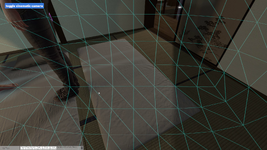
This started a few minutes ago and I can't figure out how to turn it off, I didn't change any settings at all that i'm aware of. Every time I either click on a character control point or click off of one a green grid pops up for a second or two and this disappears. How do I turn this off? I'm using the desktop version not the VR version and it does it in both play and edit modes
 

Attachments

  • zsfgdshtghh.png
    zsfgdshtghh.png
    3.1 MB · Views: 0
This is not "native", something is hooked to the camera and makes this sphere appear (it's the "collision sphere" you see on pretty much all atoms when selected).
Try another random scene, I'm pretty sure you won't have this. (unless you have a session plugin that produces that).
 
This is not "native", something is hooked to the camera and makes this sphere appear (it's the "collision sphere" you see on pretty much all atoms when selected).
Try another random scene, I'm pretty sure you won't have this. (unless you have a session plugin that produces that).
Thank you so much for this reply! This was driving me crazy. It ended up being a session plugin causing it (CUAManager in case anyone else stumbles across this in the future). I never would have thought to check that, I guess I should be more attentive to recent installations in the future when something goes wrong
 
Back
Top Bottom