
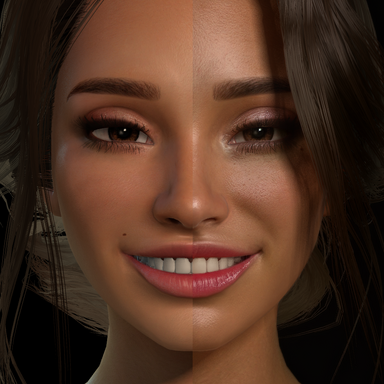
DLSS 5 Setup

Guides DLSS 5 Setup

BiskyBisky

Member
Joined
Jul 18, 2023
Messages
9
Reactions
42
BiskyBisky submitted a new resource:

DLSS 5 Setup - A short guide to get that new-fangled DLSS 5 leak up and running

View attachment 619420

Hey all! Just wanted to make a quick tutorial on how I got DLSS 5 up and running in VaM.

Resources Needed:

A 50-series (maybe 40-series works too, I'm not entirely sure) NVIDIA GPU
iMMERSE-main.zip --- https://github.com/martymcmodding/iMMERSE (Click green "Code" dropdown -> Download ZIP)
renodx-dlss5.addon64 & streamline.zip --- https://mega.nz/folder/qzJzGDpa#SQcLioRmC2IyZ-DQO5mOhw (Reuploaded...

Read more about this resource...
 
Will it work in vr?
I’m sorry, I should’ve clarified in the guide: I’ve only tested this with desktop mode and my headset is collecting dust somewhere so I’m not likely to give it a shot. I think from what I’ve seen around the forum VR is not supported out of the box with this method.

I’ve updated the guide to include this disclosure.
 
I was able to get it to work in VR by installing Reshade with OpenXR checked, then copied C:\ProgramData\ReShade\ReShade64.dll to the VAM.exe location and renamed it dxgi.dll.
Also updated ReShade64_XR.json to reflect the path to VAM
C:\ProgramData\ReShade\ReShade64_XR.json:
{
"file_format_version": "1.0.0",
"api_layer": {
"name": "XR_APILAYER_reshade",
"library_path": "<Path to MSFS2024>\\dxgi.dll",
"api_version": "1.0",
"implementation_version": "2",
"description": "crosire's ReShade post-processing injector for 64-bit",
"disable_environment": "DISABLE_XR_APILAYER_reshade_1"
}
}
However it does crash on me almost every time I switch back to the game after opening the SteamVR menu. Oddly enough not every time. Not sure what causes that but maybe another person's setup will be more stable.
 
Didnt work for me, now can't uninstall :(
Run ReShade_Setup_6.8.0_Addon.exe again. Select VaM.exe dir -> Select dx 10/11/12 -> select uninstall on the third selection and run the binary.

By the way it didnt work for me on 4080!
 
You need special modifications to make DLSS5 work with VAM this early in DLSS5's life cycle. Another forum user has a working prototype. So it is possible but i don't see anyone with a publicly accessible mod yet.
 
Yeah I gave these a shot and did sometrouble shooting specific to havign a 4080. I ran into issues where the DX11/12 wasn't hooking, adding a bridge and applying the DX11/12 fix.

I haven't gotten to work yet, but seems relatively early for functionality.
 
thanks for doing this

the problem is vam already barely runs on most peoples systems and now we have this which is a system killer...
unless there is a massive improvement or we all just get 5090s lol i cant see this being realistic for 99% but... vam 2 and dlss5 in 5 years maybe ?
 
thanks for doing this

the problem is vam already barely runs on most peoples systems and now we have this which is a system killer...
unless there is a massive improvement or we all just get 5090s lol i cant see this being realistic for 99% but... vam 2 and dlss5 in 5 years maybe ?
Totally get that, this is just a little extra oomf for folks who have the performance overhead to spare. All of this is riding on an unintentional leak of the neural rendering tech anyway, optimization is probably one of the last bullet points the folks designing this stuff tackle before full release 😆 it really is wild how close it pushes VaM into uncanny valley territory with solid mocap, Mxx’s “Late Night Selfie” is a fabulous example of this
 
You need special modifications to make DLSS5 work with VAM this early in DLSS5's life cycle. Another forum user has a working prototype. So it is possible but i don't see anyone with a publicly accessible mod yet.
Exactly, this is what the DLSS5 feed addon is doing for games that don’t natively support DLSS. It should be giving the neural rendering the info it needs to run properly but it is quite finicky, maybe explore using something like Magpie instead?

Magpie Upscaler GitHub
 
It randomly crashes every time I try to load a secondary menu, should I just uninstall and reinstall reshade entirely?
 
Everything was running smoothly until this morning, VAM suddenly started crashing constantly unless I uninstall ReShade. Very weird.
 
I tried it too, and it works really well—it's pretty impressive, actually. I feel like it's growing on me more and more over time. I've also tested quite a few things to get it working in VR. I managed to get it running, but the overlay feels a bit floaty on the character when moving, which in VR basically means all the time, so the immersion is somewhat broken for now. I think there will be improvements on that front as well.

By the way, I have an RTX 5090 OC and it runs around 40 FPS, which isn't really ideal for VR either. Then again, I did tinker quite a bit, to be fair. I imagine there are cleaner pipelines than the one I set up: UEVR -> ReShade -> SteamVR -> Virtual Desktop -> Meta Quest 3.
 
Everything was running smoothly until this morning, VAM suddenly started crashing constantly unless I uninstall ReShade. Very weird.
I do occasionally have VaM crash on startup with this stuff installed as well, seems totally random. Usually just relaunching straightens it out 🤷
 
I do occasionally have VaM crash on startup with this stuff installed as well, seems totally random. Usually just relaunching straightens it out 🤷
I found a workaround. Always disable it before quitting the game/loading a new scene, and re-enable it after the scene is loaded. Something about loading/starting new scene crash the game for me.
 
Came back to VAM only to test DLSS 5, and it's amazing! Thanks for the tutorial. Stationary image is great, but when I move the camera lighting start to flicker/smear, I guess it has something to do w motion vectors, but I have no idea how to fix that. Also, part of the tut seems a bit outdated, neural rendering thing is now in the last tab in in-game menu, at least on my end.
 
Came back to VAM only to test DLSS 5, and it's amazing! Thanks for the tutorial. Stationary image is great, but when I move the camera lighting start to flicker/smear, I guess it has something to do w motion vectors, but I have no idea how to fix that. Also, part of the tut seems a bit outdated, neural rendering thing is now in the last tab in in-game menu, at least on my end.
I’ve noticed the smearing/flickering is a lot worse in scenes with minimal background information (empty scene with just a person and a couple lights) vs more fleshed out scenes with props, proper backgrounds, etc. And thanks for the heads up! I will take a look at the latest RenoDX files and update the guide when I get a chance 👍🏻
 
Anyone testing it with a rtx 4070 ti? I followed the tutorial exactly but im still crashing on start up.
 
To get it to work, I had to download the patched version of nvngx_dlssnr.dll from the Renodx discord. I'm using a 4080 Super

Zrzut ekranu 2026-09-08 023920.png
 
Was working great for a day, then it just broke out of nowhere. Status reads "Waiting" when I activate NR tab... I checked log and it says this:

13:30:56:322 [25144] | WARN | [DLSS 5 Feed 0.7.0] [DLSS 5 Feed] DLSS5_Feed.fx is compiled for motion-vector provider 0 (texMotionVectors) but no known texMotionVectors shader is installed: motion vectors will be zero (still images only). Install one, or change the DLSS5_MV_PROVIDER preprocessor definition. MartysMods_Launchpad is enabled, but DLSS5_Feed.fx is compiled for provider 0 (texMotionVectors) and does not read it -- set the DLSS5_MV_PROVIDER preprocessor definition to 1 to use it

Not sure where this "motion-vector" setting is to edit, maybe somewhere in the MartysMods folder...
 
Back
Top Bottom