• Hi Guest!

    We are extremely excited to announce the release of our first Beta1.1 and the first release of our Public AddonKit!
    To participate in the Beta, a subscription to the Entertainer or Creator Tier is required. For access to the Public AddonKit you must be a Creator tier member. Once subscribed, download instructions can be found here.

    Click here for information and guides regarding the VaM2 beta. Join our Discord server for more announcements and community discussion about VaM2.
  • Hi Guest!

    VaM2 Resource Categories have now been added to the Hub! For information on posting VaM2 resources and details about VaM2 related changes to our Community Forums, please see our official announcement here.

VaM 1.x Detail Skin and Norm section...

Threads regarding the original VaM 1.x

virtamater

Well-known member
Featured Contributor
Joined
Dec 12, 2020
Messages
399
Solutions
3
Reactions
1,774
How would you create an extra layer for the skin section to add nipple textures right on the skin shaders.. Ive made some really large detailed images, created n inspired by CuteSvetlana but they lose all the detail when added to the texture file..The cloth item is nice, but its hard to adjust exact skin colors and Ive been messing around with the actual DazModel and added a lot of subdivisions to the actual Mesh in that area..

How to add the extra subdivisions to the nipples and aerela back to the VaM model..
Or a better skin addon that doesn't have that gap and better alignment.
Or just make a slot to add higher detail images over the skin texture itself..

:)
 
You want to add subdivision on the mesh? That's not possible. The whole system works ensuring you keep all the same vertices for being able to use blendshapes ( the morphs ), and thus, you need to have exactly the same topology.

The only way to add subdivision is through tesselation. And in VAM, it can't be localized, either you tesselate the whole mesh, or you don't.

For the texture, the only way you could have new slots, is if you'd write your own shader and use the custom shader loader plugin.
 
This doesn't help with the geometry, but I have been playing around with decal maker to test some things.

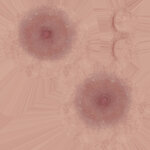
When using a 4k texture, one nipple is only about 125 pixels square.

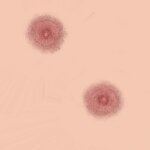
I just did an experiment to see how big the texture files would be if I isolated just the nipples to upscale them to a stupid size for decal and normal overlays to use with the decal maker plugin. They are actually a surprisingly reasonable file size.
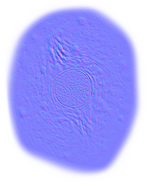
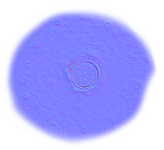
Just the nipples on a blank png decal upscaled to 16k was 2mb, and the 16k normal map (nipples with a plain RED: 128 GREEN: 128 BLUE: 255 background) was just 1.5mb.

As I only scaled up the images for testing, the results were nothing special to look at, but the same principle could give you much more detailed results with good images. At 16k, the nipple area is effectively up to 500x500 pixels each.
 
oh.. I didnt know you could do that with the decal plugin.. I'll give that a try then and thanks again!

The issue i might have is file size tho.. Ive been using a 100 inch monitor for everything so all my images are super huge.. I'll have to test sizes and those things too.
 
oh.. I didnt know you could do that with the decal plugin.. I'll give that a try then and thanks again!

The issue i might have is file size tho.. Ive been using a 100 inch monitor for everything so all my images are super huge.. I'll have to test sizes and those things too.
Normal maps need to have the "basic" background colour to not interfere with the other normal layers. Here's a quick test I did with a riddler 4k skin on the base female. The second image has an edited 16k normal map and specular decal to match the texture. (still kind of basic as a first attempt, but you get the idea.)

1776084312.jpg
1776084336.jpg
 
Ive been using a 100 inch monitor

That's not a "monitor", that's either a massive TV, or a Theater :' )

Resolution of the screen does not change anything about your image in a game in a standard use. At the same FOV, same distance, same position in a game... It's not because you'd use a 1080p or a 16K monitor that your image would become better/uglier. If you prefer, you don't see "more" of the texture, or "stretch more" the texture because you have a bigger screen. The relationship between a game and the texture resolution, is not the same as an "image" displayed flat (like in a preview software) in your native resolution.

A better resolution of a texture in a game engine would simply allow better quality when you zoom extremely close to the object... which will (again) still be the case for any screen size or screen resolution. At a standard average distance... several 4K for a single character is already overkill for a normal game.

All comes down to the texel density: how much pixels are in a 1m ( 1 unit ) of the engine. And sadly, the way Genesis characters are unwrapped, the texel density is all over the place: you have a 4K for the face, a 4K for the torso, a 4K for all the limbs... hence why you have weird discrepencies between the inherent high quality of the face and the nipples for instance.

The idea is to think of your use case and your constraints, and preview the textures from the most common situation. For instance, even tho we are in a VR game for VAM, where we can put our face at 1cm of the character, most of the time the distance will be a somewhat distant position like this. So preview that texture in this situation, not fringe cases like... the 3 times you're gonna zoom in... for any realtime use (a normal scene).

If you're doing virtual photography, or extreme close up shots, THEN in that situation you could crank up the resolution. But anything that's gonna be used for a standard gameplay scene... above 4K is overkill and hitting really hard the GPU for no real benefits. Having bigger textures makes the VRAM shoots up, longer loading times etc... so multiple characters with 8K sets could probably end up being very tedious to use in a scene without really obvious changes in a standard situation.

Texture work matters. Even tho texel density is important, you can clearly see that the texture itself has a massive influence on the final result just by grabbing different skins on the hub here. Better have a very nice 4K that will perform well... than have a bad 8K which has a 4 times footprint and can look uglier.
 
Super! I'm gonna hunt through that plug in now and see.. and I defiantly see a difference in detail from the higher res bumps :) and I'm glad that adding a million verts to the nipple mesh wasn't needed :)
 
lol thanks! Scale of 1-10... how would it be to finagle a detail section to do this?
 

Attachments

  • 8K Nip Linear R_Low_BaseColorStud.png
    30.3 MB · Views: 0
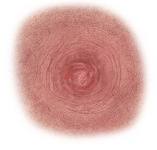
  • Stud_Normal.jpg
    26.5 MB · Views: 0
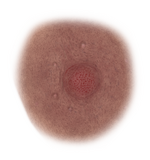
These are straight from SuperRio.. but once shrunk onto the skin texture is when they get fuzzy.. Im wondering about.... how to hack this?? https://hub.virtamate.com/resources/skin-micro-detail-tessellation-plug-in.42910/ and set up a nip spot straight to where it supposed to go?
8k is def overkill for a nipple as a skin texture. Certainly can't do that the way i was testing. The torso texture would need to be over 262144x262144 pixels.:eek:

I'm a bit concerned my computer is going to spontaneously combust just by me thinking that number.
 
Just to add a more detail square over the existing texture.. not to have the whole torso texture be 16k.. but just the spot where the nips mapped out and then like an overlay over the decal..

In the meantime.. i just did this with some Daz 9 skins and will see if it any better... new nip and diffuse.. the set was from a small nipple set.. so it didnt have to be scaled down to much cuz it was smaller anyway.. lol I'll know it it was worth it in about 20 mins... But i was thinking more of a detail shader spot.. I'll get some images of this in a biut on the model :)
 

Attachments

  • DragiHadzitosic-RB Materials Pack-Large-BC01.jpg
    DragiHadzitosic-RB Materials Pack-Large-BC01.jpg
    6.2 MB · Views: 0
  • DragiHadzitosic-RB Materials Pack-Medium-BC02.jpg
    DragiHadzitosic-RB Materials Pack-Medium-BC02.jpg
    356.2 KB · Views: 0
  • Small1.png
    Small1.png
    1.5 MB · Views: 0
  • Small1Nrm.png
    Small1Nrm.png
    1.6 MB · Views: 0
  • Small2.png
    Small2.png
    1.8 MB · Views: 0
  • Small2Nrm.png
    Small2Nrm.png
    2.5 MB · Views: 0
  • torsoDNNipNorm1.jpg
    torsoDNNipNorm1.jpg
    1.7 MB · Views: 0
  • torsoDNNip1.jpg
    5.2 MB · Views: 0
Last edited:
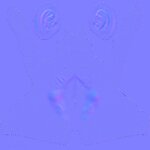
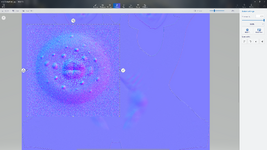
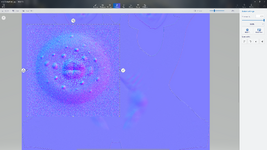
This is the size difference in the detailed normal.. and it is just a red blue blob when scaled to size lol
 

Attachments

  • Screenshot 2026-04-13 201942.png
    Screenshot 2026-04-13 201942.png
    8.4 MB · Views: 0
  • Screenshot 2026-04-13 201942.png
    Screenshot 2026-04-13 201942.png
    8.4 MB · Views: 0
This is the size difference in the detailed normal.. and it is just a red blue blob when scaled to size lol

I don't see any difference between the two.

You still need to understand texel resolution about that. You can shoot as much pixel as you want on your nipple (like whatever 8K or 16K) unless you are putting your face like 1mm away from the model, it will somewhat look the same as a 2K / 4K at an average distance.

Even worse, since I'm not sure how Meshed handles custom textures loaded on the chars, either mips or resampling could be bad enough to look uglier with higher resolution than a proper "standard" resolution.
 
Last edited:
Back
Top Bottom