• Hi Guest!

    We have posted a new VaM2 dev log on Patreon, starting a monthly cadence of written progress updates between Beta releases. Highlights include the new Gizmos System, Selection Carousel, and Modes System with Context-Specific Editing. Beta1.2 is 15 of 21 items complete.

    Read the full post on Patreon, or follow progress on the public Trello roadmap.

“Browser not ready” when downloading from Hub

case762

New member
Joined
Jan 11, 2021
Messages
15
Reactions
2
Hey all, I get this error message “Browser not ready, if this panel does not go away your w may be missing a required package…. (see attached) when trying to download items from the Hub. I clicked the link and downloaded the package and they’re sitting in “my downloads” but I’m still getting the message. TIA.
 

Attachments

  • EFC8F526-37B5-4F43-89A6-CD92FA947723.jpeg
    EFC8F526-37B5-4F43-89A6-CD92FA947723.jpeg
    1.8 MB · Views: 0
Is that a new problem? Did it work before?
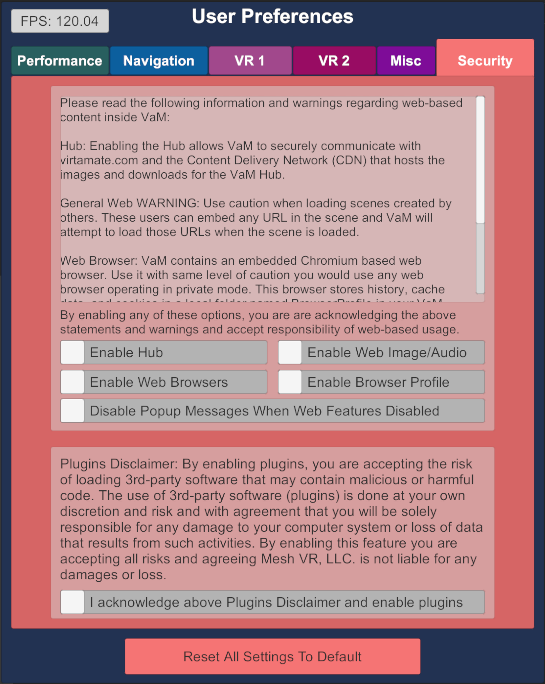
Check your settings if you enabled Hub viewing permissions.
 
This problem has existed since I started. I believe I enabled Hub viewing permissions, but now I can't remember where to check.
 
In the settings:
ZwY5AGoz6ntatrPc1cNiOuPb1L4py4QbIbvP-O_v_ILitHJOfd8ZGnRsbxN-caujCNJlBUqF5EWjvzKs1ygkLTy2pe-RzPywbhvH0g50EwZuajXk9cb9ZmuOwvF2SykCACX5V3-Z
 
What about running a core check in vam_updater.exe, checking for a Firewall problem and latest version of VAM?
VAM is not in a protected folder with weird permissions like Program Files or something like that, right?
 
Back
Top Bottom