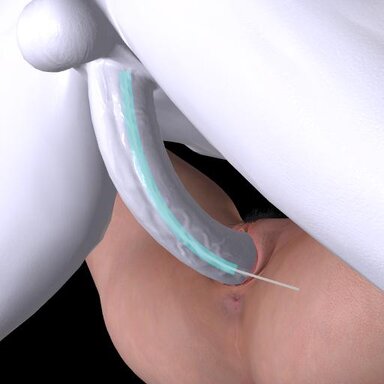


Generates a dynamic path between a penis and a target atom, then guides the penis controls along that path.
The path can be curved, rotated, and offset, and can automatically adjust based on distance or angle.
Support Custom Unity Asset (Requires a standard VaM controller generation plugin).
Preset system.
- Default save path: Saves/PluginData/HelicalPink/PenisPathAlignment/. You can optionally create subfolders.
- Presets are scanned in both local and VARpackage directories. Local files take priority.
- When creating a scene VAR package, simply select the preset files you want to include in the Package Builder.
- Yellow text indicates a mismatch or does not exist in scene. The preset setting will apply to selected atom if it can instead.
- Overwritten preset files from a VAR package will be saved to the local directory.
Trigger Mode.
- You can create as many markers as you want.
Setting Up for CUA.
- A proper bone structure is required for satisfying results.
Some may look like they have one, but actually don't. If they don't, just give up.
Credits:
MacGruber
The path can be curved, rotated, and offset, and can automatically adjust based on distance or angle.
Support Custom Unity Asset (Requires a standard VaM controller generation plugin).
Preset system.
- Default save path: Saves/PluginData/HelicalPink/PenisPathAlignment/. You can optionally create subfolders.
- Presets are scanned in both local and VARpackage directories. Local files take priority.
- When creating a scene VAR package, simply select the preset files you want to include in the Package Builder.
- Yellow text indicates a mismatch or does not exist in scene. The preset setting will apply to selected atom if it can instead.
- Overwritten preset files from a VAR package will be saved to the local directory.
Trigger Mode.
- You can create as many markers as you want.
Setting Up for CUA.
- A proper bone structure is required for satisfying results.
Some may look like they have one, but actually don't. If they don't, just give up.
Requires a standard VaM controller generation plugin, such as Stopper.CUAControllers.
Demo1 with Foost.DildoLanguage
Step0.
Use a standard VaM controller generation plugin to generate the controllers first.
Step1.
Select the controllers to be affected by the curve.
The plugin works with a single controller, and the selected controllers do not have to be consecutive.
If an existing build for this object is found, the "Load" button will appear.
Directory : Saves/PluginData/HelicalPink/PenisPathAlignment/CUABuild/

Step2.
Set the Forward and Up axes of loaded asset prefab.

Step3.
Select the starting point of the curve. Choose the controller closest to the root from the list.

Step4.
Set the Grab Controller's axes like Step 2.

Step5.
Complete. If you are not satisfied with the result, reload and try again.
Some of them require a creative approach.
Demo1 with Foost.DildoLanguage
Step0.
Use a standard VaM controller generation plugin to generate the controllers first.
Step1.
Select the controllers to be affected by the curve.
The plugin works with a single controller, and the selected controllers do not have to be consecutive.
If an existing build for this object is found, the "Load" button will appear.
Directory : Saves/PluginData/HelicalPink/PenisPathAlignment/CUABuild/
Step2.
Set the Forward and Up axes of loaded asset prefab.
Step3.
Select the starting point of the curve. Choose the controller closest to the root from the list.
Step4.
Set the Grab Controller's axes like Step 2.
Step5.
Complete. If you are not satisfied with the result, reload and try again.
Some of them require a creative approach.
Credits:
MacGruber