





Penis Aligner Plugin - Automatic Dildo Attachment Tool for pass-through dildo alignment for pass-through
This plugin to aid in attaching and parenting dildo objects to penis atom of people in scenes. This is primarily for VR passthrough usage (https://hub.virtamate.com/resources/how-to-use-passthrough-in-vam-vr-ar.37851/)
In tandem with Chroma-keyfier plugin to turn dildo green as well as cockz CUA as a default asset so that ur penis can be aligned in pass-through with the dildo and occludes the female model for more realism.
This plugin also automatically removes collider on dildo CUA as well as attach parent linkage to person so the dildo aligns with penis, and when transparent works for pass-through scenes. Collider should still rely on male person model with character transparency plugin enabled.
CUA plugin Setup:
Cockz Asset CUA. (https://hub.virtamate.com/resources/cockz.7303/)
ChromaKeyfier (https://hub.virtamate.com/resources/chroma-keyifier.40192/) // This turns the dildo green, so it can be pass-through and align with your dong.
Penis aligner (This plugin)
Session plugins setup:
Camera-background-color Plugin for passthrough on session plugin (https://hub.virtamate.com/resources/camera-background-color.24185/) // For working passthrough with virtual-desktop and ALVR
Character plugins used:
CharacterTransparency (https://hub.virtamate.com/resources/character-transparency.26690/) // Turns the entire character transparent, for pass through usage and collision.
Instructions setup and pictures below:
1. Create a Custom Unity Asset
2. Select Cockz asset and white_reg.prefab (Download linked / refer to pictures below)
3. Attach ChromaKeyfier plugin to the asset so that it can be chroma-fied and transparent to align with the camera-background-color plugin.
4. Ensure u have camera background color plugin and your quest 3 / passthrough via virtual-desktop or ALVR has the color aligned so now the cockz is pass-through.
5. Attach PenisAligner (This plugin) and press attach to penis mid and it will automatically align and remove collision.
6. Additionally use character transparency to turn male transparent, so now u have a working-passthrough scene with transparent-penis that occludes the models and passthrough is realistic, good for blowjobs i suppose.
*recommended to save as an Custom Asset preset so spawning in the asset immediately handles all the setup.
Requires pass-through camera background-color plugin and virtual-desktop / ALVR already setup.
Refer to (https://hub.virtamate.com/resources/how-to-use-passthrough-in-vam-vr-ar.37851/)
Recommended setup but any CUA or object works.

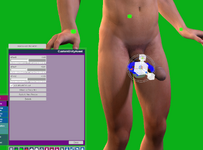
This plugin to aid in attaching and parenting dildo objects to penis atom of people in scenes. This is primarily for VR passthrough usage (https://hub.virtamate.com/resources/how-to-use-passthrough-in-vam-vr-ar.37851/)
In tandem with Chroma-keyfier plugin to turn dildo green as well as cockz CUA as a default asset so that ur penis can be aligned in pass-through with the dildo and occludes the female model for more realism.
This plugin also automatically removes collider on dildo CUA as well as attach parent linkage to person so the dildo aligns with penis, and when transparent works for pass-through scenes. Collider should still rely on male person model with character transparency plugin enabled.
CUA plugin Setup:
Cockz Asset CUA. (https://hub.virtamate.com/resources/cockz.7303/)
ChromaKeyfier (https://hub.virtamate.com/resources/chroma-keyifier.40192/) // This turns the dildo green, so it can be pass-through and align with your dong.
Penis aligner (This plugin)
Session plugins setup:
Camera-background-color Plugin for passthrough on session plugin (https://hub.virtamate.com/resources/camera-background-color.24185/) // For working passthrough with virtual-desktop and ALVR
Character plugins used:
CharacterTransparency (https://hub.virtamate.com/resources/character-transparency.26690/) // Turns the entire character transparent, for pass through usage and collision.
Instructions setup and pictures below:
1. Create a Custom Unity Asset
2. Select Cockz asset and white_reg.prefab (Download linked / refer to pictures below)
3. Attach ChromaKeyfier plugin to the asset so that it can be chroma-fied and transparent to align with the camera-background-color plugin.
4. Ensure u have camera background color plugin and your quest 3 / passthrough via virtual-desktop or ALVR has the color aligned so now the cockz is pass-through.
5. Attach PenisAligner (This plugin) and press attach to penis mid and it will automatically align and remove collision.
6. Additionally use character transparency to turn male transparent, so now u have a working-passthrough scene with transparent-penis that occludes the models and passthrough is realistic, good for blowjobs i suppose.
*recommended to save as an Custom Asset preset so spawning in the asset immediately handles all the setup.
Requires pass-through camera background-color plugin and virtual-desktop / ALVR already setup.
Refer to (https://hub.virtamate.com/resources/how-to-use-passthrough-in-vam-vr-ar.37851/)
Recommended setup but any CUA or object works.
