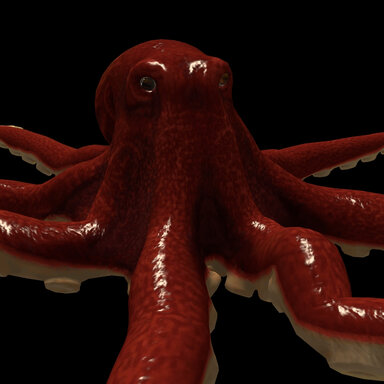
Port from sketchfab.
Very nice model to work with. But took some work to get the physics to where they are. They're not proven yet so proceed at your own risk if you try animating it.
3 sizes: Regular, BigBro and LilBro.
Each size required manual tweaking of their physics. Can't be scaled with VAM's scaler without breaking.
How to set it up:
- Load the octopus.assetbundle on a CustomUnityAsset and select a size.
- You must use Puppeteer to create a "grab" point for the model. It is not attached to the CUA atom. This allows Puppeteer to have full control.
- Load Puppeteer on the CustomUnityAsset
- In the Target Bone filter search for "armature".
- Click Create Physics Controller For Bone
- The controller is spawned at the octopus.
- If your scene has no floor, it has probably fallen into the void. Then:
- Select the spawned controller from the atom list instead, and use the move tab to reset the coordinates.
- Unselect/reselect the asset in the asset tab. It should now be grabbed at where you moved the controller.
- Spawn any additional controllers you need.
- You can filter by "10" to list only the tentacle tips.
- Or use the mouse mode: Shift+T to enable. Hovering over the asset will highlight joints underneath. Right-click on one to spawn a controller of your choice.
- Poses can be saved and recalled.
|
Recommended to keep the spring values as low as you can get away with. I've stress-tested a bunch but they're not immune to uncontrolled stretching if a meteor hits them. LilBro is the most unstable.

Think of it as an elastic band: The harder you pull past the limits, the wilder the rebound.
I would not recommend hardlinking, or link controllers.
Recall a pose, or reload the asset, in case of breaking. You won't lose any poses by doing so.
| Other plugin recommendations for this asset: | Any VAMifier to fix the shading.
CuaGpuColliders - makes the asset's colliders affect cloth sim |
Also BodyLanguage gaze compatible.
-

GIF 25-01-2026 19-42-13.gif
6.4 MB
· Views: 0











 Hope it's not creating too much chaos out there. I'll be continuing to tweak the physics and see if I can't make it more stable.