


New Features & Changes
1. Allows you to Save settings as Presets and Load them across scenes. (Feature idea suggested by [SneakyOne])
2. Disable tracking beyond "Active Distance".
3. Discard "AutoCurveScale By Angle" and "AutoCurveScale By Distance". Added "Curve Falloff Power" Instead.
4. Added Advanced mode.
Advanced Mode Features
1. Supports unlimited marker creation.
2. Allows markers to be positioned freely.
3. Supports Saving and Loading markers across scenes.
4. "Use Trigger Mode"
Disables manual target selection and locks only onto targets that come into contact with the trigger.
Note: Due to the way Unity handles physics, the lower the FPS, the more likely it is that trigger collisions may occasionally be missed.
& "Use Scanning Mode" (Feature idea suggested by [redeyes])
Disables manual target selection and automatically locks onto the closest target within the search area.
Note: Performance may decrease as the number of markers increases.
!!! Bugs !!!:
Classic Mod
New Mode
Trigger mode & Scanning mode
Some features are still under development and will be released in Version 3, mainly additional offset settings for the penis.
Credits:
MacGruber
1. Allows you to Save settings as Presets and Load them across scenes. (Feature idea suggested by [SneakyOne])
2. Disable tracking beyond "Active Distance".
3. Discard "AutoCurveScale By Angle" and "AutoCurveScale By Distance". Added "Curve Falloff Power" Instead.
4. Added Advanced mode.
Advanced Mode Features
1. Supports unlimited marker creation.
2. Allows markers to be positioned freely.
3. Supports Saving and Loading markers across scenes.
4. "Use Trigger Mode"
Disables manual target selection and locks only onto targets that come into contact with the trigger.
Note: Due to the way Unity handles physics, the lower the FPS, the more likely it is that trigger collisions may occasionally be missed.
& "Use Scanning Mode" (Feature idea suggested by [redeyes])
Disables manual target selection and automatically locks onto the closest target within the search area.
Note: Performance may decrease as the number of markers increases.
!!! Bugs !!!:
1. If the target Atom's name is in the form xxx/xxx

and you press "Save Marker" while the "Marker" field is showing that name,

an error will occur.

This happens because the marker save location is fixed to:
"Saves/PluginData/HelicalPink/PenisPathAlignment/Marker"
When an Atom name contains a /, such as xxx/xxx, the plugin interprets it as:
Marker/xxx/xxx.json
which makes it try to access a non-existent subdirectory (Marker/xxx), causing the save to fail.
Temporary workaround:
Click on the "Marker" text field and change the name manually. After renaming it, the marker can be saved and loaded normally.
2. Even if you use the workaround above, the save file itself still records the Atom like this.

When loading the marker, the target Atom's name must match exactly, including the xxx/xxx format, otherwise an error will be logged.
Temporary workaround:
Either edit the "atom : " field directly in the save file using a text editor, or rename the Atom in-game so that its name matches exactly.
Regular scene save/load should not be affected because it uses a different save method.
This is entirely my design mistake. I will redesign the format and address this issue in the next version.
And for those of you who have already made a few hundred marker files, I plan to keep the existing save files compatible with the new format.
Please wait for a little while.
and you press "Save Marker" while the "Marker" field is showing that name,
an error will occur.
This happens because the marker save location is fixed to:
"Saves/PluginData/HelicalPink/PenisPathAlignment/Marker"
When an Atom name contains a /, such as xxx/xxx, the plugin interprets it as:
Marker/xxx/xxx.json
which makes it try to access a non-existent subdirectory (Marker/xxx), causing the save to fail.
Temporary workaround:
Click on the "Marker" text field and change the name manually. After renaming it, the marker can be saved and loaded normally.
2. Even if you use the workaround above, the save file itself still records the Atom like this.
When loading the marker, the target Atom's name must match exactly, including the xxx/xxx format, otherwise an error will be logged.
Temporary workaround:
Either edit the "atom : " field directly in the save file using a text editor, or rename the Atom in-game so that its name matches exactly.
Regular scene save/load should not be affected because it uses a different save method.
This is entirely my design mistake. I will redesign the format and address this issue in the next version.
And for those of you who have already made a few hundred marker files, I plan to keep the existing save files compatible with the new format.
Please wait for a little while.
Classic Mod
New Mode
Trigger mode & Scanning mode
Some features are still under development and will be released in Version 3, mainly additional offset settings for the penis.
Credits:
MacGruber
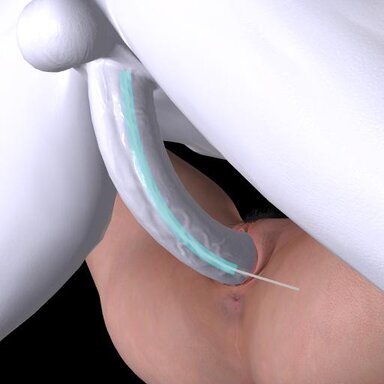
Generates a dynamic path between a penis and a target atom, then guides the penis controls along that path.
The path can be curved, rotated, and offset, and can automatically adjust based on distance or angle.
This plugin works only with Male or Alt-Futa. But the target can be a female, male, or any other atom.
Compatible with Vinput.AutoThruster | AutoGensThruster and Skynet.Orifice Dynamics.
Tip: In most cases, the "Rotation Mid to Tip Blend" slider alone is sufficient to handle penis curvature. If further adjustment is needed, adding a small amount of "Mid Position offset" and then fine-tuning with "Tip Position offset" will usually produce good results.
The path can be curved, rotated, and offset, and can automatically adjust based on distance or angle.
This plugin works only with Male or Alt-Futa. But the target can be a female, male, or any other atom.
Compatible with Vinput.AutoThruster | AutoGensThruster and Skynet.Orifice Dynamics.
Tip: In most cases, the "Rotation Mid to Tip Blend" slider alone is sufficient to handle penis curvature. If further adjustment is needed, adding a small amount of "Mid Position offset" and then fine-tuning with "Tip Position offset" will usually produce good results.