

Contains executable files or external scripts. Ensure you trust the creator and apply your own security measures.
Real motion sequence driven by funscript scripts
Scripts embedded within the plugin deliver more realistic OSR movements.
Overview
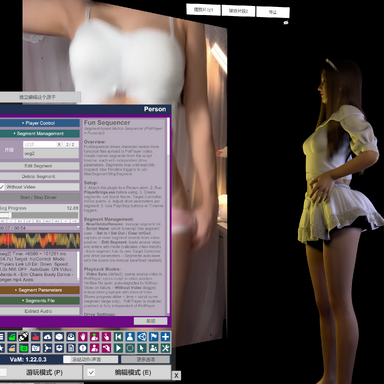
FunSequencer loads funscript files and generates character bone motion directly within VaM. Funscripts are community-made timed motion curves originally designed for interactive hardware. These pre-authored motion sequences deliver organic, smooth rhythmic movement. Instead of playing animations baked into Timeline, you can reuse thousands of shared funscripts to drive your character dynamically.Who this plugin is for
1. VaM Scene CreatorsTraditional animation workflows rely on fixed Timeline clips, which cannot flexibly adjust timing or swap motion content. With FunSequencer you can slice funscripts into named, independent Segments. Each segment stores separate motion parameters, and can be triggered on demand. You can combine funscript-driven core movement with Timeline animations for hands, facial expressions and secondary body motion to build layered, lifelike scenes.
2. Scene builders wanting flexible interactive logic
Segments support looped playback and can be activated or halted via Timeline triggers. You can switch between different motion segments during scene runtime without reworking pre-recorded animations.
Core Features
- Import funscript files and create trimmed Segments with custom In / Out range markers
- Every segment saves independent motion settings: drive mode, axis range, playback speed and auto gain
- Three physical drive modes: Physics Link / Force / Direct
- Multi-axis control: stroke, surge, sway, twist, roll, pitch adjustable separately
- Natural Motion secondary follow system: adds linked subtle movement for head, shoulders, chest, arms, hips and limbs
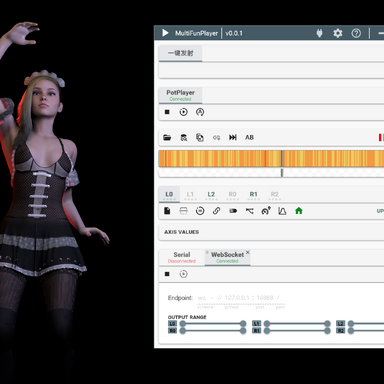
- Built-in OFS WebSocket output: forward multi-axis funscript data to MultiFunPlayer
- Integrated audio extractor to export matched audio clips from source video for your segments, bringing natural ambient sounds and vocals to your scenes.
- All segment configurations persist directly within your scene file
Usage Guide
- First run PlayerBridge.exe to enable linkage between the plugin and PotPlayer. Place AudioExtractor.exe into the custom directory (this file is unnecessary if you do not require audio extraction).
Note: Due to strict review policies for executable files on the Hub community, no EXE files are included within this plugin archive. Users may compile PlayerBridge.exe and AudioExtractor.exe themselves by building PlayerBridge\PlayerBridge.cc and AudioExtractor\AudioExtractor.cc contained in the archive. Pre‑compiled binaries are also available for download on GitHub:
Release v1.0 - AudioExtractor & PlayerBridge · nbnb9527/nb-VaMTools
Full Changelog: https://github.com/nbnb9527/nb-VaMTools/commits/v1.0 What's Changed / 更新内容 AudioExtractor / 音频提取器 Extract audio from video files via ffmpeg 通过 ffmpeg 从视频文件中提取音频 Usage / 用法: Playe... github.com
- Load the plugin onto your character atom.
- Open your script‑enabled video within PotPlayer.
- Open the plugin UI and click Load Funscript from Player to load the funscript into the plugin.
- Create Segments: set In / Out points to trim the desired section of the funscript, then give each segment a name. Each segment stores its own independent motion parameters.
- Configure segment parameters: drive mode, L0 direction, six‑axis range (stroke, surge, sway, twist, roll, pitch), auto gain, etc.
- Start the Segment Driver. The plugin will automatically take over the target controller, with motions driven by the active segment.
- Other common settings:
- target control: Body part driven by the script
- L0 Direction: Principal‑axis orientation. For example, set to Down for dance animations; set to Back for dual‑interactive combat‑style scenes.
- Stroke / Surge / Sway / Twist / Roll / Pitch: Six‑axis range of motion per segment
- Natural Motion: Natural Motion: Enables natural follow‑through movements for the head, shoulders and hands. This produces stochastic secondary motion. Disable this option if your scene already has pre‑configured head‑shoulder‑hand animations. It is recommended to enable it under frozen or static‑pose conditions.
- debug: Toggle this on to diagnose motion‑related anomalies.
- OSR driving modes:
- Plugin playback position is synced with PotPlayer, allowing PotPlayer to feed into MFP for OSR driving.
- The plugin can also drive OSR via the WS protocol: enable WS Output on the plugin side, and select OFS as the input source within MFP.
- Direct plugin‑native OSR driving can be implemented with minimal modifications; this will be considered for future updates. - Advanced usage (Timeline knowledge required): A single funscript can map to multiple poses, and scenes often contain multiple transitions. Leverage scene keyframe features to dynamically adjust the L0 direction and trigger different Timeline animations at specific timestamps for richer scene behaviour.
- Multiple funscripts can be used with one scene: open a new video in PotPlayer and click Load Funscript from Player to import the corresponding funscript. A single funscript can also be reused across different scenes. Use Timeline save functionality to persist all keyframe configurations, then load them inside another scene.
- All plugin parameters are persistent. Audio extraction from video is also supported, so you can publish your finished scenes.
Timeline Integration (Critical for scene workflow)
Available trigger actions you can call inside Timeline keyframes:- StartSegment(SegmentName)
Activate segment playback in standalone timer mode (Without Video).
- StopSegment(SegmentName)
Halt the specified running segment
- StopAllSegments
Terminate all active motion segments
Typical workflow example:
Use Timeline to handle facial animation, hand gestures and idle movements. Trigger FunSequencer segments to supply core rhythmic body motion at required timestamps.Notes
When using video files stored on network SMB/UNC shared paths: You may encounter compatibility issues in Video Sync preview mode and audio extraction. For audio extraction, it’s recommended to copy the generated batch command and run it manually in CMD to avoid access failures.中文版
FunSequencer
Funscript 时序编排动作驱动插件 for VaM
概述
FunSequencer 在 VaM 内加载 Funscript 脚本并实时生成角色骨骼运动。Funscript 是社区创作者制作的时序运动曲线,最初为互动体感设备设计。海量公开脚本包含大量自然流畅、富有节奏感的动态素材。你不再局限于 Timeline 预烘焙动画,可以直接复用社区脚本动态驱动人物。适合人群
1. VaM 场景制作者传统动画方案依赖固定 Timeline 片段,难以灵活调整节奏、更换动作素材。FunSequencer 支持将 Funscript 截取为独立命名片段(Segment),每个片段拥有一套专属动作参数,支持按需触发运行。你可以将脚本驱动的主体动作,搭配 Timeline 制作的手部、表情、次要肢体动画叠加使用,分层构建更真实的场景。
需要交互式动态逻辑的创作者
片段支持循环播放,可通过 Timeline 触发器随时启动、终止。场景运行过程中能够自由切换不同动作片段,无需反复修改预制作动画。
核心功能
- 载入 Funscript,自定义截取区间,创建命名动作片段(Segment)
- 每个片段独立保存全套参数:驱动模式、各轴幅度、播放速度、自动增益
- 三种物理驱动模式:Physics Link / Force / Direct
- 六轴独立调节:前后行程、进退、左右摆动、扭转、俯仰、横滚
- Natural Motion 次级跟随系统:为头部、肩、胸、手臂、髋部等添加联动微动
- 支持 OFS WebSocket 输出,可向 MultiFunPlayer 转发多轴脚本数据
- 内置音频提取工具,可从源视频导出与动作片段匹配的音频,为你的场景增添自然的环境音效与人声。
- 所有片段配置直接保存在场景文件内
使用流程
- 先运行PlayerBridge.exe,用来插件和potplayer联动。将AudioExtractor.exe放到custom目录(如果不做音频提取就不需要这个文件)。
- 将插件加载到人物原子
- Potplayer打开带脚本视频
- 打开插件界面,点击Load Funscript from Player即可加载脚本到插件
- 创建片段(Segment):设置 In / Out 截取区间,为片段命名。每个片段独立保存一套动作参数。
- 配置片段参数:驱动模式、L0 方向、六轴活动范围(stroke、surge、sway、twist、roll、pitch)、自动增益等。
- 启动 Segment Driver,由当前激活片段驱动动作。
- 其它常见设置:
- target control 脚本驱动部位
- KF L0 Direction 主轴方向,比如舞蹈是下,双人战斗可能要换成后
- KF L0 ~ KF R2 六轴活动范围
- Natural Motion 随驱动部位,其它的头、肩、手的自然动作,因为只是随机运动,如果场景本身配置好头、肩、手动作的,不要设这个。如果是冻结、静止状态,推荐打开。
- debug 动作出现异常的时候可以打开看看是哪里出问题了 - OSR驱动方式:
- 插件播放进度和potplayer实现了联动,可以让potplayer接入MFP驱动OSR
- 插件也可以通过WS协议驱动OSR,插件端勾选WS Output,MFP输入端选择OFS
- 后期也很容易改写成插件直驱,后面再看吧 - 高阶应用(需要有timeline基础):一个脚本可能对应多个姿势,一个场景也会有几个转场,这时候可灵活应用场景的keyframe功能,在特定的时刻改变L0方向,调用timeline的不同动画,让场景更加丰富多彩。
- 同一个场景可以搭配不同的脚本,用potplayer打开新的视频,点击Load Funscript from Player即可载入新的脚本;同一脚本也可应用于不同场景,利用timeline的保存功能,可保存timeline里所有的keyframe的设置,再另外一个场景中载入即可。
- 插件参数都做了持久化,也提供了从视频提取音频的功能,可以把你制作好的场景发布出去。
Timeline 集成(场景制作核心)
可在 Timeline 关键帧直接调用触发器指令:- StartSegment (片段名称)
以离线独立模式启动片段
- StopSegment (片段名称)
停止指定片段
- StopAllSegments
停止全部正在运行的片段
典型工作流示例
Timeline 负责表情、手部姿态、待机微动;在关键时间点触发 FunSequencer 片段,提供主体律动动作。注意事项
视频文件存放于局域网 SMB 网络共享路径时:在视频同步预览模式以及音频提取功能中可能出现兼容性问题。进行音频提取时,建议复制生成的批处理命令,手动粘贴至 CMD 中运行,防止访问失败。
Contains executable files or external scripts. Ensure you trust the creator and apply your own security measures.