





MFP Butt Driver
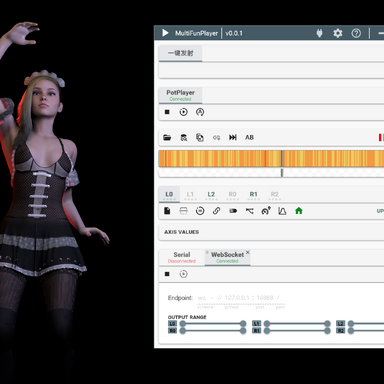
MultiFunPlayer 6-Axis Bone Driver for VAMReceive data via WebSocket (WS) or UDP from MultiFunPlayer, and drive character bone movement inside VAM. Compatible with funscript playback in MultiFunPlayer / OpenFunscripter.
Who this plugin is for
- OSR hardware users: Existing OSR VAM drivers rely on physical motion capture, which often results in repetitive or overly extreme movement. Hundreds of manually crafted openscript funscripts from community creators deliver smooth, comfortable and stimulating motion patterns. This plugin lets you play those funscripts inside MultiFunPlayer, stream motion data over WS/UDP, and animate your VAM character. MultiFunPlayer is one of the most feature-rich funscript players available. It accepts inputs from many upstream sources, so this driver works not only with openscripts but also streams from OpenFunscripter.
- VAM scene creators: There is a similar existing plugin: JustADude.FunscriptPlayer. It requires predefined animation sets before use. I lack experience building custom animation profiles, so I implemented a Timeline-style interpolation method instead. No pre-built animation clips are required to generate movement. Note: Parts of the interpolation code were written with assistance from AI. Motion reconstruction quality is not perfect, further improvements are welcome from experienced creators.
Usage
- Select connection mode: WS or UDP
- Set port (default: 18888)
- Click Start server
- Select target Person Atom
- Assign Controller A (bottom) and Controller B (top)
- Pause any other running animations (Timeline, AnimationPattern, etc.)
- Click Play
- Large-range motion (dance sequences): pick two bones further apart, e.g. hips and abdomen
- Small subtle motion (sex): pick bones closer together, e.g. hips and pelvis
Atom Triggers
- Atom Stop/Start Trigger: Assign custom actions
- Triggers fire automatically when MFP Butt Driver starts / stops
- Example usage: Pause / unpause Timeline
- If you are unsure how to configure trigger actions, use VAM's built-in freeze options.
Limitations & Todo List
- Motion reconstruction quality needs further optimization.
- This plugin only drives hip/butt related bones by default. Hands, head and other limbs remain static, which can look unnatural. I have conceptual ideas for follow-limb motion linked to hip movement, but limited scene-making experience means results may not be satisfactory.
- Future idea: Extract and replace only hip motion from existing Timeline scenes. Keep original Timeline animation for head, arms and other parts while overlaying funscript-driven hip movement. I am unaware of existing plugins that implement this feature.
--------中文版说明------
接收 MultiFunPlayer 通过 WS/UDP 传输的数据,驱动 VAM 人物骨骼运动,支持 MultiFunPlayer、OpenFunscripter 播放 Funscript 脚本。适用人群
- OSR 设备使用者现有的 OSR 驱动插件基于实体设备动作捕捉,动作容易单调重复或是幅度过激。社区大量精心制作的 openscript 脚本拥有自然舒适的律动。本插件实现通过 MultiFunPlayer 播放脚本,网络传输数据驱动 VAM 人物。MFP 生态丰富,上游来源不限于 openscript,OpenFunscripter 输出同样兼容。
- VAM 场景制作者Hub 已有同类插件 JustADude.FunscriptPlayer,但它需要预先配置动画模板。本人缺少动画制作经验,因此采用类似 Timeline 插值方案,无需预先制作动画片段即可生成动作。
 插值部分代码借助 AI 辅助完成,动作还原效果尚有优化空间,欢迎有经验的创作者改进。
使用流程
- 选择连接模式:WS 或 UDP
- 设置端口(默认 18888)
- 点击 Start server
- 选择人物 Person Atom
- 指定 Controller A(底部)、Controller B(顶部)
- 暂停其他正在运行的动画(Timeline、AnimationPattern 等)
- 点击 Play
设置建议
控制器骨骼选择直接影响最终效果:- 大幅度动作(舞蹈类):选择间距较远骨骼,例如臀部、腹部
- 小幅舒缓动作(性行为):选择邻近骨骼,例如臀部、髋部
原子触发器
- Atom Stop/Start Trigger:绑定自定义动作
- 插件启动 / 停止时自动触发
- 参考用法:暂停、恢复原子的Timeline
- 不熟悉触发器配置时,可以直接使用 VAM 原生内置冻结功能。
当前局限 & 计划
- 动作插值还原效果有待优化
- 当前仅驱动髋 / 臀部骨骼,头、手等肢体保持静止,观感违和。已有跟随联动思路,但缺乏场景制作经验,难以保证效果。
- 远期设想:分离 Timeline 场景局部动画,仅替换臀部动作为脚本驱动,保留头部、手部原有 Timeline 动画,暂未发现现成插件实现该功能。