

Facade: Skin Texture, Makeup, Effects Editor for VaM
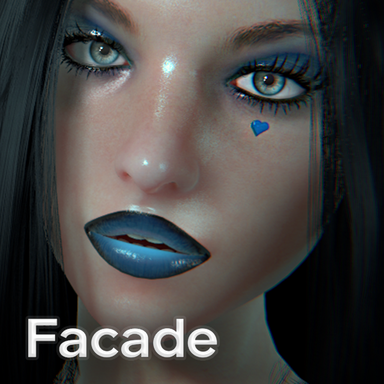
Facade is a real-time skin texture, makeup, and effects editor for VaM. Build entire looks directly on your model, combine existing textures, paint, apply shader effects, and experiment with all sorts of wonderfully questionable cosmetic decisions. No Photoshop round-trips required! From subtle makeup and freckles to glitter, holographic effects, gems, animated veins and whatever else you can dream up, Facade gives you a whole new set of tools to customize your models. DeepSkin by Mxx was used with permission in these screenshotsCurrently in Beta! There are still some rough edges, known quirks and features that need more testing. Please save often, enable autosave, and let me know what breaks!
 Layer-based editing
Build your look using a flexible layer system combining images, painted layers and live shader effects.- Image layers – Import, position, scale, rotate, stretch and mirror textures directly on the canvas.
- Paint layers – Create and edit your own painted details.
- Shader layers – Stack live effects without permanently baking them into your textures.
- Masks – Give each layer its own painted or image-based mask.
- Color adjustments – Hue, saturation, lightness, contrast and temperature controls.
- Transform tools – Pin, stretch and grid-warp images to get everything sitting exactly where you want it.
 GPU-powered Makeup & Shaders
These aren't just flat images slapped onto a model. Facade uses real-time shader effects that interact with lighting and the camera, with some rather fun tricks up its sleeve.- Gloss lipstick – Wet specular highlights that shift with the light.
- Glitter – Individual micro-flakes that catch light from different angles.
- Metallic – Chrome-like reflections using the scene's probe.
- Holographic – Animated rainbow interference, like holographic nail foil.
- Gems – Transparent effects with refraction, edge sparkle and caustics.
- Textured shine – Bring your own highlight textures for custom foils and duochromes.
- Blush / contour / conceal – Soft diffuse overlays with full color and depth control.
 Works everywhere
Every tool and effect can be used across the model's body:- Face
- Torso
- Arms and legs
- Fingernails and toenails
Want to paint something on her shoulder? Put glitter on her nails? Add some rather questionable effects elsewhere? Go nuts.
 Smart Edges – Clip System
Keep paint and effects exactly where they're supposed to be with geometry-aware clipping regions.Available regions include:
- Lips – Crisp lipstick, liner and ombre effects.
- Eyelids – Eyeshadow and liner without bleeding onto surrounding skin.
- Ears & Nostrils – Precise application without unwanted spill.
- Nipples – Apply effects and color directly to the intended area.
- Fingernails & Toenails – Nail polish, gems and glitter where they belong.
 A proper Brush System
A bunch of different ways to get paint where you want it:- Build-up – Accumulate more paint by hovering longer, much like a real airbrush.
- Airbrush mode – Keep depositing paint while holding still.
- Speed thinning – Faster strokes produce thinner lines. Great for eyeliner tails, wings and other fiddly details.
- Clone brush – Sample anywhere on the canvas and paint it somewhere else. Handy for patching or removing unwanted texture details.
- Paint on model – Paint directly onto the 3D model's surface, with the UV hit feeding into the same brush system.
- Line tools – Create clean, controlled strokes and shapes.
Brushes and their settings can be saved and reused across scenes.
 Looks, Presets & Optimization
Save your creations as named Looks and reuse them whenever you need them.- Save Looks directly to the current scene/model.
- Store Looks in your personal defaults.
- Preview and compare effects while adjusting them.
- Optimize – Reduce the performance overhead of your finished creations.
- Light readback – Only track painted skin areas each frame.
- Tidy – Remove empty paint, unused data and unnecessary effect overhead.
- Smart-edge caches – Improve loading for scenes using clipping regions.
- Lighter builds – Optionally remove hidden layers, merge compatible effects and resize oversized images.
Autosave is included, with configurable intervals and rotating backups.
 VR & Performance
- Full single-pass stereo VR support.
- Glitter, shimmer, transparency and shader effects work in VR.
- Compositing only runs when something has actually changed.
- Animated effects run at 30Hz rather than every frame.
- Designed for reliable scene loading.
A few examples!
There's quite a bit you can do with this thing. Here are some of the looks and experiments I've been playing with:A few things to know
Facade is still in Beta, and there are known quirks and a few deeper & incomplete features. Please save regularly, enable autosave, and report any bugs you come across. Feedback, suggestions and examples of what you're creating are very welcome! I'm particularly interested in seeing what people come up with once they get their hands on it. There are plenty of possibilities here that I'm sure I haven't even explored yet. Feedback & Iteration
If something is broken, feels unclear, or could be better– say it! The goal is to refine this into something the community can enjoy.
 Credits:
If I am ever missing or mis-crediting someone or something please let me know so that I may correct it.
 Massive Special Mega-thanks to Mxx for creating Deepskin and allowing me to use it to show off!Special thanks to the VaM Community members who've encouraged me and shown interest!
 A little help
If you want to support what I’m building, even a one-time tip goes a long way and directly helps me keep improving these systems and releasing more scenes. Please see my Patreon for such a display of gratitude.Have fun, mates!
Arachnut