


You are using an out of date browser. It may not display this or other websites correctly.
You should upgrade or use an alternative browser.
You should upgrade or use an alternative browser.

Reduced memory footprint further. I would love to see comparisons from older Decal Maker versions vs RC6 to see if the improvements are universal.
Improved Rendering when editing textures.
WIP: Added a new Genital building UI. Males still need proper templates made, they are far more troublesome, but still hope to later swap bits in.
Normal/spec/gloss still WIP
- Fix: Decals disappearing when adding 20+ decal layers.
- Fix: Flickering when updating Decal with 10+ layers.
- Fix: Bug with Normal Maps. Set to the same strength, A single normal applied via DM should now match what the it would look like if applied via VAM's UI.
- Add: Enable Specular/Gloss slider adjustments. 0 value = hide.
- Add: Genital Builder UI. This UI will let you build and export
A big thanks to MonsterShinkai for the texture used in the Genital Builder.
Provided with the following: License is CC BY: can distribute, remix, tweak, and build upon work, even commercially. Must credit creator.

Female Genital Textures - Textures -
(edit: EZ mode Tunnel Decal added. Just apply that texture to genital decal. Nothing more than that. Still looks nice) And for the texture artists out there, Here are some female genital textures I made. There are 4 genital diffuse textures for...hub.virtamate.com

Anus Decals - Textures -
License is CC BY: can distribute, remix, tweak, and build upon work, even commercially. Must credit creator. You can use them as they are for genital decals. There are only diffuse textures. You can also combine them with other genital decal or...


Memory optimization: Should use 2-3 less GB on startup. Loading textures will also consume less ram.
Fix: Change the appearance load UI anchor so we do not interfere with Tittymagics UI load check.
Texture Adjustment Panel:
- Fix: Mouse and texture movement will sync regardless of scale
- Fix: UI should sync with Decal changes in main UI Add/remove/order
- Fix: Alpha clip for nipples/genitals is suppressed when Exporting a texture.
- Fix: Texture should be movable across the screen at small scale values. Removed Translation constraints.
- 10
-
 10
10
Added: Move, scale, and Export decals.
To Use:
Saving is limited to the single decal at a time. The blended texture is not savable.
- Add decals like usual.
- Use the Edit textures button in the top UI.
- Use sliders to select the region and then the Decal to edit.
- Drag texture to reposition.
- Drag small cyan button to reposition the rotation pivot point.
Bugs: There are still issues with rotation and scaling when the center point is not default
Fixes : chokpahi-decal.assetbundle not found\nAsset bundle was not using a VAR package aware filepath! So was not found when insiade a VAR
RC 3 : Is Triggers are wonderful things
- Added: JSONStorableUrl ("Load Preset File") that allows directly loading of a preset *json
Just pass in the URL path and it will be loaded and applied.
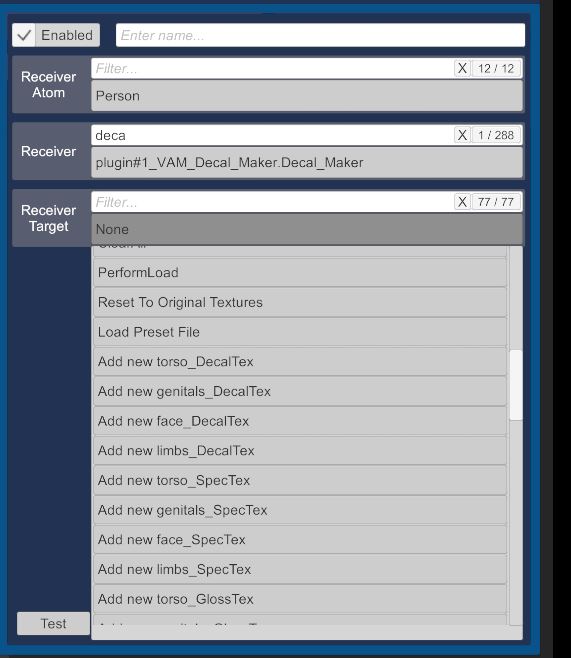
- Added: JSONStorableUrl (“Add new *”) that allows triggers to create new panels. Pass in a image URL to have a new panel (Decal, Spec, Gloss, Norm) made.
- Added:Experimental Support for loading and saving Decal Maker presets with the built in VAM Appearance preset. When a detected Appearance preset is loaded the user will be prompted to load the decal maker settings.
Options are : Add, Replace, or cancel
- Fixed: Eye settings will be saved.
New triggers for loaded images/creating new panels
Prompt UI for when a Appearance preset contains DecalMaker info

- 1
-
1
Patch for Alpha value being stored as 1 instead of slider value in presets and saves
Patched to work on 1.21.0.4
Fixed: Broken load preset button.
Fixed: Images with filenames too long would error ImagePathText. Now sanitized length
Added new features:
Two new buttons added to decal panels. One copies the current panel and one that links panel settings.
Green ++ button: Makes a duplicate of the current panel and places it bellow current panel.
White button with * Click this button to select a number. All panels with the same number with sync alpha and color values. One control to rule them all!
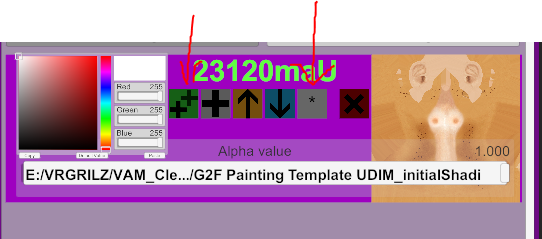
Incomplete WIP feature :
Started adding Eye textures.
Click Toggle Eyes to switch between Body and eye textures.
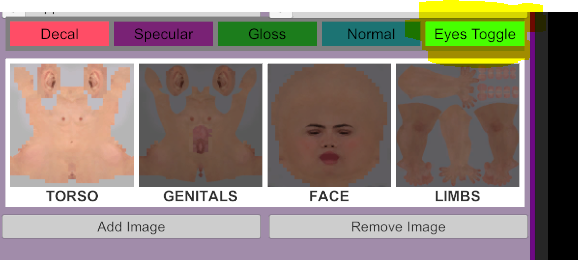
Only the Iris and whites are currently functional.
Will have to change shaders/renderer for other eye parts.
Fun you can have with animations and eye textures
Beta 13: The Patch and nothing but the patch.
Two minor fixes.
Fixed: Last browsed Path should be properly remembered and used.
Fixed: Spec and Gloss were using the wrong UI shader leading to blank UI's.
Beta 12 Video Killed the Radio Star Edition
Video is now a supported option. Select the same way you would choose an image. Video should be in 4096*4096 format.
When using a video source new trigger variables are available:
Play/Pause
Jump to Frame #
Jump to Time
This is a feature I made to see if it was possible, it has no use case yet, but allows for animated decal/specular and normal effects that I hope some creative people can make use of.
Fix: Prefabs recognize the new naming of saved presets. The removal of the dsgn to the preset string was not being handled.
Beta 11 Scotty Edition
Improved: Found a bit more speed 'inna her Cptn. Improved render speed making animated triggers smoother.
Fixed: 600+ texture loads. Loading Looks/Appearances could trigger a bug causing VAM to reload the same skin textures over and over.
Added: Texture reset added to triggers. This is the soft reset that keeps all decals present.
Testing a 10 second fade 1 texture slot:
Old: 160fps > 78fps
New: 160fps > 155fps
Testing a 10 second fade 4 texture slots:
Old: 160fps > 55fps
New:160fps > 150fps
Beta 10: Trigger edition
Use of triggers WILL Impact framerates. Avoid slow 0 to 100 transitions where changes are so minimal it is not worth the re-render time. Use stepped values or very fast trasitions to make the least impact in overall FPS. Also multiple texture slots active at same time will kill fps.
Added: Sliders for each panel are controllable by Triggers.
Added: Color for each panel that are controllable by Triggers.
Fixed: Memory usage and Improved memory usage and disposal when plugin is removed or reloaded.
Fixed: Recently saved presets will show in the load preset window.
Fixed: Prefabs are temporary by default as intended.
Fixed: Slider no longer blocks lower edge of color select on Decal Panels.
Fixed Normal and spec/gloss renderpanel using the applied texture instead of base texture as source.
Fixed: Male genital textures using wrong index in renderpanel.
Info: Heavy refactoring and rewriting the UI, please let me know if something does not behave correctly.
Trigger Actions Info: Each panel has name that will show as a jsonstorable in the trigger system based on Region, _Material and Name
Example: torso_DecalTex2257wBC and Color_torso_DecalTex2257wBC
The Name is based on the date of creation and 3 random letters.
This name is saved with scenes and Decal Maker presets so triggers will work when reloaded.
- 2
-
2