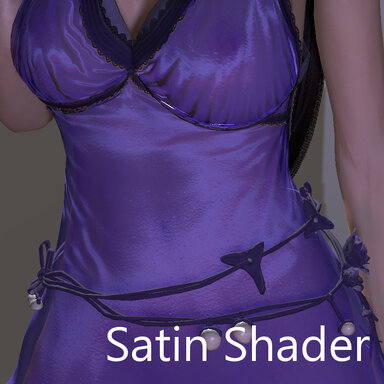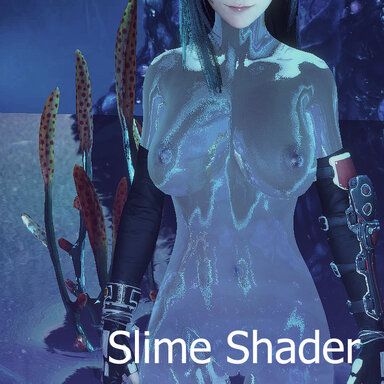


A custom shader that includes multiple translucency effects for all your slimy/gooey needs
How to use:
This is a Custom Shader which must be loaded using a plugin:
CustomShaderLoader: https://hub.virtamate.com/resources/custom-shader-loader.56671/
CustomShaderLoaderAlt: https://hub.virtamate.com/resources/customshaderloaderalt.65067/
The simplest way to try it out is to load the CustomShaderLoader plugin on a Person atom directly, load the Slime_Shader assetbundle and the shader properties, and select the cloth to receive the effect in the Loader plugin.
Demo:
Shader Modes properties
CUA and Cloth are handled differently. In order to support both, there is a toggle in the properties file which should be used based on the case.
This toggle must be ON for Cloth/Skin, otherwise the item will not place correctly, and OFF for CUAs, otherwise CUAs will be invisible
Supported VAM properties (in Customize Cloth UI)
New Shader Properties (in CustomShaderLoader plugin)
[Advanced shader options]
Defaults should be sufficient, but I've allowed users to change blend modes for specific lighting cases
_SrcBlend -> Unity Blend modes (0: Zero, 1: One, 2: DstColor, 3: SrcColor, 4: OneMinusDstColor, 5: SrcAlpha, 6: OneMinusSrcColor, 7: DstAlpha, 8: OneMinusDstAlpha, 9: SrcAlphaSaturate, 10: OneMinusSrcAlpha)
_DstBlend -> Unity Blend modes (same 0-10)
_ZWrite
Caveats/Workarounds:
When removing the shader, the skin looks metallic
-> Change the Fresnel value and colour of the skin
The Skin doesn't load values on scene load
-> Try lulu's Shader Loader
-> Avoid using the duplicate sliders that are already available in game such as Diffuse Color/Specular color
The CUA doesn't load values on scene load or disappears
-> Some CUA won't load correctly, possibly due to timing/race conditions, but I don't think I can fix it at the shader level. To fix the user must manually re-adjust all values after the scene is loaded, including toggling on and off the first toggle in the properties for Clothes/CUAs
When using on Skin, the teeth and eyes still appear
-> Make them invisible (Hide Material) or modify the shader Render Queue value for those items
Note: this was AI assisted, there could be other issues
Special Thanks:
Shader guide and template: https://hub.virtamate.com/resources...atible-unity-shader-for-skin-clothings.57095/
Showcase:


Photo Credits:
Regguise.CustomShaderLoader
lulu.CustomShaderLoaderAlt
Tifa (Skynet, Rukk)
Tifa clothes (JackyCracky)
Tifa Hair (Skynet)
Lashes (AT5)
ascorad.asco_Expressions
Collision Interactive Water Rigs (Jackaroo)
Alien Flora (animated) (VAMFantasy)
Model Walking Scene (ddamm)
asco's Facial Expression Morph Pack
ZRSX.Animal_dildos
DemonLoard.HalloweenPumpkin
How to use:
This is a Custom Shader which must be loaded using a plugin:
CustomShaderLoader: https://hub.virtamate.com/resources/custom-shader-loader.56671/
CustomShaderLoaderAlt: https://hub.virtamate.com/resources/customshaderloaderalt.65067/
The simplest way to try it out is to load the CustomShaderLoader plugin on a Person atom directly, load the Slime_Shader assetbundle and the shader properties, and select the cloth to receive the effect in the Loader plugin.
Demo:
Shader Modes properties
CUA and Cloth are handled differently. In order to support both, there is a toggle in the properties file which should be used based on the case.
This toggle must be ON for Cloth/Skin, otherwise the item will not place correctly, and OFF for CUAs, otherwise CUAs will be invisible
Supported VAM properties (in Customize Cloth UI)
- _Specular
- _Shininess (Gloss)
- _Fresnel
- _Alpha
- _Colors, _Textures, etc.
New Shader Properties (in CustomShaderLoader plugin)
- _Translucency
- _TranslucencyColor
- _TranslucencyPower
- _TranslucencyDistortion
- _Thickness
- _RimBoost
- _Wrap
- _Absorption
- _Refraction
- _Opacity
- _InteriorTint
- _Anisotropy
- _AnisoShift
[Advanced shader options]
Defaults should be sufficient, but I've allowed users to change blend modes for specific lighting cases
_SrcBlend -> Unity Blend modes (0: Zero, 1: One, 2: DstColor, 3: SrcColor, 4: OneMinusDstColor, 5: SrcAlpha, 6: OneMinusSrcColor, 7: DstAlpha, 8: OneMinusDstAlpha, 9: SrcAlphaSaturate, 10: OneMinusSrcAlpha)
_DstBlend -> Unity Blend modes (same 0-10)
_ZWrite
Caveats/Workarounds:
When removing the shader, the skin looks metallic
-> Change the Fresnel value and colour of the skin
The Skin doesn't load values on scene load
-> Try lulu's Shader Loader
-> Avoid using the duplicate sliders that are already available in game such as Diffuse Color/Specular color
The CUA doesn't load values on scene load or disappears
-> Some CUA won't load correctly, possibly due to timing/race conditions, but I don't think I can fix it at the shader level. To fix the user must manually re-adjust all values after the scene is loaded, including toggling on and off the first toggle in the properties for Clothes/CUAs
When using on Skin, the teeth and eyes still appear
-> Make them invisible (Hide Material) or modify the shader Render Queue value for those items
Note: this was AI assisted, there could be other issues
Special Thanks:
Shader guide and template: https://hub.virtamate.com/resources...atible-unity-shader-for-skin-clothings.57095/
Showcase:
Photo Credits:
Regguise.CustomShaderLoader
lulu.CustomShaderLoaderAlt
Tifa (Skynet, Rukk)
Tifa clothes (JackyCracky)
Tifa Hair (Skynet)
Lashes (AT5)
ascorad.asco_Expressions
Collision Interactive Water Rigs (Jackaroo)
Alien Flora (animated) (VAMFantasy)
Model Walking Scene (ddamm)
asco's Facial Expression Morph Pack
ZRSX.Animal_dildos
DemonLoard.HalloweenPumpkin