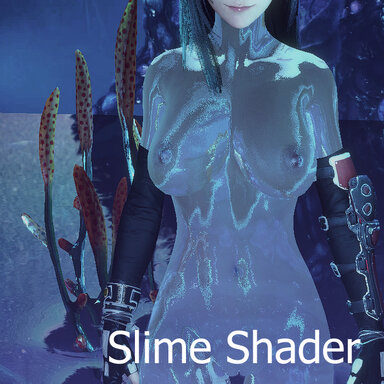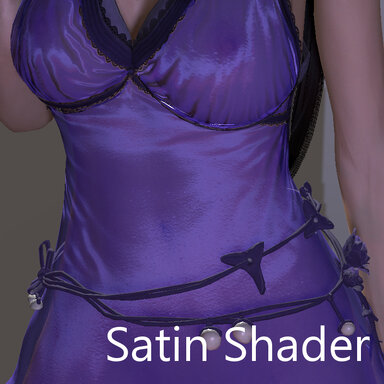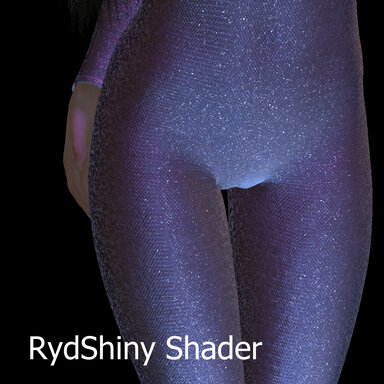


A custom shader to add Shiny effects to clothes (spandex, satin, velvet, glitter, knit, fuzz)
I was trying to create a specific shiny look, and this is the result.
Includes the shader assetbundle and 3 textures to get started (Knit, Fuzz, and Glitter flakes)
Demo:
How to use:
This is a Custom Shader which must be loaded using a plugin:
CustomShaderLoader: https://hub.virtamate.com/resources/custom-shader-loader.56671/
CustomShaderLoaderAlt: https://hub.virtamate.com/resources/customshaderloaderalt.65067/ (Recommended)
The simplest way to try it out is to load the CustomShaderLoader plugin on a Person atom directly, load the RydShiny assetbundle and the shader properties, and select the cloth to receive the effect in the Loader plugin.
Shader Properties:
Supported VAM properties (in Customize Cloth UI)
New Shader Effects (in CustomShaderLoader plugin)
[Advanced shader options]
Tips and Tricks:
Special Thanks:
Shader guide and template: https://hub.virtamate.com/resources...atible-unity-shader-for-skin-clothings.57095/
Showcase:


Photo Credits:
I was trying to create a specific shiny look, and this is the result.
Includes the shader assetbundle and 3 textures to get started (Knit, Fuzz, and Glitter flakes)
Demo:
How to use:
This is a Custom Shader which must be loaded using a plugin:
CustomShaderLoader: https://hub.virtamate.com/resources/custom-shader-loader.56671/
CustomShaderLoaderAlt: https://hub.virtamate.com/resources/customshaderloaderalt.65067/ (Recommended)
The simplest way to try it out is to load the CustomShaderLoader plugin on a Person atom directly, load the RydShiny assetbundle and the shader properties, and select the cloth to receive the effect in the Loader plugin.
Shader Properties:
Supported VAM properties (in Customize Cloth UI)
- Specular
- Gloss
- Fresnel
- Alpha
- Colors, _Textures, etc.
New Shader Effects (in CustomShaderLoader plugin)
- Anisotropic: Dual lobe anistropic effect, based on Specular, Gloss, Knit and Glitter
- IBL Reflection: Adds reflection based on the current cubemap (default or use skymagic)
- Knit: Adds texture of tiny yarn ridges to the specular, based on Aniso, Glitter and provided texture
- Velvet: Emulates light-capturing darkening effect of velvet, based on Diffuse color
- Fresnel Rim: Lights up the rim of the cloth, based on Specular color and Fresnel
- Edge Opacity: Dual edge transparency/sheer options for clothes, based on Alpha and mask texture
- Fuzz: Emulates small strands of fabric interacting with the light, base on Fuzz Texture
- Glitter: Emulates small flakes of metallic glitter, based on Flake Texture and Specular mask
[Advanced shader options]
- _CullMode (0=Double Sided, 1=Front, 2=Back) allows to use the shader on double-sided clothes that have a back-face visible, like dresses/skirts, at the cost of another pass, otherwise use "Back"
- _ZWrite (Opaque) allows to use the shader with the depth buffer on or off for Transparent/Opaque clothes
- Shadow casting options
Tips and Tricks:
- Start with fewer lights for a more realistic feel
- The shader uses Diffuse/Spec colors and other variables from the Cloth UI, make sure they are not 0 or black
- In some cases, you want to remove the spec/gloss textures and let the shader do the work
- The IBL reflection can use cubemaps loaded through the SkyMagic plugins
- Knit, Fuzz and Glitter require external textures, 3 are provided in the VAR, but you can use your own
- If textures have a problem loading (when changing clothes in the plugin), it's best to remove it and re-add it (the plugin won't re-add the same-named texture)
Special Thanks:
Shader guide and template: https://hub.virtamate.com/resources...atible-unity-shader-for-skin-clothings.57095/
Showcase:
Photo Credits:
- lulu.CustomShaderLoaderAlt
- VL_13.Catsuit_CS
- bill_prime.Tattoos_torso
- JackyCracky Roxanne Shoes
- BooMoon.Piercings.2
- Hair: Ramsess R-Loose
- vamBear.Skymagic Loader Plus
- vamBear.15_Studio_HDRIs_for_HDRI_Light_Creator_pack1.1