

Clothing Editor
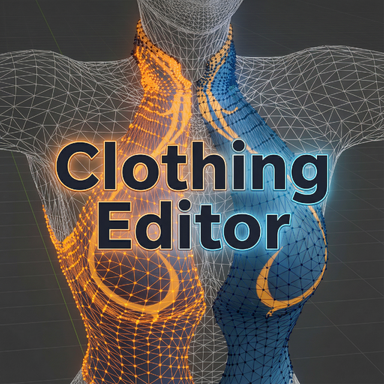
This is a plugin that aims to provide a bit finer control to the clothing creation process.
Main features include:
1. Visualization of clothing/skin meshes of base/morphed/drawn position.
2. Full/partial rewraps
3. base mesh sim cloth data generation that rids of wrap deforms
4. All changes made through the tool is fully savable. No runtime clothing plugin required.
Below are some videos showcasing some of use case:
- Partial rewrap - correct result in tight area
- Partial rewrap - solid bits on wrapped clothes
- Base mesh sim data generation
Important things to know before using this:
- It is recommended to use this plugin only after you have had some experience in importing clothes into VaM, and have a basic understanding on how the clothing system works.
- Only use this as a tool in clothing creation. Do not use this plugin with any actual content consumption.
- The plugin works only as an "editor", meaning that it will only work on clothing items that has already been created. It will ignore anything that is still in VaM's clothing creator. Therefore when creating new clothes, save the clothing item first from clothing creator, then load the plugin to edit it.
- After the changes are saved. You can remove the plugin and reload the clothing item.
- The 'morphed' skin position buffer will not initialize until the "import" button in VaM's clothing creator has been clicked (although you only need to press it once per game session, no need to load anything into the creator either) So if you intend to wrap cloths to morphed skin, press it in clothing creator then press the "refresh morphs" button in the plugin. Additionally, if you change morphs on the person, press "refresh morphs" to update it.
- Technically the plugin supports switching between all the clothings on the person, however it is not thoroughly tested. At this point it is still recommended to only work on one clothing item at a time. If you need to switch, clear the plugin and reload.
- The plugin will work on clothing items from a package, but it won't be able to save any of the changes.
- To be able to re-generate sim data, the clothing item will need to be created with sim data generated. Also make sure you only re-generate sim data *after* you gotten your final wrap result, as it will get overwritten every time you wrap.
- The plugin creates files under the clothing directory:
- <clothing_name>_mappings.json
- <clothing_name>.vab.backup
- <clothing_name>.vaj.backup
- If you updated the clothing mesh externally and reimported it under the same clothing name, make sure to delete these files before reloading the plugin so they can be regenerated again using the updated mesh. Otherwise you will see issue during vertex selection.
Some tips and tricks:
- Always check if you have the intended wrap skin target selected ("base"/"morphed"/"drawn").
- The wrapper always uses the "base" clothing mesh as input.
- The "mirror" selection on clothing mesh will only work well if your clothing mesh is decently symmetrical.
- On skin meshes, use "Select by material" can quickly select parts that are hard to manually select, e.g. eyeballs, lashes, etc
- Assign clothing vertices to difference material names externally (e.g. in Blender) so you can select them quickly in the plugin.
- Use "Sel Thru" mode in clothing selection to select vertices that are unreachable.
- "Grow" and "Shrink" can be useful when fine tuning your selection.
- The two wrapper options: "Smooth"/"VaM Native" can be used interchangeably most of the time, just choose whichever give you the best result. Once specific case is when wrapping a large solid part onto a single triangle, "Smooth" will generally give a better result.
- The "Wrap Surface Offset" is used when wrapped clothing mesh should sit "below" the wrapped skin surface. If you are not sure if you should change it, check out this guide by @mopedlampe :

Video guide for advanced clothing Imports without deformation - Guides -
I just made a video guide along with the freshest elevator tunes you can find that replaces the old text-guide. The guide is primarily aiming for people that are already experienced in clothing imports. If you are completely new to this topic the... hub.virtamate.com
There will most certainly be bugs. Please let me know if any issue you run into. Any suggestions and/or feedback are also welcomed.
Special thanks
- @Stopper' clothing rewrapper was the original inspiration of this tool.

Clothing ReWrapper - Plugins + Scripts -
A QoL plugin for importing clothing. Allows for re-wrapping of clothing against selected vertices. Mean to simplify wrapping of rigid clothing and accessories. This is still an early version but wanted to get feedback from the community. I don't...
hub.virtamate.com
- The plugin's UI is powered by @14mhz 's CustomUI system, with some modification.

CustomTabUI - Plugins + Scripts -
※ Reporting bugs or issues will help me improve the plugin and help others. CustomTabUI ● This .cs for new style tab UI implementation for developer. ● This is licensed under CC-BY, so you are free to incorporate it into your own code and use it...
hub.virtamate.com

CustomLayoutUI - Plugins + Scripts -
※ Reporting bugs or issues will help me improve the plugin and help others. CustomLayoutUI ● This .cs for new style Layout UI implementation for developer. ● This implementation offers robust flexibility for crafting a custom UI tailored to your...
hub.virtamate.com

CustomUI - Plugins + Scripts -
※ Reporting bugs or issues will help me improve the plugin and help others. CustomUI ● This .cs for plugin UI component library for developer. ● This is licensed under CC-BY, so you are free to incorporate it into your own code and use it as you...
hub.virtamate.com