

Contains executable files or external scripts. Ensure you trust the creator and apply your own security measures.
 AUDIO CUA STUDIO
 Build & extract VAM audio CUA bundles — no Unity required
 Made for the VAM community
 Say goodbye to Unity 2018.
 You don't need to learn it. You don't even need to install it.
 Drag audio in → click once → done.
  Making a CustomUnityAsset for audio used to mean installing Unity 2018, learning the AssetBundle pipeline, and fighting import settings — just to get your music or voice lines into a scene.
 Not anymore. Drop your audio, hit one button, get a ready-to-use
 .assetbundle. That's the whole workflow. Why CUA audio?
When a scene needs more than a handful of clips — say hundreds of voice lines
 — mounting every clip directly in the scene just isn't realistic. A CUA packs them all into one bundle the scene loads on demand. This tool builds that bundle for you, without the Unity wall that's kept it out of reach.


 What it does
 Create CUA — turn one track or hundreds of clips into a single audio bundle (BGM, voice packs, SFX).
 Extract Audio — open any audio
 .assetbundle, browse its clips, preview them, export them back out.
Features No Unity, no install — one self-contained
 .exe. Just run it. Drag & drop — drop files or a whole folder; build a pack in seconds.
 Compact by default — packaged size ≈ your source size (no surprise 4× bloat).
 Built-in player — preview every clip before you extract.
 One-click normalize — even out loudness across clips.
 Live size estimate — file count + estimated package size as you go.
 4 languages — English / 한국어 / 日本語 / 繁體中文.
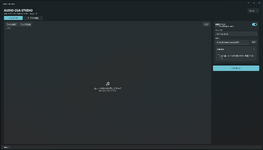
 How to use
- Run
AudioCuaStudio.exe. - Create: drag audio or a folder onto the left → name it + pick an output folder → Create CUA.
- Extract: drag a
.assetbundleonto the left → preview with → Extract all.
 Supported input MP3 · WAV · OGG · FLAC · M4A
 What's in the download
AudioCuaStudio.exe— the app (everything bundled in).
ffmpeg.exe— reads/converts audio (official FFmpeg build; license included).
README.txt
 Just unzip and run — keep the files together!
 Requirements
 Windows 10/11 (64-bit). Nothing else to install.
Contains executable files or external scripts. Ensure you trust the creator and apply your own security measures.